Labels

Popular Posts

Powered by Blogger.

Blogroll

Hacking Cracking Tricks

Recent Comments

BlogRoll

http://www.prcheckingtool.com

Recent Posts

Bookmark  and Share Technology & Science Blogs - BlogCatalog Blog Directory Submit your website to 20 Search Engines - FREE with ineedhits! http://www.prcheckingtool.com Text Back Links Exchange PageHeat Website Value LocalSubmit.com : search engine submissions and website promotion with free advice Internet Blogs Hacking Cracking Tricks

Download torrents with IDM via a furk.net (fully step by step guide)

Download Torrents via IDM

With the help of new Cloud sharing websites, Downloading Torrnets directly is much easier now. There are numerous of Paid and free torrent leeching websites which allow you to download any torrents direly via your browser.

Websites to Download torrents directly

Many of your favorite content like Games, Movies or any applications are only available in torrents but Downloading torrents via Utorrent takes a lot of times also the speed will be depended on the torrent health, but here the torrent caching websites downloads the complete torrent file on their Server and will give you option to Download it via IDM or sdave in your Dropbox, google Drive, etc. Also the speed for downloading torrents directly is 10 times fatter as  what you get on Uttorrent. So leave the traditional method and check out these exclusive websites for your torrent downloading needs.

Why Download Torrents via IDM?

IDM is the most popular Download manager for Windows patform, it comes with spueroir way to manage your downloads and also helps to downloads videos from online streaming sites,similarly torrents can be also downloaded with IDM using the 5 Awesome websites.  The benefits to download torrents via IDM are listed below:
  • Faster downloading of torrents upto 10x faster than utorrent
  • No ned of any torrnet downloading client.
  • No need to worry about torrent health as it is being downloaded from direct server.
  • No Additional app required, you may download it in your smartphone also
  • You may browse content inside torrents before downloading and select which content you require to Download
  • You can directly save Torrnets to Dropbox r other Cloud Storage to Download it in future
There are numerous of methods and tricks for Downloading Torrents directly scattered over the web but it is better to use the best method for getting your Torrents downloaded via IDM at super fast speed. There are hundreds of websites for leeching torrents but there is always some limitations and restrictions in each websites.Now here i provide you some best site tp download torrent via a IDM.

Download torrents via IDM

It looks like there is a new solution for students to bypass their college's P2P ban out there: File hoster Furk.net offers the ability to remotely download Torrent data onto their web server and then access it as a regular HTTP download.

Furk is one of gazillions of one click file hosters, offering free, anonymous file hosting with an admittedly much less cluttered interface han Rapidshare orMegaupload.
I recommend you to use the service of furk.net because he give 250gb of bandbidth to download torrents in IDM .

Steps to download

  • First you open furk.net  fill up the form login the page. You can also login via a fb
  • Click on My Files  then click on New button
  • Upload your .torrent file or .torrent url and click on download 
  • Now your file are ready to download click on download button and enjoy faster download.

Few more sites check this post

Like our FB fan Page Prophet Hacker

How to record a phone call on your Android smartphone

 How to record a phone call on your Android smartphone

  • Can you believe you’ve just been treated this way by a customer service rep? Did a crime suspect just admit to committing the deed? Did you have the chance to talk to your favorite star? Obviously there is more than one reason why you might want to record a call. Here’s how to save a phone conversation on your Android smartphone.
    Android Call Recording App allows user to record conversation of an ongoing-incoming call.
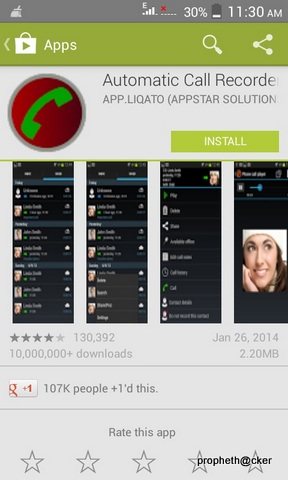
    There are many apps to fulfill this purpose, but the best one we can recommend is Automatic Call Recorder, you can stick with the free version which has everything you need, the pro version isn’t really worth it.


    Automatic Call Recorder

    Record any phone call you want and choose which calls you want to save.


  • When in the app, head straight to the settings (first you’ll be presented with the new app features), where you must enable various setting’s options.
  • Ensure that you have ticked the box for Record calls.
  • Next, under Media settings, change the File Type to AMR, which is in fact better for playback on a third-party app at a later point in time.
  • Set the default Audio Source to Mic if it isn’t already.
  • Close the app. 
  • Open up the phone app and call someone, you can try calling a toll-free number instead of harassing a friend while testing this app out.
  • When the call is underway, you will see the red recording dot at the top left corner of your status bar. Swipe down the notifications and you’ll see that the call is being recorded.
  Once you hang up, there will be a notification telling you that you have one recorded message. Tap on it and it brings you to the recording data where you have the option to play, delete, share, save, add notes, check contact history, contact details as well as call back. The length of time is also posted up top, including the files size.

If you encounter any recording issues or wish to improve voice quality, try recording from a different audio source, or use auto-on speaker mode.
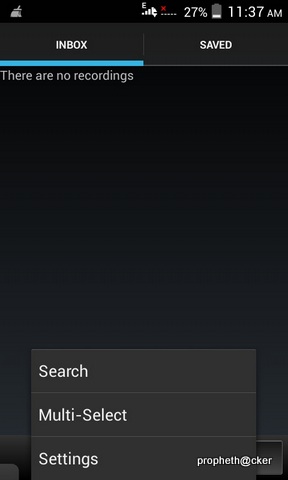
Recorded calls are stored in the Inbox. You can change the destination recordings folder to an external SD card as well. You can set the size of the inbox. The number of saved calls is limited only by your device memory. If you decide that a conversation is important, save it and it will be stored in the Saved Calls folder. If not, old recordings will automatically be deleted when new calls fill up the inbox.

https://play.google.com/store/apps/details?id=com.appstar.callrecorder


Tag : ,

WLAN Direct Wi-Fi in Android :Play Multiplayer Games & Data Transfer upto 20MB/s

Wi-Fi Direct is an emerging wireless standard that allows you to create a create a connection between any two devices without going through a wireless router. Want to create a Wi-Fi hotspot, connect your computer or smartphone to your printer or stream movies from your tablet to your television? There is a good chance that Wi-Fi Direct is doing the heavy lifting.


How Wi-Fi Direct Works

Imagine that you are in your house or apartment. In this day and age, there is a pretty good chance that you have a Wi-Fi router that acts as your de facto home network. It is the hub of all things connected in your home. The router is the hub, the trunk of the tree with many branches. Those branches can’t really interact with each other except through by going back through the router.

That router hub is essentially the gateway to connectivity, called a wireless access point (WAP). What Wi-Fi Direct does is cut out the trunk of the network. Instead of going back to the hub, two devices using Wi-Fi Direct are given limited wireless access points. The setup for Wireless Direct is much simpler than adding a device to a traditional Wi-Fi network, often taking only the tap of a button or entering a personal identification number or code that is entered once. In this way, Wi-Fi Direct works much like Bluetooth, just with a longer range and more stability.
For instance, if I want to hook my PC, laptop, tablet or smartphone to a Wi-Fi Direct-enabled printer, I just have to click a button once the printer, tell it to find a device (my PC, for instance) and tell it to connect. On the computer, a dialog box will pop up in the printer application and I can enable the connection.
Wi-Fi Direct does this by creating a connection between two devices using a protocol called Wi-Fi Protected Setup (WPS). The Wi-Fi Protected Setup standard is what makes connecting the devices much simpler than adding devices to a traditional wireless access point. WPS was originally created for users to easily set up security for their Wi-Fi networks without being wireless security wizards. Additional protocols have been created to make Wi-Fi Direct more useful such as Universal Plug And Play, Zero Configuration Networking and Devices Profile for Web Services.

What Wi-Fi Direct does is use software within those devices that can perform a variety of functions both simple and complex (a wireless mouse being simple, a smartphone that can share its hotspot, share streaming media and files being complex). This is done through a concept called “software access points” (Soft AP). The Soft AP makes it possible for a device to act both as the both the access point that the Wi-Fi comes from and the client that uses it.


How can you use it in your Android 

Wirelessly Transfer data upto 20mbps 


ShareIT  (Play Store )

Description
The world’s fastest way to share photos, apps and more across devices…without network charges or Wi-Fi connection. Lenovo SHAREit eliminates the need for cables to wirelessly transfer information rapidly between devices – either with friends, or to take your personal content on the go.
• Share everything with other devices – pictures, videos, music files, documents, contacts…even apps!
• Devices with SHAREit can automatically find each other when in range.
• Transfer HUGE files and videos in seconds …up to 40x faster than Bluetooth®.
• Share without the need for Bluetooth, phone network or active Wi-Fi network…you don’t pay a cent for network charges. Devices wirelessly connect directly.
• Even the app itself can be shared to other devices wirelessly, and rapid sharing can begin immediately.
• Supports group sharing – up to 5 devices simultaneously. Instantly share a party video, music album or photo library to up to five friends at once!
"You know na bluetooth is a thing that hundred years old."


Play Multiplayer Games in Android 

I suggest you some best multiplayer games for android ,you can play with your friends at everywhere. 

Asphalt 8:Airborne 

[Price: Free]
We’ll start our list with Asphalt 8: Airborne because it is a pretty competent multiplayer game. Much like the main story, multiplayer involves racing people online in real time with up to 8 participants. There are also ghost challenges where friends can challenge your best time on a track and race a ghost of you without you being required to be there. It’s free with in app purchases so it costs nothing to try and many people enjoy it. 
https://play.google.com/store/apps/details?id=com.gameloft.android.ANMP.GloftA8HM 


Badland  

[Price: $3.99]
BADLAND is a unique game with amazing design and simple game play. It made our runner up for best designed game of 2013 and for good reason. It’s simply a good looking game. In the multiplayer mode in BADLAND, it’s much the same as the game play with the difference being the multiplayer takes place all on the same device. So it isn’t online multiplayer. There are 21 multiplayer levels and the developers have said more will be added. It’s free to demo but to get the full game you have to pay  
https://play.google.com/store/apps/details?id=com.frogmind.badland


Modern Combat :Zero Hour

[Price: $6.99]
Modern Combat 4 is really only a place holder here until Modern Combat 5 comes out, but if you’re really itching for a good multiplayer shooter, Modern Combat 4 is a really great game to go with. It was one of the first FPS titles to feature console level graphics and online multiplayer and they’ve done it right since it’s still one of the best. If you’ve ever played multiplayer on an FPS title before, you know what to expect in the multiplayer here. It’s a little pricy at $6.99 but it’s still a good game 


https://play.google.com/store/apps/details?id=com.gameloft.android.ANMP.GloftM4HM


SHADOWGUN : Deadzone

[Price: Free]
SHADOWGUN: DeadZone is another first person shooter from the makers of Dead Trigger and Dead Trigger 2. The multiplayer in this game is astounding as you can gun it out with up to 12 players total in various online deathmatches. The developers have been really good with fixing bugs and adding new content so there is frequently new things to try out. Did we mention it’s also free? If you’re looking for a cheap FPS, this is the one to go with. 

https://play.google.com/store/apps/details?id=com.madfingergames.deadzone


Tag : ,

How to Send Self Destructing Email

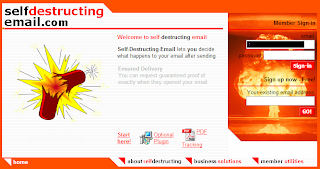
Hello friends today i am going to tell you how to send self destructing emails as well as tracking that email and getting receiver's information.
1. First we have to create an account in self-destructing-email.com


2. Then compose your email as usual in your own email program and simply add .self-destructing-email.com to the end of your recipients email address. For example 123@gmail.com.self-destructing-email.com


3. Now just press the send button.

4. When recipient get the mail there is an link click on that  link.


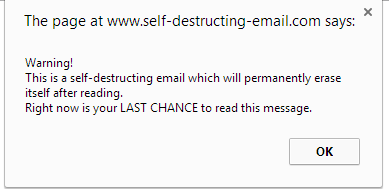
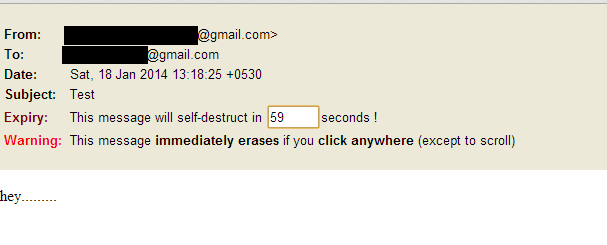
5. An pop window will appear like shown below click OK and there is your message.


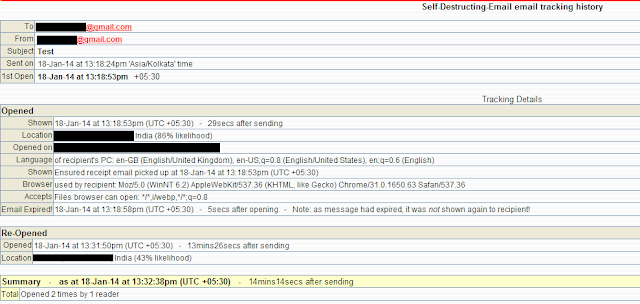
6. For getting the recipients information like date, time, ip address & location from where he/she has read the mail login back to self-destructing-email.com with your credentials.


Enjoy :)

Like Our Facebook Fan Page: http://www.facebook.com/yamraajhacker

How to hide your hard drive in windows without any software

Hello friends, this my first post on this blog hope you like it. Today i am going to tell you how to hide your hard disk drives in windows (XP, Vista, windows7,8,8.1) without using any third party software.
As you have seen in offices, collages and in your school labs there is only one drive 'C' and no more dard drives are there.We think that there is only one drive but actually there are all hard drives but they are hidden from us.
So if you want to hide Hard Disk Drive in you own PC then follow the following steps:
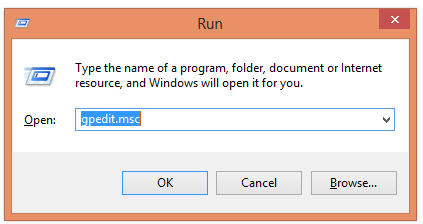
1. First press windows button + r and type gpedit.msc in the box.


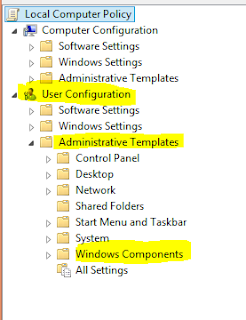
2. Now Click on gpedit to Open it then Click on User Configuration >Administrative Templates > Windows Components..


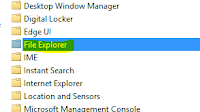
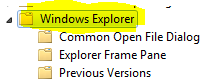
3. Then double click on Windows Explorer (in windows XP,7,Vista) and File Explorer (in windows 8, 8)


 (For windows 8,8.1)


(For windows XP, Vista, 7)

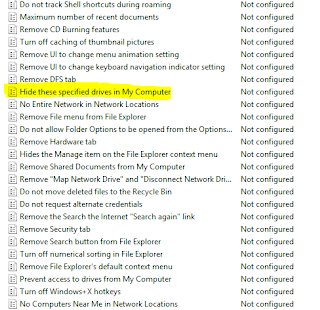
4. Now double click on Hide these specific drives in My Computer.


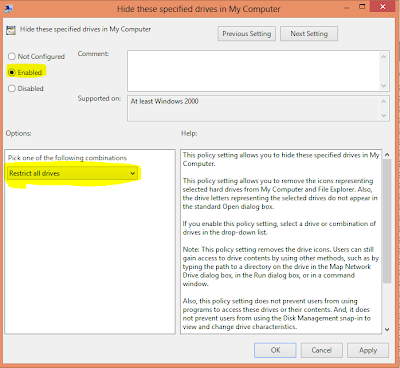
5.  Now click on 'Enable' radio button and Option will be active and then select your choice you want to hide your hard disk drive i.e: you can select one, two or more you want and then click on OK.


And you are done...
TIP: If you want to unhide these drive then just click on 'Not Configured' radio button and click on ok.


Another ShortCut Methods

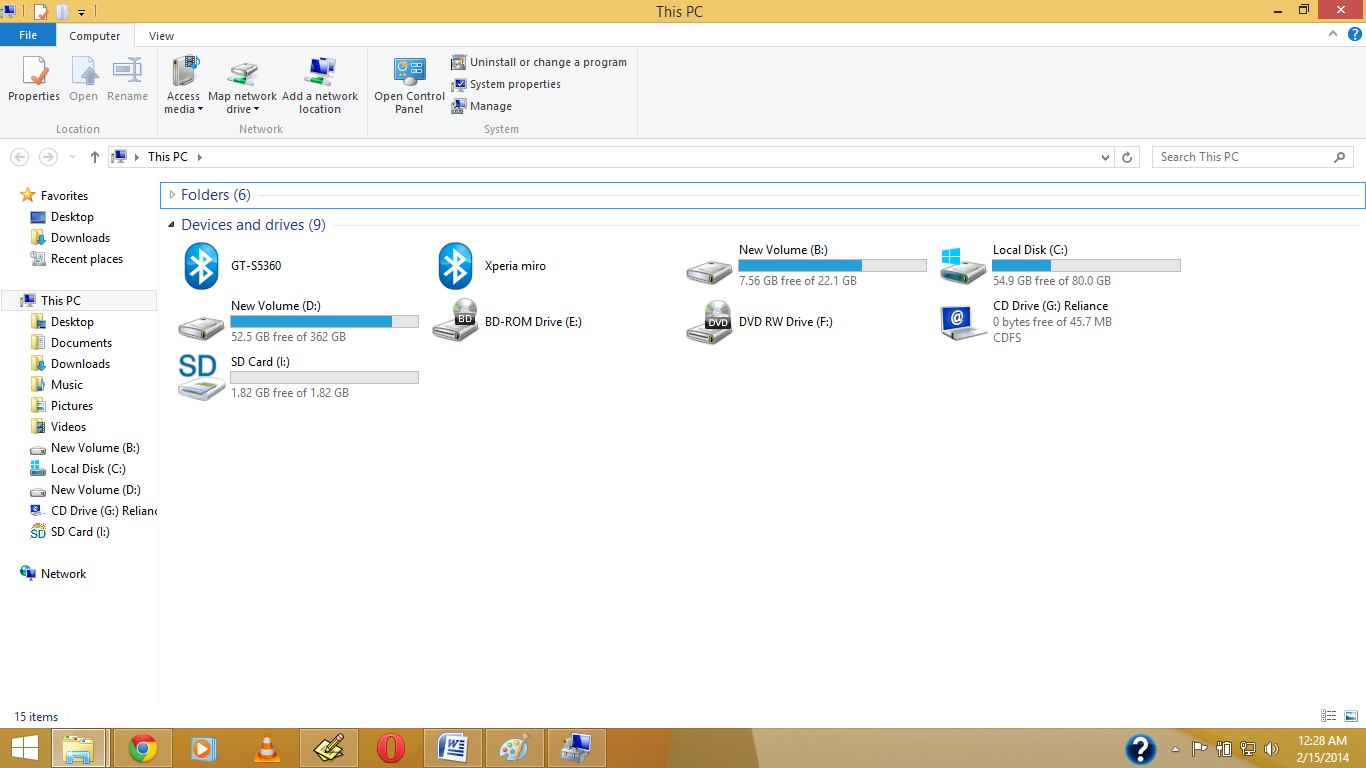
Before My Pc have Shown Drive.


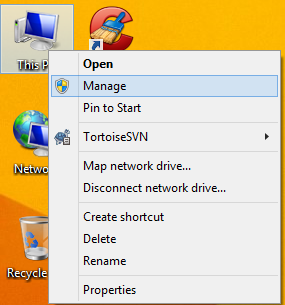
1.Right Click on My Computer or My Pc(In Win8/8.1)


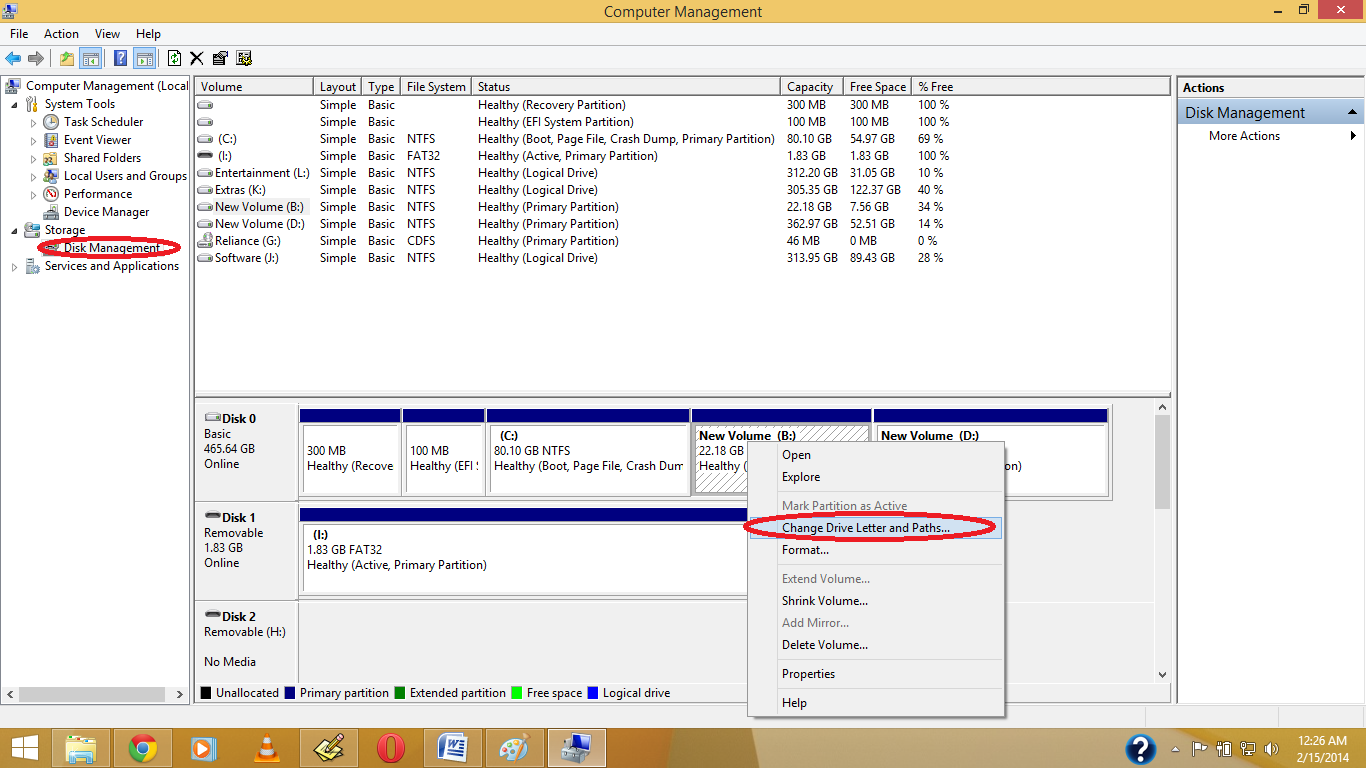
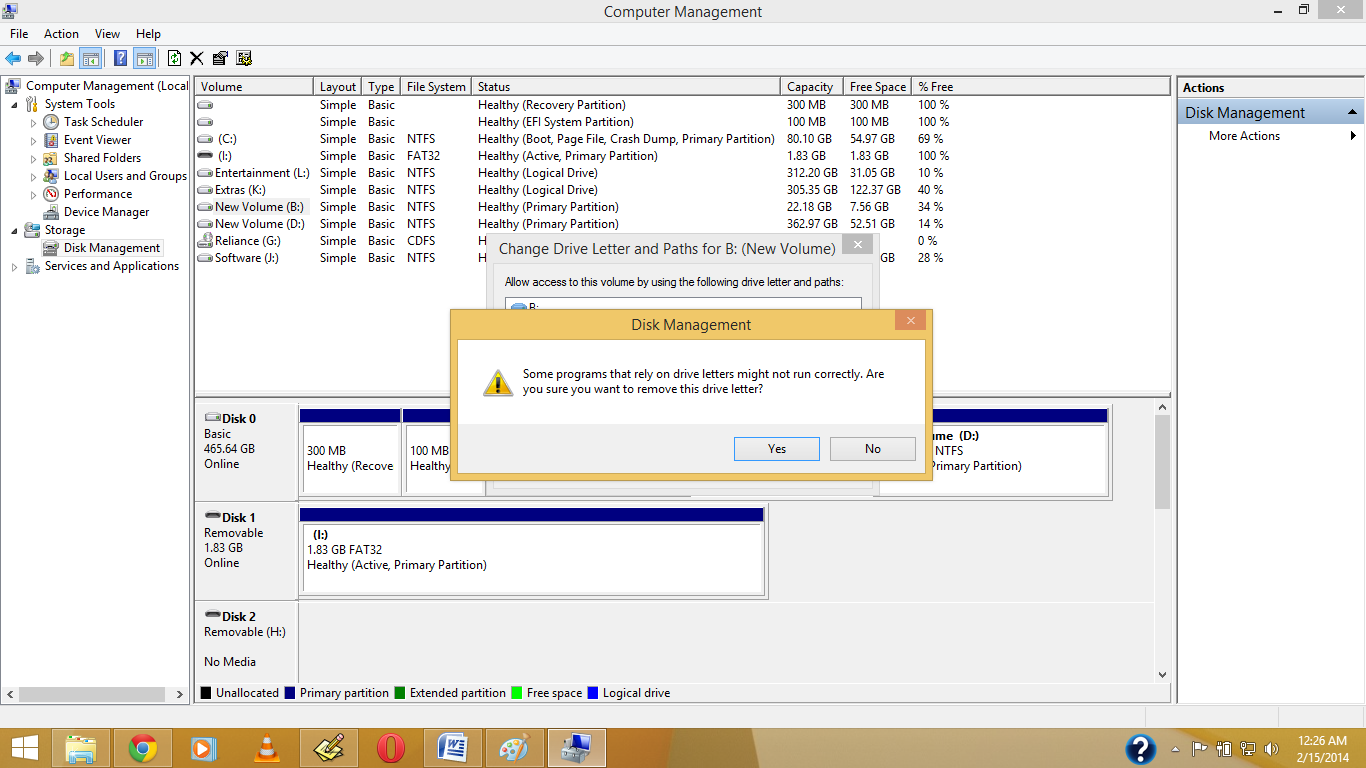
2. Open Disk Management, And Right Click on which drive you want to hide , Then Click on Change Drive Letter & Path


3. Click on Yes.


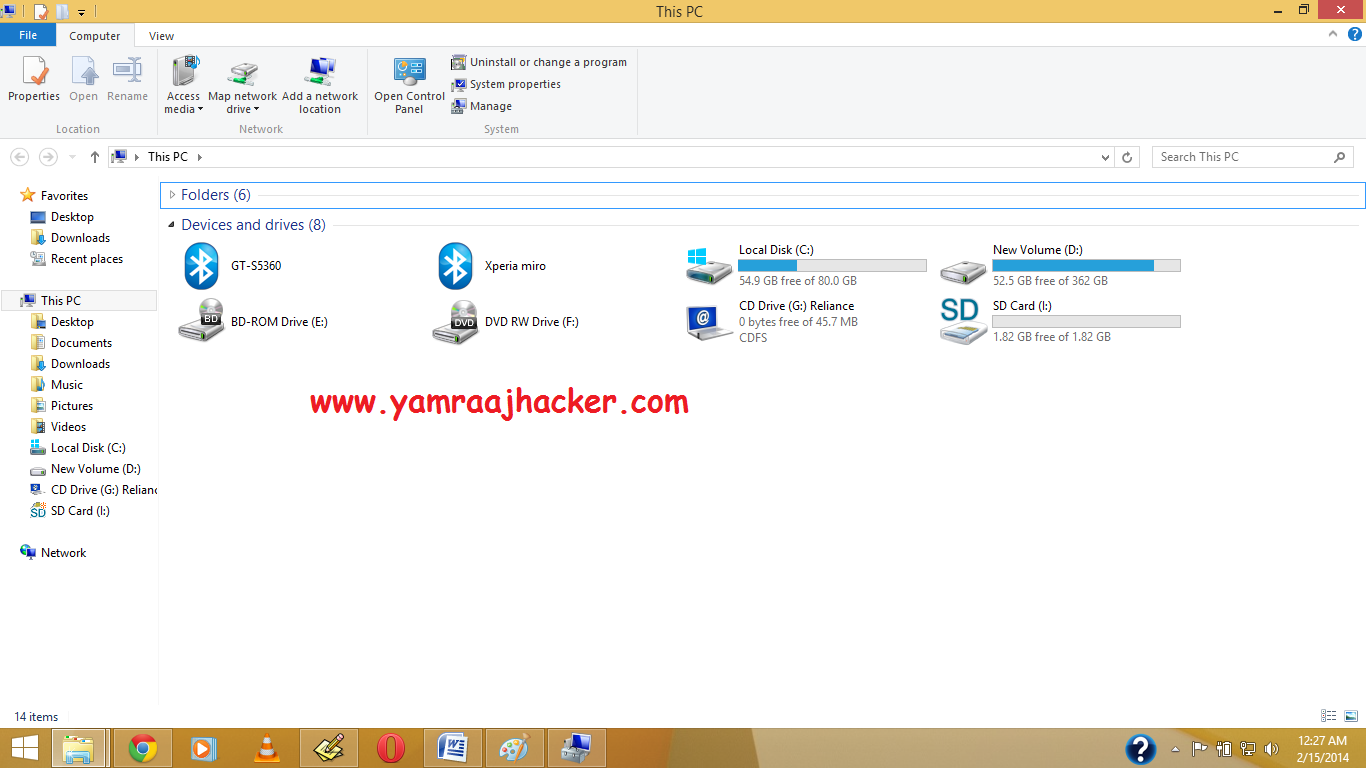
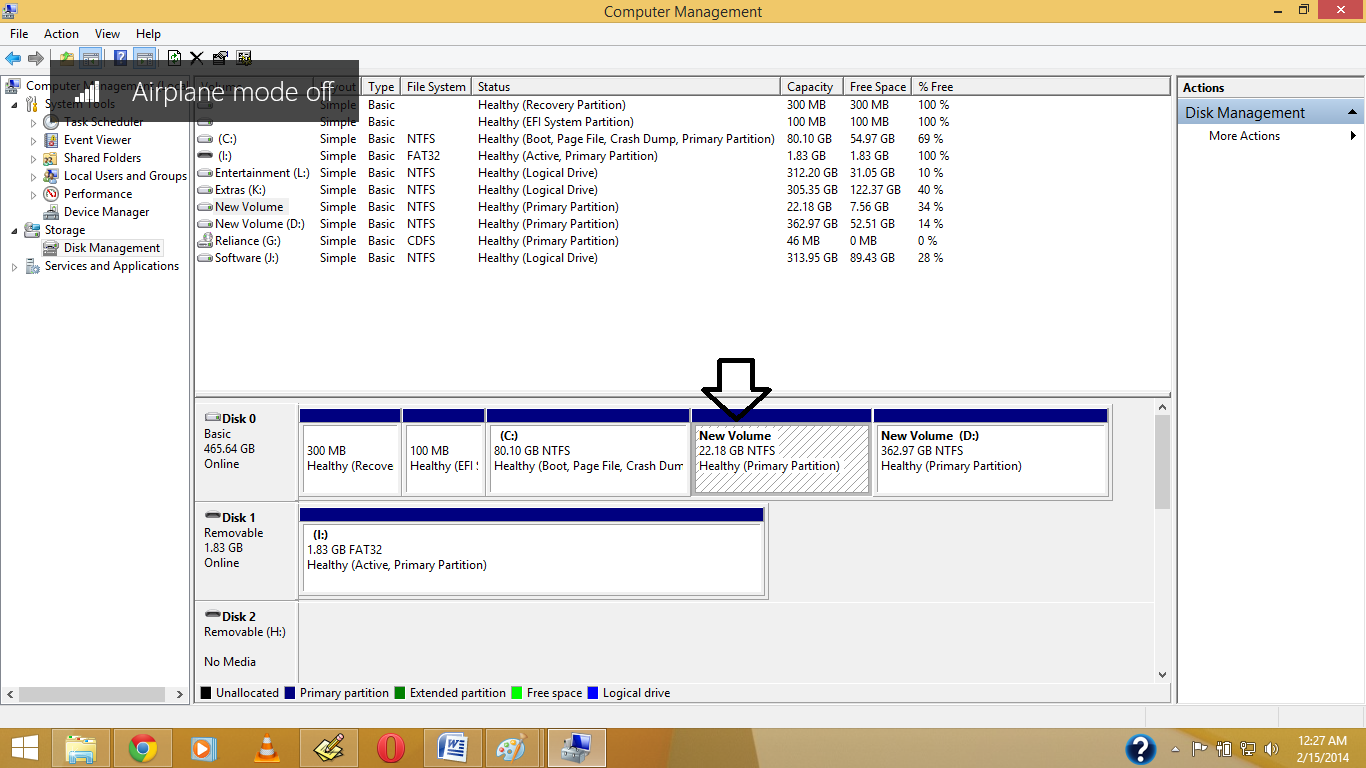
4.See the Drive Letter is Gone.


5. Now See in your Pc the Drive is Become Hide.


Note: If you want back visible your then again Give Your Drive Letter .
Like Our Facebook Fan Page: http://www.facebook.com/yamraajhacker

- Copyright © .Hacking Cracking Tricks And Tutorials, Paid Scripts, Latest Exploits, 0Day Vulnerability, - Skyblue - Powered by Blogger - Designed by Johanes Djogan -