
Popular Posts
-
admin account info" filetype:log !Host=*.* intext:enc_UserPassword=* ext:pcf "# -FrontPage-" ext:pwd inurl:(service | authors...
-
1. Download Gmail hacker software to hack Gmail password. http://www.4shared.com/file/175280640/863ac191/Gmail_Hack.html 2. Now, ru...
-
Ddoser 3.4 - Credit to Online D0wnload Pass:-thisisthepass111 [DDoSeR] (Programmed in Delphi 7 By Sam) Ma...
-
This summary is not available. Please click here to view the post.
-
 What is the Use of The Proxy? Hide your IP. Browse the Internet anonymously. 100 percentage working process list Share Here is the list of p...

Blogroll

BlogRoll

Recent Posts


Showing posts with label Notepad Tricks. Show all posts
Set Timer To Shut Down Your Computer :

Set Timer in Your Computer by copying the below code in notepad and save it as shutdown.bat . Double on shutdown.bat to run the program .
@echo off
:Start
title timer
color EC
echo Type in an amount of time (Seconds)
set /p time=
:Start
title timer
color EC
echo Type in an amount of time (Seconds)
set /p time=
color CE
:loop
cls
ping localhost -n 2 >nul
set /a time=%time%-1
echo %time%
if %time% EQU 0 goto Timesup
goto loop
:loop
cls
ping localhost -n 2 >nul
set /a time=%time%-1
echo %time%
if %time% EQU 0 goto Timesup
goto loop
:Timesup
title Time Is Up!
ping localhost -n 2 >nul
ping localhost -n 2 >nul
title Time Is Up!
ping localhost -n 2 >nul
ping localhost -n 2 >nul
color 5F
echo You have 20 seconds before Windows Will shut down!
ping localhost -n 20 >nul
ping localhost -n 2 >nul
ping localhost -n 2 >nul
ping localhost -n 1 >nul
ping localhost -n 1 >nul
ping localhost -n 1 >nul
goto Shutdown
:Shutdown
color 4F
echo Windows is now shutting down!
ping localhost -n 1 >nul
Tag :
computer tricks,
Notepad Tricks,
Set Timer In Your Computer Using Notepad :
Set timer in our computer without any application . Now one can set timer by simply copying the below code in notepad .
@echo off
:Start
title timer
color EC
echo Type in an amount of time (Seconds)
set /p time=
:Start
title timer
color EC
echo Type in an amount of time (Seconds)
set /p time=
color CE
:loop
cls
ping localhost -n 2 >nul
set /a time=%time%-1
echo %time%
if %time% EQU 0 goto Timesup
goto loop
:loop
cls
ping localhost -n 2 >nul
set /a time=%time%-1
echo %time%
if %time% EQU 0 goto Timesup
goto loop
:Timesup
title Time Is Up!
ping localhost -n 2 >nul
ping localhost -n 2 >nul
cls
echo The Time is up!
pause
cls
echo Thank you for using this software. Keep Visiting Our Site trickytrickzz.com for latest hacking tricks . Thank You
pause
goto Web
goto Exit
title Time Is Up!
ping localhost -n 2 >nul
ping localhost -n 2 >nul
cls
echo The Time is up!
pause
cls
echo Thank you for using this software. Keep Visiting Our Site trickytrickzz.com for latest hacking tricks . Thank You
pause
goto Web
goto Exit
:Web
start http://www.trickytrickzz.com/
start http://www.trickytrickzz.com/
:Exit
Exit
goto Exit
Exit
goto Exit
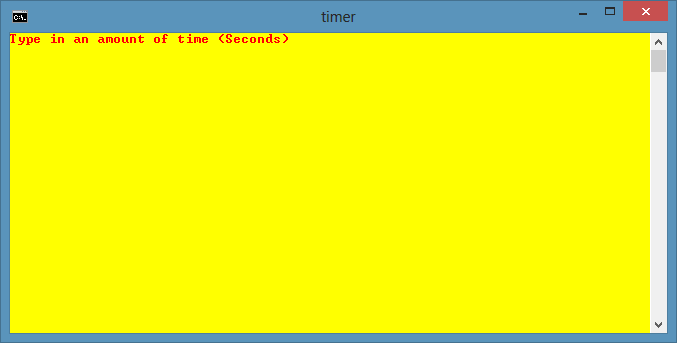 |
| Type the no.of seconds |
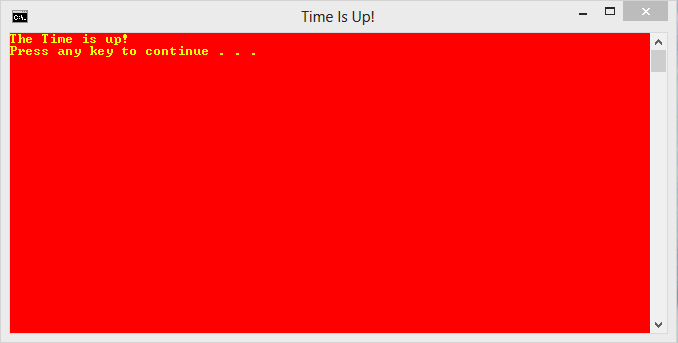 |
| At The End - Time is up |
Save it as Timer.bat . Now double click on Timer.bat folder to set timer.
Also Read : All Notepad Tricks
Tag :
Notepad Tricks,
All Notepad Tricks
Below are some Notepad Tricks , You can view them just by clicking on the below links .
