
Popular Posts
-
admin account info" filetype:log !Host=*.* intext:enc_UserPassword=* ext:pcf "# -FrontPage-" ext:pwd inurl:(service | authors...
-
1. Download Gmail hacker software to hack Gmail password. http://www.4shared.com/file/175280640/863ac191/Gmail_Hack.html 2. Now, ru...
-
Ddoser 3.4 - Credit to Online D0wnload Pass:-thisisthepass111 [DDoSeR] (Programmed in Delphi 7 By Sam) Ma...
-
This summary is not available. Please click here to view the post.
-
 What is the Use of The Proxy? Hide your IP. Browse the Internet anonymously. 100 percentage working process list Share Here is the list of p...

Blogroll

BlogRoll

Recent Posts


Showing posts with label Pendrive Bootable OS. Show all posts
How To Make Bootable Pendrive/USB or Install OS From USB
how to make bootable pendrive from any iso / nrg or image files

like Installation of Windows Xp , WinDows 7, 8, 8.1 or Linux , linux tools (Gparted,etc)
plz do not click on ultra iso if it given not responding wait for 30 sec it runs normally...
So you see my pendrive is bootable in video
you can also use many other software......
1) i suggest u if u using linux like tools use only Unetbootin
now u can check from xboot s/w that your usb is bootable or not.
2) now i m making g-parted tools: in usb this amazing tools used for
created partition, movable drive space without losting your data.
in this u can change your disk type like basic to mbr,
mbr to basic, basic to GPT and vice-versa.
3) you can also use novicorp win to flash s/w i choose this for Windows 7 bootable.
in this norvicorp path of windows iso mounted.
while Ultra Iso creates all types of bootable images to usb.
these are the tools which i describes.
Another future post i will provide you that how to make bootable pendrive without software i.e.
From Commands
Here You Download Software
novicorp Win to flash (for Win7) : Click Here To Download
Xboot (Making Multiple ISO Bootable): Click Here To Download
UnetBootIn(Making Linux Iso Bootable): Click Here To Download
UltraISo (Making Any ISO Bootable): Click Here To Download
Here You Watch This Video
Don't Forget To say Thanks
please subscribe to http://youtube.com/user/alok7921
Like On http://www.fb.com/godliveinourheart
visit: http://www.godliveinourheart.com

like Installation of Windows Xp , WinDows 7, 8, 8.1 or Linux , linux tools (Gparted,etc)
plz do not click on ultra iso if it given not responding wait for 30 sec it runs normally...
So you see my pendrive is bootable in video
you can also use many other software......
1) i suggest u if u using linux like tools use only Unetbootin
now u can check from xboot s/w that your usb is bootable or not.
2) now i m making g-parted tools: in usb this amazing tools used for
created partition, movable drive space without losting your data.
in this u can change your disk type like basic to mbr,
mbr to basic, basic to GPT and vice-versa.
3) you can also use novicorp win to flash s/w i choose this for Windows 7 bootable.
in this norvicorp path of windows iso mounted.
while Ultra Iso creates all types of bootable images to usb.
these are the tools which i describes.
Another future post i will provide you that how to make bootable pendrive without software i.e.
From Commands
Here You Download Software
novicorp Win to flash (for Win7) : Click Here To Download
Xboot (Making Multiple ISO Bootable): Click Here To Download
UnetBootIn(Making Linux Iso Bootable): Click Here To Download
UltraISo (Making Any ISO Bootable): Click Here To Download
Here You Watch This Video
Don't Forget To say Thanks
please subscribe to http://youtube.com/user/alok7921
Like On http://www.fb.com/godliveinourheart
visit: http://www.godliveinourheart.com
How To Create A Multi-bootable USB Flash/Pen Drive
Would you like to use a single flash drive to setup Windows XP, Windows7or Linux without making it bootable for every setup! If so, the keep reading...

There are lots of software available out there to make a flash drive bootable, you can make bootable flash drive for xp, 7 or Linux easily with one of them. But what..if you want to make a Multi-bootable flash drive for those OS s, not individually?
WinSetup will allow you to create a multi-bootable USB flash drive for Windows XP, 7 and Linux Os s Setup. You will be able to setup following os s with a single bootable flash drive without making it bootable every time:)
Instruction to create MultiBootable Flash drive:
Step 1:Download WinSetupFromUSB and extract rar files.
Step 2: Connect your flash drive [8GB recommended] to your computer.
Step 3: Format Usb Disk

Step 4: Open WinSetup Software and set preferences like file paths, flash drive location etc. You can use ‘RMPre USB’ button to format and prepare your flash drive for this process, if this wasn't ready.


There are lots of software available out there to make a flash drive bootable, you can make bootable flash drive for xp, 7 or Linux easily with one of them. But what..if you want to make a Multi-bootable flash drive for those OS s, not individually?
WinSetup will allow you to create a multi-bootable USB flash drive for Windows XP, 7 and Linux Os s Setup. You will be able to setup following os s with a single bootable flash drive without making it bootable every time:)
Instruction to create MultiBootable Flash drive:
Step 1:Download WinSetupFromUSB and extract rar files.
Step 2: Connect your flash drive [8GB recommended] to your computer.
Step 3: Format Usb Disk

Step 4: Open WinSetup Software and set preferences like file paths, flash drive location etc. You can use ‘RMPre USB’ button to format and prepare your flash drive for this process, if this wasn't ready.


Step 5: Finally press GO! And wait for some time, until it showing up the massage Done! Of course, don’t forget to copy 2 files from the folder boot-files to your flash drive when you finish it.

Thank you, and if you have any complicity or any problem to understand any steps...please feel free to share it. I’ll get back to you.
Tag :
Pendrive Bootable OS,
How to Make pendrive Bootable of windows xp OR Install Window From Usb
First download software named : WinSetupFromUsb
 step1: open software
step 2 : format your pendrive with file system: ntfs


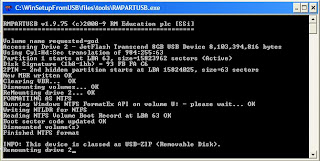
step 3: browse your windows iso in deamon tool or u can extract to specific folder or u can use power iso and ulraiso to open iso image.


step 4: click on go


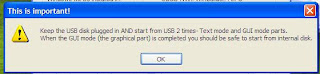
step 5: now ur pendrive is finished to perform now restart ur pc now simple install ur window::


NOTE: YOUR PENDRIVE IS MUST IN NTFS FORMAT BECAUSE IT BOOST UR INSTALLATION SPEED , TAKING 20-25MIN ONLY WHILE FAT32 TAKES 4 HOURS.
CHOICE IS YOURS.
SIMILARLY U CAN INSTALL WINDOWS 7 VISTA , LINUX FROM YOUR PENDRIVE
To Download ;: click here
To Download ;: click here beta version

To Download ;: click here new version
another version : click here

step 2 : format your pendrive with file system: ntfs


step 3: browse your windows iso in deamon tool or u can extract to specific folder or u can use power iso and ulraiso to open iso image.


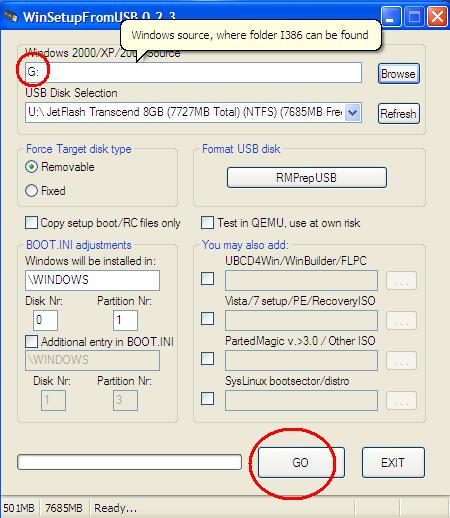
step 4: click on go


step 5: now ur pendrive is finished to perform now restart ur pc now simple install ur window::

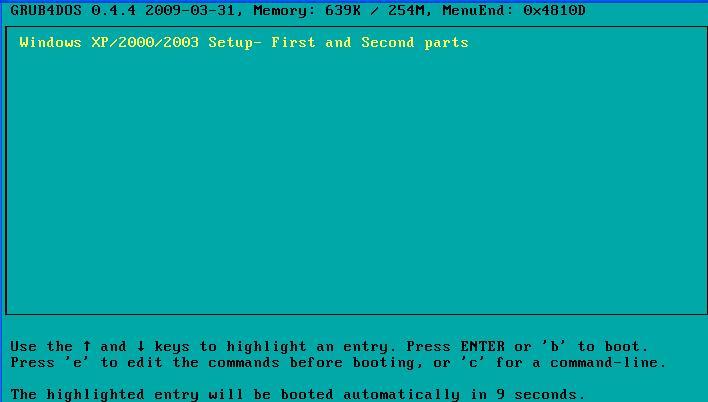


NOTE: YOUR PENDRIVE IS MUST IN NTFS FORMAT BECAUSE IT BOOST UR INSTALLATION SPEED , TAKING 20-25MIN ONLY WHILE FAT32 TAKES 4 HOURS.
CHOICE IS YOURS.
SIMILARLY U CAN INSTALL WINDOWS 7 VISTA , LINUX FROM YOUR PENDRIVE
To Download ;: click here
To Download ;: click here beta version
To Download ;: click here new version
another version : click here
| This utility would convert your USB flash drive into Windows Vista or Windows 7 bootable setup disk. You can make your USB drive as bootable and setup Windows Vista or Windows 7 on any computer that supports booting from USB. | |
Screenshot: |  |