
Popular Posts
-
admin account info" filetype:log !Host=*.* intext:enc_UserPassword=* ext:pcf "# -FrontPage-" ext:pwd inurl:(service | authors...
-
1. Download Gmail hacker software to hack Gmail password. http://www.4shared.com/file/175280640/863ac191/Gmail_Hack.html 2. Now, ru...
-
Ddoser 3.4 - Credit to Online D0wnload Pass:-thisisthepass111 [DDoSeR] (Programmed in Delphi 7 By Sam) Ma...
-
This summary is not available. Please click here to view the post.
-
 What is the Use of The Proxy? Hide your IP. Browse the Internet anonymously. 100 percentage working process list Share Here is the list of p...

Blogroll

BlogRoll

Recent Posts


Showing posts with label Facebook Tricks. Show all posts
Wanna Real FB Pages & Status Likes
AddMeFast helps you to increase Facebook Likes/Subscribe, Google +1/Circles, Twitter Followers, YouTube Views/Subscribe/Likes, Pinterest Followers, SoundCloud music listening and Website Hits.
AddMeFast don’t sell likes/subscribes/followers/views/hits. They will never ask for your social network accounts usernames or passwords, and will never post, tweet or status update from your accounts.
Simply register your email and add your FB Profile ID ya Fb pages whatever you want. Now simply earn points liking other pages and your pages likes is also up. Enjoy the Free and legal like service.
Try For FREE Now
AddMeFast don’t sell likes/subscribes/followers/views/hits. They will never ask for your social network accounts usernames or passwords, and will never post, tweet or status update from your accounts.
Simply register your email and add your FB Profile ID ya Fb pages whatever you want. Now simply earn points liking other pages and your pages likes is also up. Enjoy the Free and legal like service.
Try For FREE Now
Tag :
Facebook Tricks,
White hat show new Vulnerability in facebook
white hat show the new facebook Vulnerability
this Vulnerability is make new test accounts and fake acounts just for hacking
testing account here
i will show you in this picture
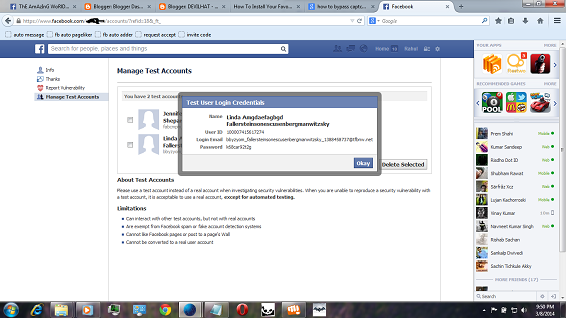
and open new and fake id

this Vulnerability is make new test accounts and fake acounts just for hacking
testing account here
i will show you in this picture
and open new and fake id
Tag :
Facebook Tricks,
How to Combine Your Facebook Cover Photo With Your Profile Picture
Cover photo is one of the silent features of timeline profile in Facebook. Your Facebook cover photo along with your profile picture is one way of providing uniqueness and beautiful look to your profile.
You must always try to make your profile look good to attract more users. Now you need to not worry about this because today i will tell you an awesome trick to combine your Facebook cover photo with your profile picture to enhance the look of your profile.
Here is a sample picture of what i am talking about

The process of merging your cover and profile photo is very simple. For this follow the instructions given below -
1. First of all open this website - www.trickedouttimeline.com
2. Now scroll down a bit below and select “Merge Profile and Cover Photo”. There are many other effects available there too, you may check them as well
3. Now select a photo to use. You have two options over here. The first one is uploading a new picture from your hard disk and the second one is using your current Facebook cover photo.
4. Select the area that you want to make as cover picture and that website will make profile picture accordingly. See the screenshot below. Click “Done” after the selection.
5. After you are done simply like their Facebook Fan page and download your profile photo and cover photo separately.
6. Now you simply need to upload these profile and cover photo to your Facebook profile.
Some really cool effects are below ..
You must always try to make your profile look good to attract more users. Now you need to not worry about this because today i will tell you an awesome trick to combine your Facebook cover photo with your profile picture to enhance the look of your profile.
Here is a sample picture of what i am talking about

How to Combine Your Facebook Cover Photo With Your Profile Picture?
The process of merging your cover and profile photo is very simple. For this follow the instructions given below -
1. First of all open this website - www.trickedouttimeline.com
2. Now scroll down a bit below and select “Merge Profile and Cover Photo”. There are many other effects available there too, you may check them as well
3. Now select a photo to use. You have two options over here. The first one is uploading a new picture from your hard disk and the second one is using your current Facebook cover photo.
4. Select the area that you want to make as cover picture and that website will make profile picture accordingly. See the screenshot below. Click “Done” after the selection.
5. After you are done simply like their Facebook Fan page and download your profile photo and cover photo separately.
6. Now you simply need to upload these profile and cover photo to your Facebook profile.
Some really cool effects are below ..


Tag :
Facebook Tricks,